QR Codes for Real Estate Agents: 8 Ways to Turn Signs into Inquiries
A practical playbook for real estate agents: QR codes on yard signs, open house sign-ins, business cards and seller leads, with every sign tracked on its own.


Someone drives past your listing, likes the curb appeal and wants to know the price, the square footage and when they can see it. If the sign only shows a phone number, they have to remember it, open their messages and explain which house they saw. Some of that interest fades before they ever reach you. A QR code shortens the path: the buyer points their phone camera at the sign and lands on the listing page, a chat with you, a virtual tour or a contact form.
That matters because so much of your marketing lives offline: yard signs, window displays, flyers, business cards, apartment building notice boards, open houses and real estate expos. Connecting each piece to a digital destination makes information easier to reach and shows you which pieces actually get attention. CodeQR brings together static and dynamic QR codes, Pages and analytics in one workspace, so you can organize campaigns and follow scans in one place.
This guide focuses on how you use QR codes as an agent: signs, open houses, your business card and seller leads. If you only need to create a code, jump to the checklist near the end.
What a QR code does for you as an agent
A QR code does not replace you. It removes the steps between "I'm curious" and the first conversation, and it gives the buyer one clear action. Instead of cramming every detail onto a sign or flyer, add a short call to action such as "See photos and details" and send people to a page built for their phone.
You can also give each listing, piece of print or placement its own code. The same home can have one code on the yard sign, another in a neighborhood magazine ad and a third on the flyer you hand out at an event. The destination may be the same, but a separate, clearly named code for each placement shows you where buyers are finding the listing.
8 ways real estate agents use QR codes
Here are eight ways to put QR codes to work across your listings, your personal brand and your prospecting.
1. Yard signs that open the full listing
The yard sign is still one of the most direct links between a property and the people who pass by. Its QR code can open a page with photos, video, square footage, bedrooms, building or community amenities, approximate location and a button to reach you. To protect the people who live there, leave out anything that reveals routines, access codes or sensitive details about an occupied home.
A dynamic code pays off here. When the home sells or rents, point the code to similar listings, your agent profile or a short note saying the home is no longer available. The sign never leads to a broken link.
2. Business cards that open your contact card
Instead of sending people to a social profile, link your card to a digital business card with your photo, service area, the property types you work with, phone, email and a Save contact button. The printed card stays simple, and you can update the digital version when your number, website or service area changes.
3. Flyers and brochures with the details print can't hold
Flyers for new developments and listing brochures have to balance design and information. A QR code lets you keep only the highlights on paper and send readers to floor plans, current price sheets, videos, maps and FAQs. A specific call to action, such as "Scan to see the 3-bedroom floor plan", is clearer than a bare "Learn more".
4. Open house sign-in without the clipboard
Put a code at the entrance that opens a short sign-in form for name, phone and what the visitor is looking for. Ask only for what you need and say how you will use it. After the visit, the same destination can show extra materials and a button to ask a question or book a private showing.
In CodeQR, the Pre-redirection form (Business and above) asks visitors for their details before they reach the listing page, and you choose whether they can skip it. On any plan, you can point the code to the form tool you already use. For more ideas, see QR codes for lead capture.
Respect your visitors' privacy. Never leave sign-in lists where others can see them, and don't use a public form to ask for financial documents, pre-approval letters or anything you don't need at that moment. Sensitive information belongs in your brokerage's secure process.
5. Virtual tours, video walkthroughs and photo galleries
For homes that sell on looks, the code can open a 360° tour, a video walkthrough or a curated photo gallery. This works on window displays, print ads, standing displays and listing presentations. Before you publish, test the page on a mobile connection and make sure it is comfortable to browse on a small screen.
6. Neighborhood guides
Many buyers judge the neighborhood as much as the house. A page can bring together a map, schools, transit, shops, parks and approximate commute times, with a note that details can change. It gives buyers context without overloading the main listing.
7. Seller leads and home valuation requests
QR codes also help you win listings. On business cards, listing presentations, community bulletin boards and just-sold postcards, a code can open a page that explains how you price a home, which documents to have ready, the areas you serve and a form to request a call. Avoid promising a price, a sale timeline or guaranteed appreciation.
8. One code per sign, event and placement
At real estate expos, sales offices for new developments or pop-up events, create a separate code for each placement: one for the entrance banner, one for the counter and one for the handouts your team gives out. Do the same for every yard sign. With separate codes, you can compare scans by placement instead of relying on your team's impressions.
Static or dynamic QR codes for listing materials?
A static QR code writes the destination directly into the image. It works for information that won't change, such as your office Wi-Fi or a permanent contact. But if the listing URL changes, every printed code keeps pointing to the old address.
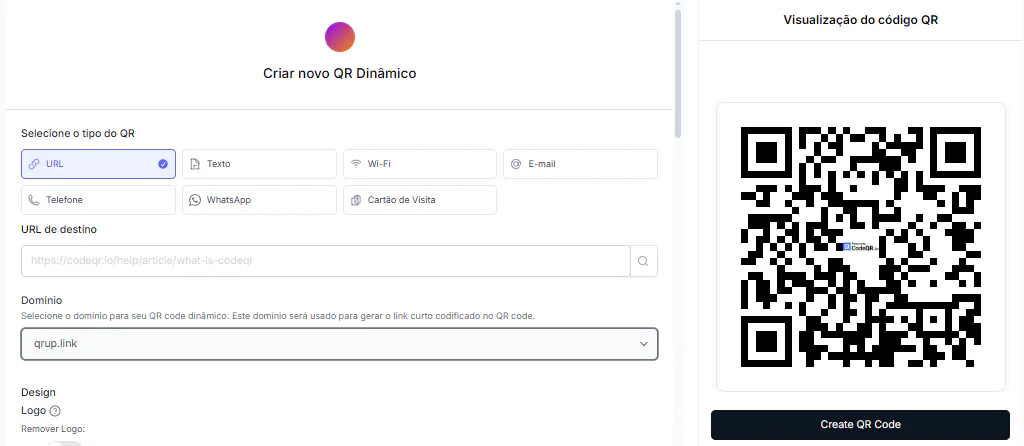
A dynamic QR code goes through a short link, so you can edit the destination and see scan activity. For signs, flyers, business cards and brochures, that flexibility is usually the better fit: homes go off the market, pages get updated and campaigns need to be compared. For a detailed comparison, read how dynamic and static QR codes differ.
Creating your codes: an agent's checklist
The step-by-step for making a code is covered in our guides to QR codes for real estate signs and flyers and the QR code generator for real estate. Before anything goes to print, run through this checklist:
- Pick one main action per code. A listing page, a chat, a sign-in form, a virtual tour or a page with a few options, but not all of them at once.
- Build the destination for a phone. Use a clear headline, compressed photos, the essential facts and a contact button people can see right away.
- Go dynamic whenever the address may change or you want to measure results.
- Brand it without hurting scans. Use your brand colors with enough contrast and leave a clear margin around the code. A custom logo in the center requires a paid plan; codes on the Free plan carry the CodeQR logo. See pricing.
- Name every code so you can find it later. For example: "Sign — 123 Maple St — for sale" or "Flyer — new development — May expo".
- Test in real conditions. Scan with more than one phone, from different distances, at the size you will print.
- Check your state and MLS advertising rules, and your brokerage's policy, before the piece goes to print.
What to measure
Scan counts show interest, but don't read them in isolation. Compare scans with conversations started, forms submitted, showings booked and offers received. A piece with fewer scans can still bring better leads.
- Scans per code and per campaign.
- The days and times with the most activity.
- Where scans come from, by country and city. Device breakdowns start on Starter.
- Calls, messages and showing requests. Track these in your phone, messaging or scheduling tool.
- Completed forms and the source of each lead.
- The listings and content that draw the most interest.
If you work with a team or across many listings, CodeQR for companies helps you update destinations and keep data from your print campaigns in one place. On Pro and above, you can group codes into folders; on any plan, use tags and a consistent naming convention.
Best practices for signs, cards and print
- Put a clear call to action next to the code: "See photos", "Book a showing" or "Call the agent".
- Don't shrink the code too much. Test it at its final size and think about the distance people will scan from, such as the sidewalk in front of a yard sign.
- Keep strong contrast between the code and the background. Avoid photos or textures behind it.
- Use a trustworthy destination URL with HTTPS that looks consistent with your brand.
- Don't send every piece to the same generic page. People should find exactly what the call to action promised.
- Review active codes regularly, especially after a home sells or rents.
- Handle buyer and seller information according to the privacy laws that apply to you and your brokerage's privacy policy.
QR codes for real estate agents: FAQ
What is the best destination for a QR code on a yard sign?
A page dedicated to that listing is usually the clearest experience. It can bring together photos, key features, approximate location and contact buttons. When the home is no longer available, update the destination to similar listings or your agent profile.
Can a QR code start a chat or a call directly?
Yes. Point the code to a WhatsApp chat or a phone call. If you use a chat, include a first message that identifies the home, such as "Hi, I saw your sign on Maple Street." Still, a listing page often works better when buyers want to see details before they reach out.
Can I tell which sign an inquiry came from?
Create a different QR code for each sign or campaign and name the codes with a consistent pattern. Scan data shows where the interest started, and the forms or links behind each code help confirm the source of each lead.
Does the QR code still work after the home sells?
A dynamic code stays active with a new destination. You can say the home is under contract or sold, show similar listings or send people to a page where they can contact you. The print you already paid for keeps working.
Do I need a website to use QR codes?
Not necessarily. You can send people to a WhatsApp chat, a map, a video, a form or a page built for the campaign, such as a CodeQR Page. What matters is that the destination is useful, safe and easy to use on a phone.
Turn every sign and flyer into a way to reach you
A good QR code is more than an image added to a sign. It pairs a clear promise, a destination built for what the buyer or seller needs and a way to measure what happens after the scan. Start with one simple use, such as a yard sign or your business card, test the experience and then expand to the rest of your marketing. Create a free CodeQR account to make your first code.