

A qr code for lead capture points to a CodeQR Page with a form the visitor must complete before reaching your destination. They scan a sign, flyer, or product tag, fill in their name and email, and then land where you set. You collect contact details from physical touchpoints — no app, no manual typing.
What it's for
This use case turns a printed touchpoint into a contact form. Instead of sending a scanner straight to a website, a qr code for lead capture stops them at a short form first, records who they are, and only then forwards them to the page you promised. It suits trade-show booths, product packaging, print ads, real-estate signs, and any place where you want a phone number or email from someone standing in front of your material.
How to create your qr code for lead capture
- Create a URL QR code. Open the CodeQR QR code generator, choose a URL QR code, and point it at a CodeQR Page rather than a plain link so you can attach a form.
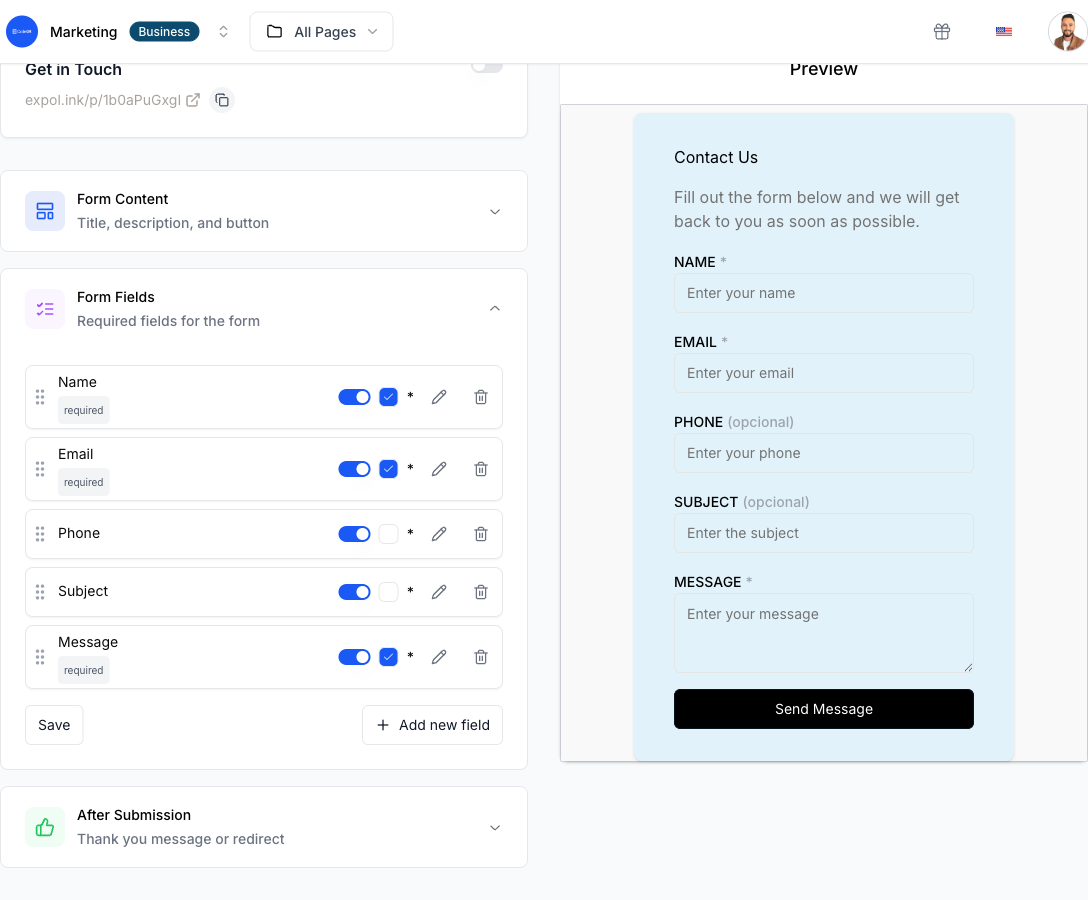
- Build the lead capture form. Add the fields you need — name, email, phone, company — and apply validation presets for email, phone, URL, digits, or a custom regex, so a mistyped address is caught before it is stored.
- Make the form mandatory before redirect. Turn on the pre-redirect form. The visitor must submit valid details before the Page forwards them to your destination link.
- Prefill from the query string. If your printed material already knows something — a campaign name or a location code — pass it in the URL and let the form prefill that field, so the visitor types less.
- Customize design and frame text. Upload your logo, set brand colors, and add frame text like "Scan to get the guide." A clear call to action raises the number of people who actually scan. See what you can change under CodeQR QR code features.
- Print, place, and track. Download the code, put it on your sign or flyer, then watch the funnel — views, starts, submissions, and dropoffs — and export captured leads as CSV.
Practical example
Consider a company running a booth at a trade show with a printed banner. They place a qr code for lead capture on the banner that opens a CodeQR Page. The form asks for name, work email, and company, with the email field set to reject anything that is not a valid address.
Because the form is mandatory, a visitor cannot reach the linked product demo until they submit. The organizer can watch how many people viewed the form, how many started typing, and how many finished — so a high view count with few submissions tells them the form is too long, not that the banner failed.
If they later swap the destination from a demo video to a pricing page, they change it once in the CodeQR Page. The printed banner never has to be reprinted. Query-string prefill also lets them run the same design at two events and tag each lead with its origin, so booth A and booth B stay separate in the export. More than 100 million U.S. smartphone users scanned a QR code in 2025, so the audience already knows the gesture.[^1]
CodeQR captures the lead and stores it, but it does not send nurture emails or run A/B tests. For follow-up sequences, connect the Page to Zapier, Make, or RD Station through a webhook and let those tools handle the drip. To attach revenue to a lead down the line, see conversion tracking, which records sale events on a Pro plan.
Best practices
- Keep the form short. Every extra field raises dropoffs. Ask for the minimum — usually name and one contact method — and let validation presets keep that data clean.
- Size the code for the scan distance. Use a roughly 10:1 ratio: a code read from 1 meter away should be about 10 cm wide, and never print the module below about 2 cm on a small flyer.
- Leave the quiet zone. Keep a clear margin of at least four modules around the code. Text or graphics crowding the edge stop cameras from locking on.
- Expect wear on rough surfaces. Laminated table tents, curved bottles, and logo-overlaid codes all cost scanning margin. Built-in QR error correction absorbs a lot — at the highest level, H, about 30% of a damaged code can be recovered[^2] — so prioritize print size and contrast, and retest after adding a logo.
- Stay dynamic. A dynamic short link lets you change the destination or fix the form after printing. Add a source tag with the UTM builder so you know which sign each lead came from.
For plan limits — the free tier includes one Page — check CodeQR pricing. If your touchpoint is about gathering opinions rather than sales contacts, the QR code for feedback page fits better; for ticketed signups, see QR code for event registration.
[^1]: Statista — More than 100 million U.S. smartphone users scanned a QR code in 2025, up from 89.5 million in 2022. https://www.statista.com/statistics/1337584/number-of-smartphone-qr-code-scanners-usa/ [^2]: QR Code (Denso Wave) — QR code error-correction level H can recover roughly 30% of a damaged or obscured code, the highest of the four defined levels. https://www.qrcode.com/en/about/error_correction.html