

A QR code for feedback is a dynamic URL QR code that opens a private feedback form the moment someone scans it. Point it at a CodeQR Feedback Page with a rating field and custom questions, print it where customers finish their visit, and collect honest responses without asking anyone to type a web address.
What it's for
A QR code for feedback collects private responses from the people in front of you — customers leaving a shop, patients after an appointment, attendees at the end of an event. The code encodes a URL that opens your feedback form, so the whole exchange happens on the visitor's own phone. This is separate from public reviews: if you want scans to land on your public Google listing instead, use the QR code for Google reviews page, which is built for that job.
Feedback like this stays with you. You decide the questions, you read every response, and nothing is posted publicly. More than 100 million U.S. smartphone users scanned a QR code in 2025, up from 89.5 million in 2022, so the scan itself is now a habit most of your customers already have.[^1]
How to create your qr code for feedback
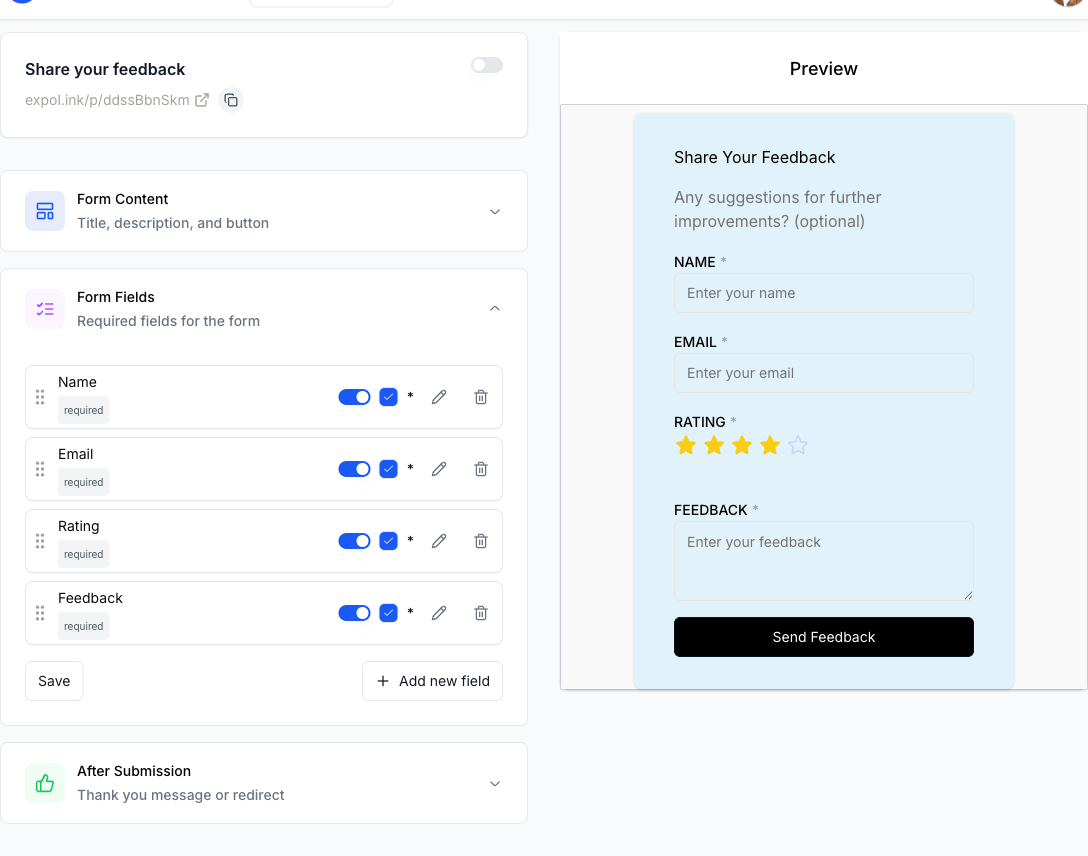
- Build a Feedback Page. Create a CodeQR Feedback Page and turn on the rating field, then add custom fields for the specifics you care about — table number, staff name, or an open comment box.
- Generate a URL QR code. Open the QR code generator, choose a URL code, and paste the link to your Feedback Page. This is the payload your printed code will carry.
- Customize the design. Upload a logo, set your brand colors, and add frame text such as "Tell us how we did" so people understand the code before they point a camera at it. CodeQR's QR codes support all of this.
- Place and print it. Put the code where the visit ends — the receipt, the table, the exit. Print one, scan it with a real phone, and confirm the form loads before you print hundreds.
- Track and summarize responses. Use conversion tracking to watch the funnel — views, starts, submissions, dropoffs — and run the AI Review Summary to condense written answers into a short readout. The free tier includes 10 AI credits.
Because the code is dynamic, you can swap the form or fix a typo in a question without reprinting a single sign.
Practical example
Consider a café printing table-tent QR codes that open a short feedback form. Each table gets the same dynamic URL code, and the frame text reads "Rate your coffee." Staff place the tents on every table before opening.
The owner adds a UTM to the destination using the UTM builder so responses from the table tents can be told apart from the same code printed on takeaway cups. When the winter menu launches, they edit the questions on the Feedback Page — the printed codes never change, so nothing on the tables needs reprinting.
Over a slow week they open the funnel view and see many people start the form but leave before submitting. That tells them the form is too long, so they trim it to a rating plus one comment. The AI Review Summary then gives them a paragraph digest of the written comments instead of reading each one by hand. No invented numbers here — the point is what the owner can now change and compare.
Best practices
- Give the code a quiet zone. Leave a blank margin of at least four modules (four "dots" wide) around the code so scanners can find its edges. Crowding it against text or a border is the most common reason a scan fails.
- Size it for the scan distance. A rough rule is that a code should be about one-tenth as wide as the distance it's scanned from. A table tent read at ~30 cm needs roughly a 3 cm code; a poster read across a room needs much more.
- Expect wear on tough surfaces. Laminated menus, curved cups, and counter cards scuff with use. QR codes carry built-in error correction — at the highest level, H, roughly 30% of a damaged or obscured code can still be recovered[^2] — but a logo overlay eats into that budget, so test the scan after adding one.
- Keep strong contrast. Dark code on a light background scans best. Avoid light-on-dark, gradients, or photo backgrounds behind the code.
- Stay dynamic. A dynamic URL code lets you edit the feedback form or its destination without reprinting. Static codes lock the payload forever — fine for a one-off, risky for anything you print in bulk. See the pricing page for what each plan includes.
Private feedback matters even when you also chase public reviews: 97% of consumers read online reviews for local businesses, and Google remains the platform they turn to most.[^3]
[^1]: Statista — More than 100 million U.S. smartphone users scanned a QR code in 2025, up from 89.5 million in 2022. https://www.statista.com/statistics/1337584/number-of-smartphone-qr-code-scanners-usa/ [^2]: QR Code (Denso Wave) — QR code error-correction level H can recover roughly 30% of a damaged or obscured code, the highest of the four defined levels. https://www.qrcode.com/en/about/error_correction.html [^3]: BrightLocal — 97% of consumers read online reviews for local businesses, and Google remains the platform they turn to most. https://www.brightlocal.com/research/local-consumer-review-survey/