

A QR code for Instagram is a dynamic URL code that points to your Instagram profile or link-in-bio page. Anyone who scans it with a phone camera opens your account instantly — no typing your handle. With CodeQR you generate one in minutes, add your logo, and repoint it later without reprinting.
What it's for
A QR code for Instagram closes the gap between the physical world and your profile. People see the code on a poster, product label, or business card, scan it, and land on your account — ready to follow, message, or shop. Instagram reached 3 billion monthly active users in September 2025, so a direct on-ramp to your profile removes friction that a typed username adds.[^1]
How to create your qr code for instagram
Follow these steps with the CodeQR QR code generator:
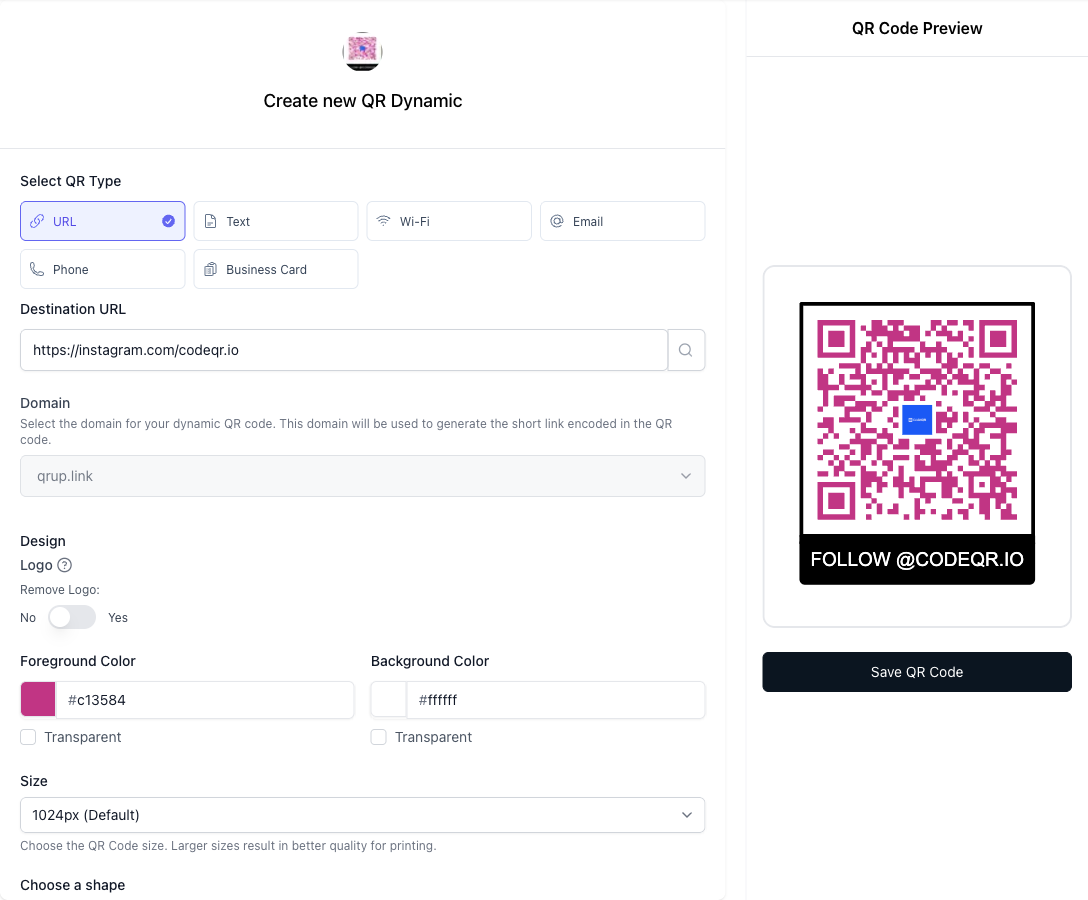
- Open the generator. Choose the URL QR type, since an Instagram QR encodes a web link rather than plain text.
- Paste your Instagram URL. Enter your profile address such as
instagram.com/yourhandle. If you want to send people to several links at once, use your link-in-bio page instead. - Customize the design. Upload your logo and set your brand colors. CodeQR's design and branding options let you match the code to your visual identity while keeping it scannable.
- Add frame text. Turn on a frame with a short instruction like "Follow us on Instagram" so people understand what the code does before they raise their phone.
- Make it dynamic and turn on analytics. A dynamic short link lets you repoint the code later without reprinting, and scan analytics show how many people scanned and when.
- Download and place it. Export a high-resolution PNG or SVG, then print it on signage, packaging, or cards.
Practical example
Consider a small maker who sells ceramics at a weekend market under an Instagram handle. She prints a QR code for Instagram on the wooden sign at her stall, with frame text such as "Follow us for restocks." The code points to a link-in-bio page carrying UTM tags built in CodeQR, so she can tell market scans apart from the ones on her packaging inserts.
Because the code is dynamic, she can swap the destination from her profile to a specific product drop during a sale — without reprinting the sign. Comparing the two UTM sources across a few market days shows whether the stall sign or the packaging insert drives more follows, so the decision about where to put a second sign comes from the dashboard rather than a guess.
Best practices
- Print at a readable size. Keep the code at least 2 × 2 cm (0.8 in) for close scanning. As a rule of thumb, the code should be about 1/10th of the scan distance — a sign read from 2 meters away needs a code around 20 cm wide.
- Leave a quiet zone. Keep a clear margin of at least four modules (the width of four squares) around the code so cameras can lock on. Don't crowd it with text or graphics.
- Test the code on the surface before the print run. Error correction is what lets a partially covered code still resolve — at the highest level, H, up to about 30% of it can be obscured and still read — and it is what makes a center logo possible at all. It is not unlimited: on curved packaging, laminated cards, or anything that scuffs, scan the printed proof with a real phone before you order a thousand of them.
- Keep strong contrast. Use a dark code on a light background. Avoid light-on-dark or low-contrast color pairs, which many phone cameras struggle to read.
- Choose dynamic over static. A static code bakes the URL in permanently; a dynamic code lets you change your handle or campaign target later. More than 100 million U.S. smartphone users scanned a QR code in 2025, so an editable destination protects that reach if your link changes.[^2]
Ready to compare options? See CodeQR pricing for what's included on the free and paid tiers.
[^1]: Instagram reached 3 billion monthly active users in September 2025. (CNBC, https://www.cnbc.com/2025/09/24/instagram-now-has-3-billion-monthly-active-users.html) [^2]: More than 100 million U.S. smartphone users scanned a QR code in 2025, up from 89.5 million in 2022. (Statista, https://www.statista.com/statistics/1337584/number-of-smartphone-qr-code-scanners-usa/)