

To make a qr code for spotify playlist that anyone can scan, copy your playlist's share link from Spotify and encode that link in a standard URL QR code — not a Spotify Code. A phone's native camera opens a standard QR code instantly, and a dynamic one lets you point it at a different playlist later without reprinting anything.
What it's for
This page is for putting a Spotify playlist behind a scannable code that lives in the physical world — a wedding sign, a gig flyer, an in-store card, a market stall. The reader wants people to point a phone at the code and land on the playlist, with no app-hunting or typing. A URL QR code does exactly that, because it encodes the playlist's normal web link.
How to create your qr code for spotify playlist
- Copy your Spotify playlist link. Open the playlist in Spotify, tap Share, and copy the playlist link. That web URL is the payload your QR code will carry.
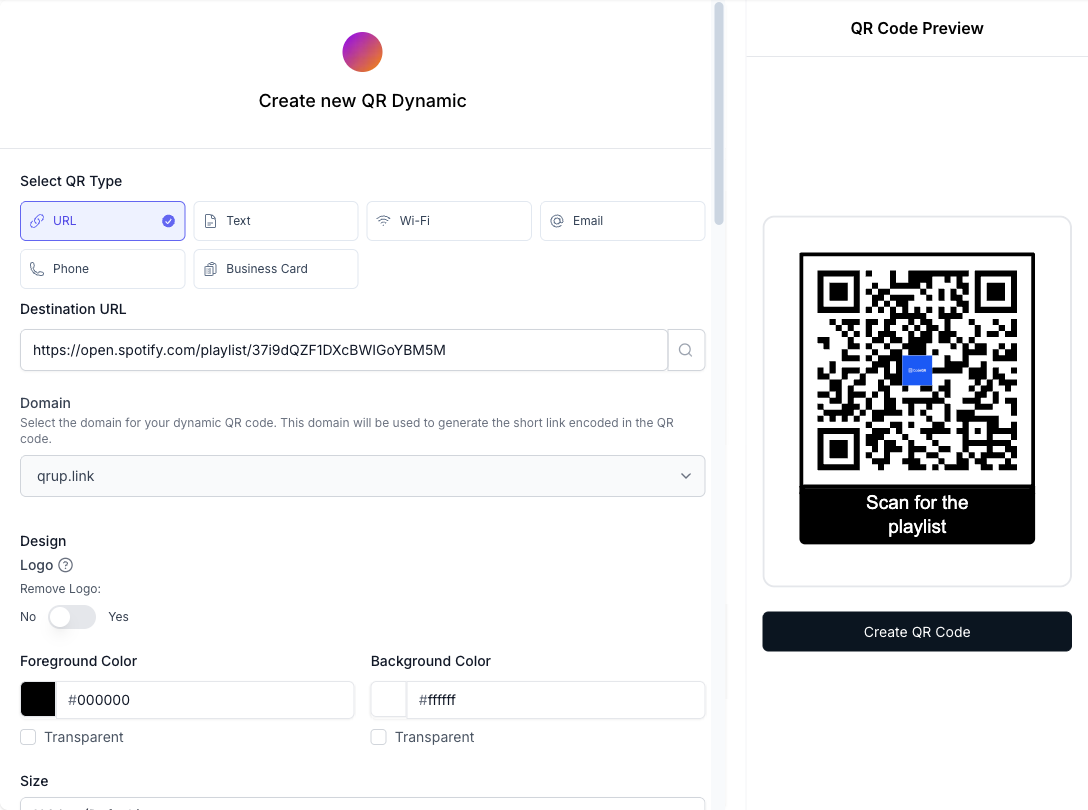
- Create a URL QR code in CodeQR. Open the CodeQR generator, choose the URL type, and paste the playlist link. Keep it a dynamic short link so the destination stays editable after printing.
- Customize the design. Upload a logo, set high-contrast colors, and add frame text such as "Scan for the playlist" so scanners know what to expect.
- Test before you export. Curved bottles, laminated cards, and fabric all cost scanning margin. QR codes carry built-in error correction — at the highest level, H, roughly 30% of a damaged or obscured code can still be recovered[^1] — but scan with two phones before exporting anyway.
- Download, print, and track. Export a high-resolution PNG or SVG, print at your planned size, and open scan analytics to see when and where the code gets used.
The Spotify Code vs. standard QR code distinction
A Spotify Code is the little graphic with the sound-wave bars that you see under album art in the app. It is read only by the in-app scanner inside the Spotify app — a phone's native camera cannot scan it, unlike a standard QR code.[^2] That is the right choice when everyone in your audience already has Spotify open.
A standard QR code is different: it encodes a normal web link, so any camera app opens it. If you want a wedding guest, a market shopper, or a flyer reader to reach your playlist regardless of which music app they use, a standard QR code pointing at the playlist URL is the reliable path. More than 100 million U.S. smartphone users scanned a QR code in 2025, and almost all of them used a native camera, not a music-app scanner.[^3] CodeQR builds the standard kind; it does not generate Spotify Codes and is not affiliated with Spotify.
Practical example
Consider a couple printing a QR code on their wedding reception signage. During the reception they want the dance-floor playlist; the morning after, they want guests who scan the same sign to hear a mellow "recovery" playlist instead.
With a static code, that would mean two signs and two prints. With a dynamic QR code, the printed graphic never changes — the couple just edits the destination link in CodeQR, and the next scan lands on the new playlist. They can also add UTM parameters so scans from the reception sign are logged separately from scans on the save-the-date card, letting them compare which placement actually drove listens. No invented result here — the point is the mechanism: one printed code, a destination they control after the fact.
Best practices
- Point the code at the playlist share link, not a Spotify Code. A standard QR code opens in any camera; a Spotify Code only opens in the Spotify app's own scanner.[^2]
- Keep at least 25 mm (about 1 inch) square for close-range scans, and scale up roughly 10× the scan distance — a code read from 2 meters away needs to be far larger than one on a table card.
- Leave a quiet zone. Keep a clear margin of at least four modules (the width of four of the small squares) around the code so scanners can find its edges against a busy flyer.
- Expect glare and bending on curved or laminated surfaces to obscure part of the code; built-in error correction absorbs a lot of that — about 30% at the highest level, H[^1] — so prioritize print size and contrast.
- Choose dynamic over static if the playlist might change — seasonal store music, post-event swaps — so you edit the destination instead of reprinting. Compare options on the pricing page.
If you also want the playlist available as a saved pass on a phone, see wallet passes.
[^1]: QR Code (Denso Wave), https://www.qrcode.com/en/about/error_correction.html — verified 2026-07-14. [^2]: Spotify, https://www.spotifycodes.com/ — verified 2026-07-14. [^3]: Statista, https://www.statista.com/statistics/1337584/number-of-smartphone-qr-code-scanners-usa/ — verified 2026-07-14.