

A QR code generator for real estate lets agents and brokerages turn yard signs, flyers, and window cards into a scan that opens the live listing on a buyer's phone. With dynamic codes you edit the destination after printing — so a price drop or a sold status never leaves a stale sign — and you see which properties get scanned and when.
What real estate teams actually need from a QR code
If you manage five or more active listings, your printed materials go stale the moment a price changes or a property goes under contract. A realtor or brokerage owner needs a code they can print once and repoint later, plus a way to tell which signs are actually pulling buyers off the sidewalk. Buyers standing at the curb want the photos, square footage, and a way to reach you in seconds — not a phone number they'll forget by the time they're back in the car.
Common use cases for real estate
- Yard signs and window cards that survive a listing change — a dynamic QR code for real estate listings points at the property page, and when the price drops or the home sells you edit the destination instead of reprinting the sign rider.
- Open-house flyers and take-one boxes — the same real estate QR workflow sends a walk-through visitor to a registration form or a full photo gallery, so you capture the lead while they're still on the driveway.
- Digital business cards buyers can save — pair a scan with wallet passes so an interested buyer keeps your contact card in Apple or Google Wallet after the showing ends.
Practical example
Consider a small brokerage running a dozen active listings across a metro area. For each property, the team creates one dynamic QR code in CodeQR's QR code generator, pointing it at that home's listing page. The code goes on the sign rider at about 6 inches wide, sized for drivers reading it from roughly five feet away, with a smaller version on the take-one flyers inside the door.
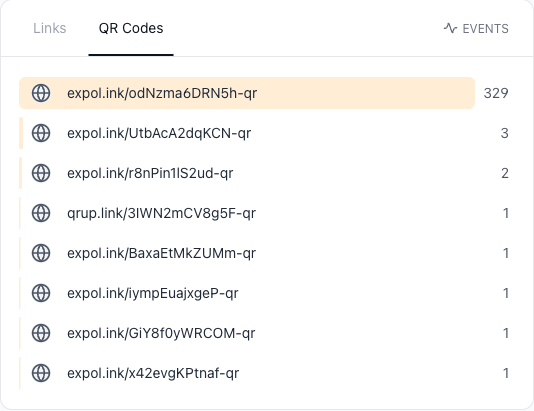
When a listing goes under contract, nobody orders a new rider. The team opens CodeQR and repoints that code to a "just sold — here's what your home is worth" valuation form, and the same printed sign keeps working. Over a weekend of open houses, comparing scans property by property shows which sign pulls more curbside interest than another — a signal for where to spend the next print budget, rather than reprinting every rider on a guess. More than 100 million U.S. smartphone users scanned a QR code in 2025, up from 89.5 million in 2022, so most walk-up buyers already know exactly what to do with the code.[^1]
How CodeQR fits into your stack
CodeQR sits alongside the tools a brokerage already runs — it doesn't replace your MLS, your CRM, or your transaction management platform. It handles the QR codes and short links that connect your printed materials to whatever page you already publish, whether that's an IDX listing, a Zillow page, or a landing page on your own site. Scan data flows into conversion tracking so you can attribute offline interest back to a specific sign or flyer. It won't write your listing descriptions or manage showings; it makes the physical-to-digital handoff dependable and measurable.
Best practices for real estate
- Size the code for the read distance. A rough rule is a 10:1 distance-to-size ratio — a yard sign read from five feet (about 60 inches) needs a code near 6 inches wide, while a handheld flyer scanned at 12 inches works fine at 1.2 inches.
- Count on error correction outdoors, but replace a worn rider. Error correction is why rain streaks, road dust, or a scuffed rider usually still scan — at the highest level, H, about 30% of the code can be damaged and still recover. It runs out: once a phone hesitates at the curb, reprint the rider.
- Give every listing its own code. One code per property is what makes your scan analytics useful — you can't tell which sign works if three listings share a single code.
- Keep quiet space around the pattern. Leave a clear margin (at least four modules) so the sign's border or a QR-adjacent logo doesn't crowd the scan zone.
- Repoint sold listings instead of tossing signs. Since 82% of clients respond positively to technology in the buying and selling process, a "just sold" code that turns a dead sign into a seller-lead form keeps working for you.[^2]
Check CodeQR pricing to match a plan to the number of active listings you run.
[^1]: Statista — More than 100 million U.S. smartphone users scanned a QR code in 2025, up from 89.5 million in 2022. https://www.statista.com/statistics/1337584/number-of-smartphone-qr-code-scanners-usa/ [^2]: National Association of Realtors — REALTORS® report 82% of their clients respond positively or very positively to technology used in the buying and selling process. https://www.nar.realtor/newsroom/realtors-embrace-ai-digital-tools-to-enhance-client-service-nar-survey-finds