
Choose between dynamic and static QR codes
Dynamic QR codes encode a short link you can re-point and measure; static codes bake the content into the image. Plan limits and how to convert.

This article explains what CodeQR puts inside a dynamic and a static QR code, what that means for editing, measuring, and printing, how each format counts toward your plan, and how to turn a static code into a dynamic one.
Availability
- Plan: both formats on all plans. Monthly allowance per plan is in the table below.
- Where: the choice is the first step of Create QR Code (Select QR Code format). An existing static code can be converted from its Edit page.
What each format encodes
Dynamic — the image encodes a short link on your domain, for example https://qrup.link/iVx0OCFyDn79-qr. Scanning opens that link and CodeQR redirects the visitor to the destination you set (a 302 redirect for URL codes; a page with the content for Wi-Fi, vCard, and other types). Because the image never changes, you can:
- change the destination or the content after printing;
- see every scan in Analytics (by day, country, device);
- add options that need a server: password, expiration date, Smart Rules and pre-redirection forms (Business), and conversion tracking (Pro).
- add Wallet passes (Business plan or above, not during a trial).
Static — the image encodes the content itself: the URL, mailto:, tel:, a WIFI: string, a vCard, a Pix payload, or a wa.me link. Scanning does not touch CodeQR, so:
- it works with no dependency on your account, plan, or domain;
- nothing is measured — no scans, no Analytics;
- the content is fixed once printed. You can edit the record and export a new image, but every copy already printed keeps the old content;
- Pix codes are static only (payment apps read the Pix payload directly).
The dialog says it in one line each: Dynamic — "The image points to a short link. Change the destination whenever you want — including after printing." Static — "The content is baked into the image. You can edit it and export again, but codes already handed out keep the old content."
How each format counts toward your plan
- Free — QR codes per month: 5 · Tracked scans per month: 1,000 · Static codes: count toward the 5
- Starter — QR codes per month: 150 · Tracked scans per month: 6,000 · Static codes: count toward the 150
- Pro — QR codes per month: 1,000 dynamic · Tracked scans per month: 30,000 · Static codes: unlimited
- Business — QR codes per month: 5,000 dynamic · Tracked scans per month: 150,000 · Static codes: unlimited
Analytics retention grows with the plan (Free 30 days, Starter 90 days, Pro 1 year, Business and above longer) — see pricing. When the allowance is used, Create QR Code is disabled with "You have reached your QR Code limit" and the API answers 403 "You have reached the monthly limit of {N} qrcodes on the {Plan} plan. Please upgrade to add more QR Codes." Existing codes keep working.
Choose
- Print runs, packaging, signage, menus, business cards, anything you cannot reprint at will: dynamic. You will want to fix a typo, move a campaign, or count scans later.
- One-off content that must work with no internet dependency and never changes — a Wi-Fi password on a wall, a Pix charge, a vCard you print once: static.
- Undecided: create it dynamic. You can never turn a dynamic image into a static one without reprinting, but you can always keep the same short link and change what is behind it.
Turn a static code into a dynamic one
Only this direction is offered. The record keeps its key and short link; from the moment you save, the image you export encodes that short link instead of the content.
- Open QR Codes, open the card menu (⋮) of the static code and click Edit.
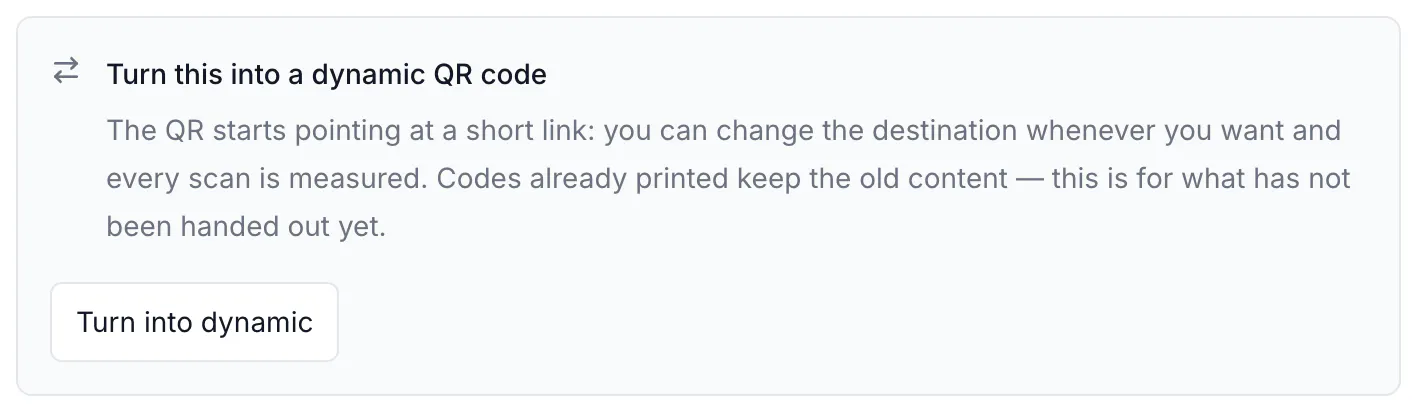
- In the box Turn this into a dynamic QR code, click Turn into dynamic. The box changes to "Will become dynamic when you save"; Keep it static undoes it.
- Click Save QR Code.
- Export the image again and replace the printed copies. Copies printed before the conversion still contain the old content — the conversion cannot reach them.
On Pro and above the converted code starts counting toward the dynamic allowance (+1); on Free and Starter nothing changes because static codes already counted.
Through the API, send PUT https://api.codeqr.io/qrcodes/{qrcodeId} with { "static": false }. Response (abbreviated): same key, "static": false, new updatedAt:
{
  "id": "cmsx87acu0001biopp3dxhgt5",
  "domain": "qrup.link",
  "key": "IUj83vmfuYFE-qr",
  "url": "https://example.com/menu",
  "static": false,
  "shortLink": "https://qrup.link/IUj83vmfuYFE-qr",
  "updatedAt": "2026-08-17T12:45:53.141Z"
}
Note that in the API static defaults to false; send "static": true explicitly for a static code. The MCP server creates dynamic codes only.
Editing a static code
When you change the content of a static code and click Save QR Code, the editor shows the modal This changes what the QR code encodes with two columns, What is already printed and What applies from now on, and the button Save anyway. It is a reminder, not a block: after saving, export and reprint.
The options listed under Optional (password, expiration, conversion tracking, webhooks) apply to dynamic codes only. On a static code they have no effect because scanning never reaches CodeQR.
Verify it works
- Dynamic:
curl -sI https://qrup.link/IUj83vmfuYFE-qr | grep -i locationreturnslocation: https://example.com/menu(or the display page for non-URL types). The card shows the Dynamic badge and a scan counter. - Static: decode the image with any scanner app — it shows your URL or content directly, and the card shows the Static badge without a counter.
Troubleshooting
I edited a static code and the printed copies still open the old page
Expected: the URL is inside the printed image. Convert the code to dynamic and reprint once; future changes will not need a reprint.
The scans of my static code are always zero
Static codes are not measured — nothing passes through CodeQR when they are scanned. Convert to dynamic and reprint to start counting.
I want a dynamic code to become static
Not offered: a dynamic image already handed out encodes the short link, so "making it static" would only be a new, different image. Create a new static code and print it.
The API created a dynamic code when I wanted static
static defaults to false in the API. Send "static": true.