
Create WhatsApp, Wi-Fi, and vCard QR codes
Make QR codes that open a WhatsApp chat with a preset message, share a Wi-Fi password, or save a contact — plus text, email, phone, and Pix codes.

At the end of this guide you know which QR code type to pick for each job — WhatsApp chat, Wi-Fi access, contact card, plain text, email, phone, or Pix — what the person who scans it sees, and how the dynamic and static versions of each type differ.
Availability
- Plan: all types on all plans. Wallet passes on the visitor page need the Business plan or above and aren't available during a trial.
- Where: Create QR Code → Select QR Type. Dynamic codes offer URL, Text, Wi-Fi, Email, Phone, WhatsApp, and Business Card; static codes add Pix. The API accepts the same types (
url,text,wifi,email,phone,whatsapp,vcard,pix, plussms,crypto,geo,latlog).
Before you start
- Decide dynamic or static per type: a dynamic Wi-Fi, vCard, Email, Phone, or Text code opens a small CodeQR page with the content and action buttons, counts scans, and can be edited later; a static one is read directly by the phone (the camera offers to join the network, save the contact, or open the mail app) but cannot be edited or measured. See Choose between dynamic and static QR codes.
- A dynamic WhatsApp code is the exception: it redirects straight to WhatsApp, no intermediate page.
- Pix is static only: payment apps must read the Pix payload from the image itself.
Steps
- Open QR Codes, click Create QR Code, choose Dynamic or Static, and click Continue.
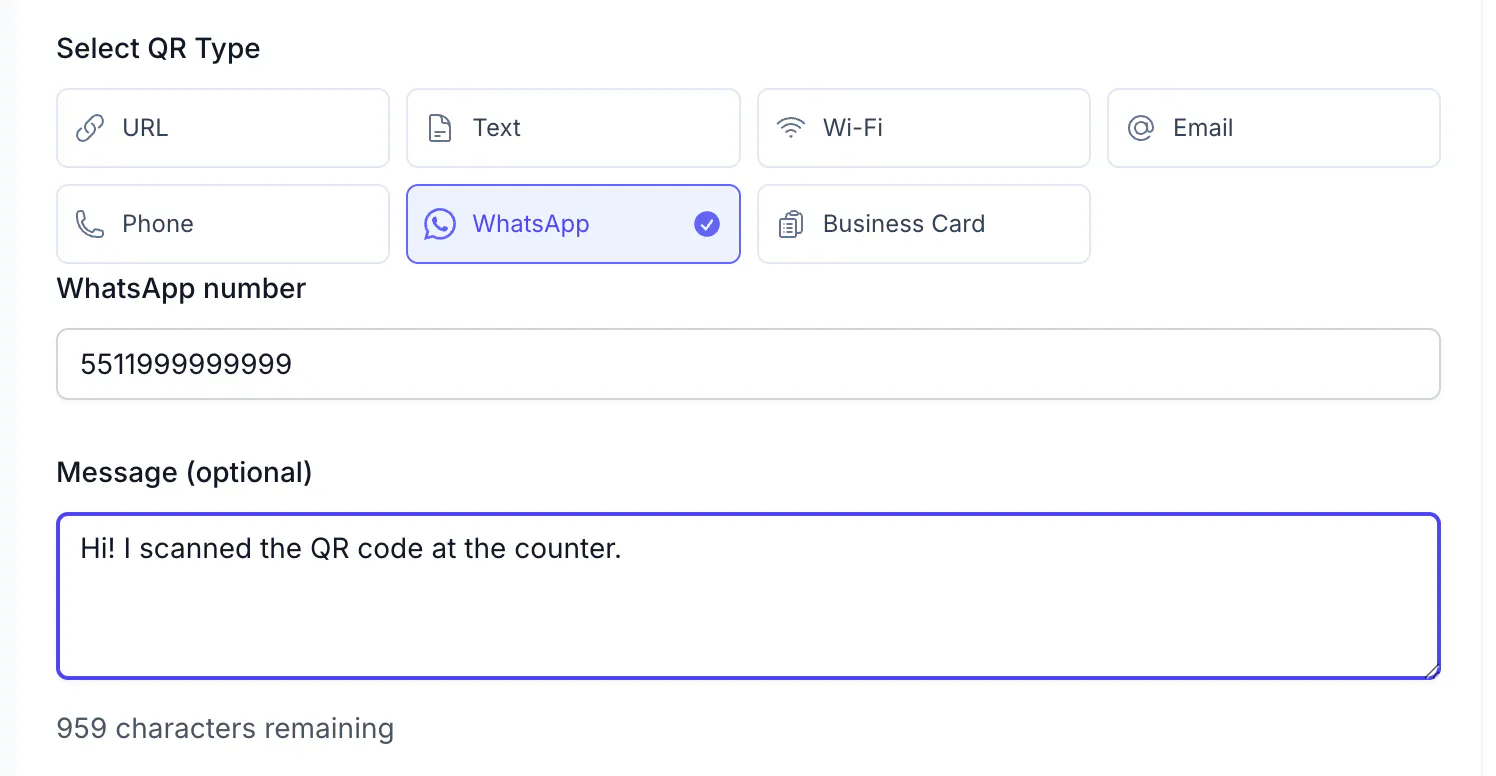
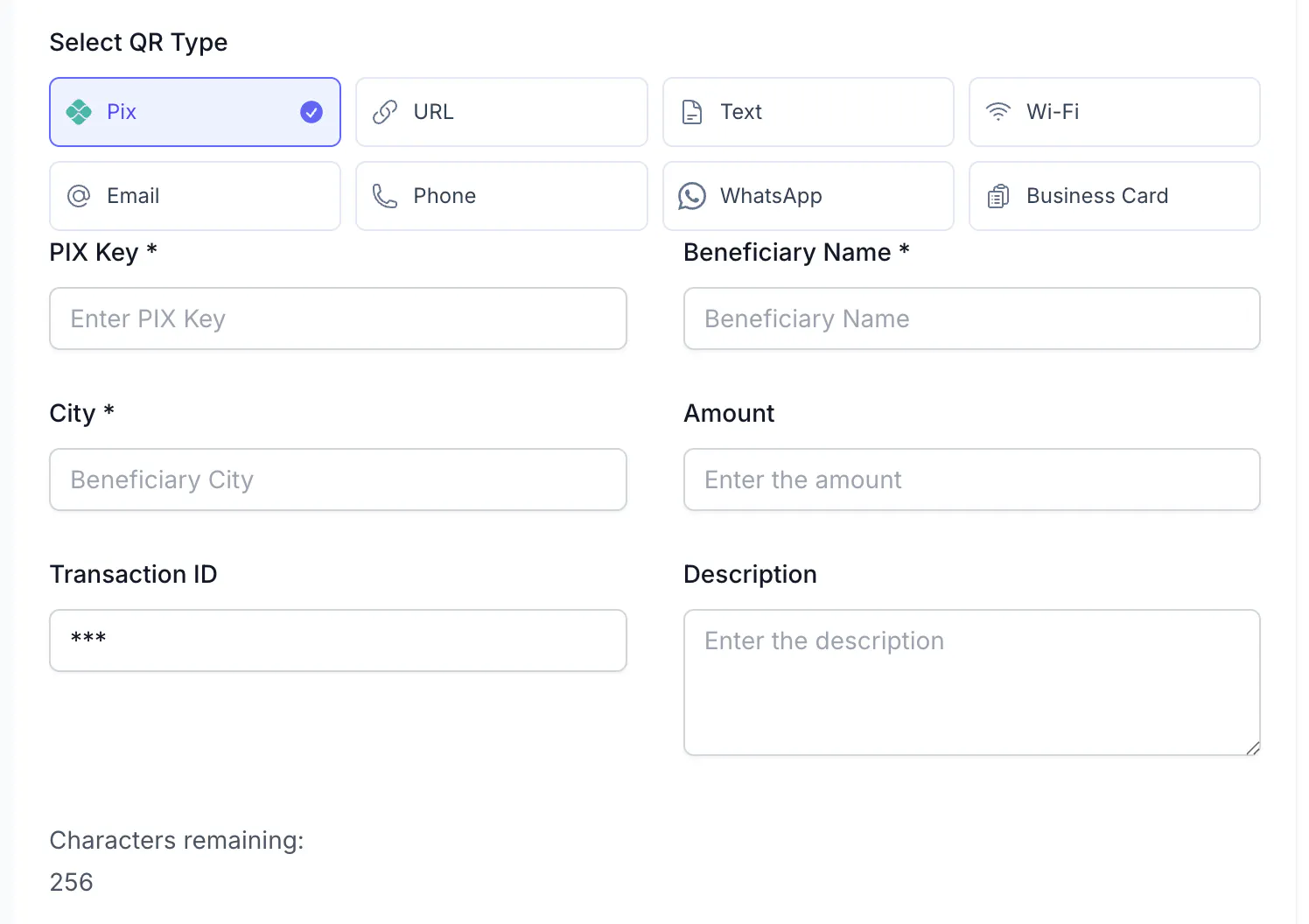
- In Select QR Type, pick the type and fill in its fields: - WhatsApp — WhatsApp number in international format, digits only (
5511999999999), and an optional Message of up to 1,000 characters that appears pre-filled in the chat. - Wi-Fi — Network name, Password, Encryption (None, WPA, WPA2, or WEP), and Hidden network if the SSID is not broadcast. - Business Card — name, phone, email, website, and address fields; the visitor gets a downloadable contact. - Email / Phone — the address or number (and subject and body for email). - Text — any text, shown as is. - Pix (static) — PIX Key, Beneficiary Name, City, and optionally Amount, Transaction ID, and Description.
- Set Design and, under Optional, a Title so you recognize the code in the list (the list shows the content, for example
WiFi SSID: Cafe GuestorWhatsApp: 5511999999999). - Click Create QR Code, then Export the file.
What the visitor sees
- WhatsApp (dynamic): the scan redirects to
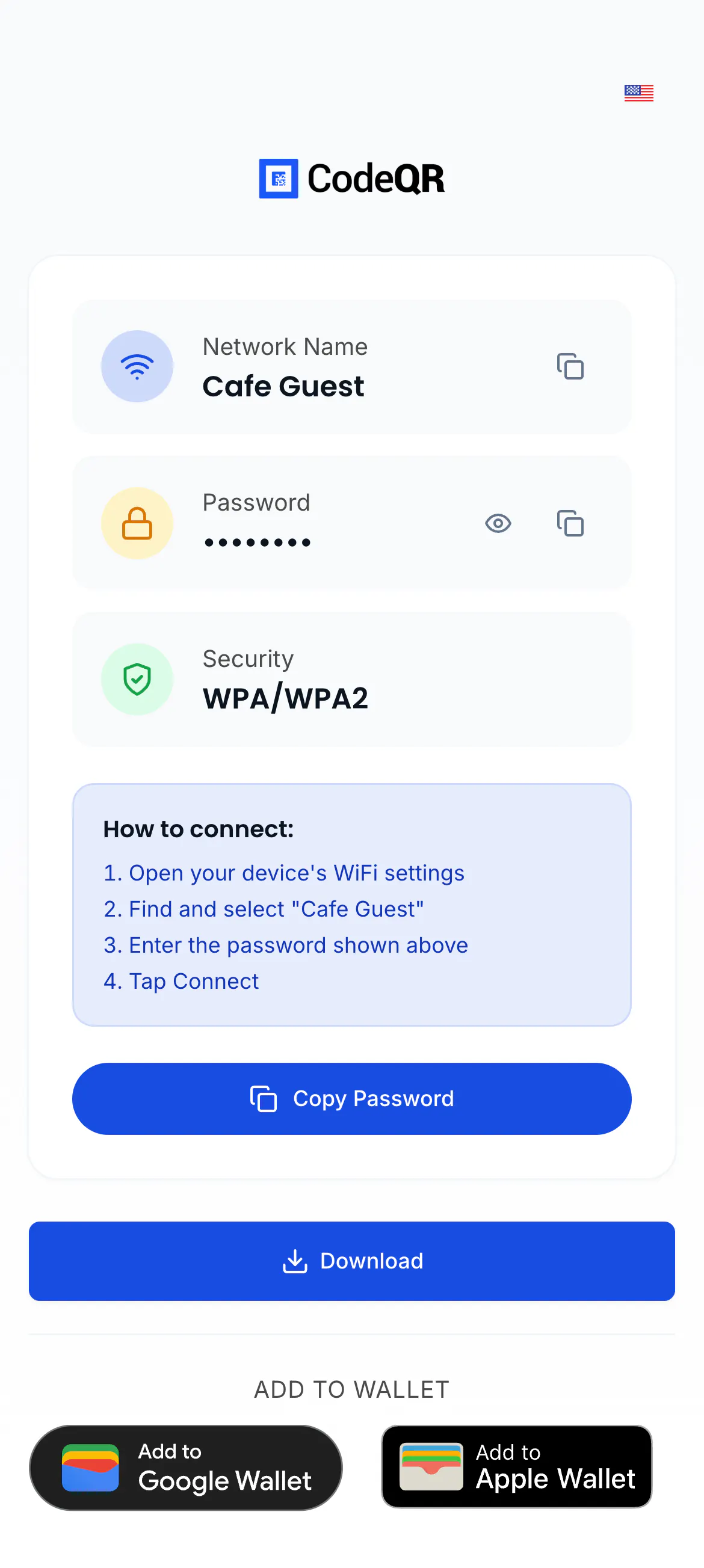
https://wa.me/5511999999999?text=…and WhatsApp opens the chat with your message ready to send. - Wi-Fi (dynamic): a page with Network Name, Password (hidden until tapped), Security, the steps to connect, Copy Password, Download, and ADD TO WALLET buttons on Business and above (not during a trial). The phone does not join the network by itself — that only happens with a static Wi-Fi code.
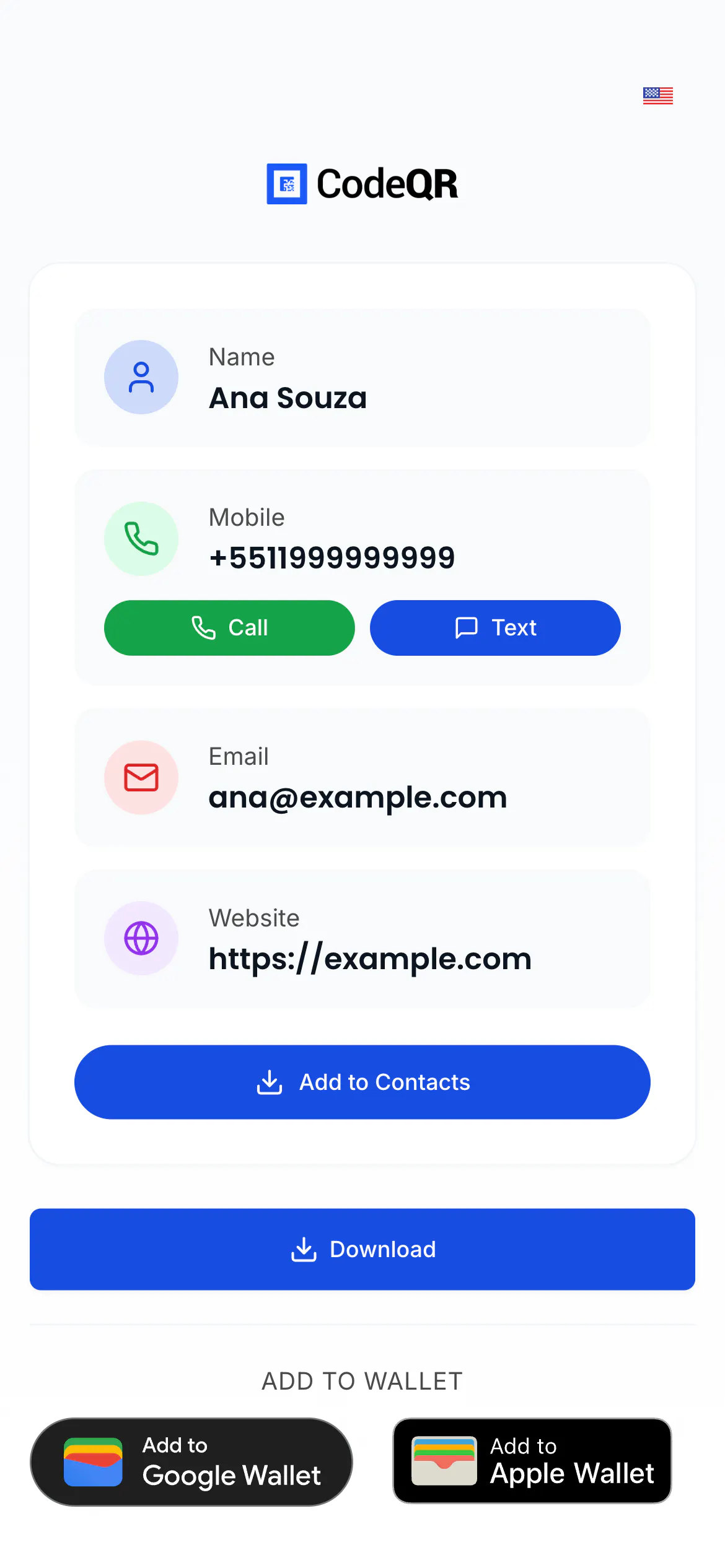
- Business Card (dynamic): a page with Name, Mobile (Call, Text), Email (Send), Website (Visit), Add to Contacts, Download, and Wallet buttons.
- Email, Phone, Text (dynamic): a page with the content and action buttons (call, copy, share).
- Static codes: the phone handles the content natively — the camera proposes to join the network, save the contact, open the mail or phone app, or shows the text; the Pix code opens in the bank app.
Every scan of a dynamic code of any type is counted in Analytics; visits to the page's public link (https://<domain>/pass/<key>) are not.
The same through the API
Send the type and its object. Examples that ran (200 OK, abbreviated responses):
WhatsApp:
curl -X POST https://api.codeqr.io/qrcodes \
  -H "Authorization: Bearer codeqr_xxxxxxxxxxxxxxxxxxxxxxxx" \
  -H "Content-Type: application/json" \
  -d '{
    "type": "whatsapp",
    "whatsapp": { "number": "5511999999999", "message": "Hi! I scanned the QR code at the counter." },
    "title": "WhatsApp counter",
    "static": false
  }'
{ "id": "cmsx87izc0005biopy0gtk834", "key": "113HDGTJxMLI-qr", "type": "whatsapp",
"whatsapp": { "number": "5511999999999", "message": "Hi! I scanned the QR code at the counter." },
"shortLink": "https://qrup.link/113HDGTJxMLI-qr" }Wi-Fi: { "type": "wifi", "wifi": { "ssid": "Cafe Guest", "password": "latte2026", "encryption": "WPA" }, "title": "Guest Wi-Fi", "static": false } → "key": "PFd23hLIz7dl-qr". Business Card: { "type": "vcard", "vcard": { "name": "Ana", "surname": "Souza", "phone": "+5511999999999", "email": "ana@example.com", "website": "https://example.com" }, "static": false } → "key": "AJMvBdqPxG6S-qr". Pix: { "type": "pix", "pix": { … }, "static": true } — always static.
Validation errors you can hit: 400 "Missing Wi-Fi SSID.", 422 "invalid_string: whatsapp.number: Invalid WhatsApp number (use E.164 digits, e.g. 5511999999999)", 400 "Missing PIX data.". The MCP create_qrcode tool supports whatsapp, wifi (ssid, password, encryption WPA/WPA2/WEP/nopass), vcard, email, phone, sms, and text — always dynamic. More in Create QR codes with the API, MCP, and automations.
Verify it works
curl -sI -A "Mozilla/5.0 (iPhone; CPU iPhone OS 17_5 like Mac OS X)" https://qrup.link/113HDGTJxMLI-qr | grep -iE "^HTTP|^location"
# HTTP/2 302
# location: https://wa.me/5511999999999?text=Hi!%20I%20scanned%20the%20QR%20code%20at%20the%20counter.

curl -sI -A "Mozilla/5.0 (iPhone; CPU iPhone OS 17_5 like Mac OS X)" https://qrup.link/PFd23hLIz7dl-qr | grep -iE "^HTTP|^x-pathname"
# HTTP/2 200
# x-pathname: /qrup.link/pass/PFd23hLIz7dl-qr
The WhatsApp code answers with a redirect to wa.me; Wi-Fi and Business Card codes answer with the visitor page. Then scan each with a phone: WhatsApp opens the chat, the Wi-Fi page shows the network, the contact page offers Add to Contacts.
Troubleshooting
The Wi-Fi code opens a page instead of connecting the phone
That is the dynamic behaviour: the page shows the network and password to copy. If you need one-tap join, create a static Wi-Fi code — the camera then offers to join, but the password cannot be changed after printing.
"Invalid WhatsApp number"
Use the international format with digits only: country code + area code + number, no +, spaces, dashes, or leading zero (5511999999999).
WhatsApp opens without my message
The message travels in the wa.me link as the text parameter and WhatsApp fills it in when the chat opens. Check that the Message field was saved (up to 1,000 characters) by requesting the short link — the location header must contain ?text=.
The contact does not save on the iPhone
Use Add to Contacts on the visitor page (dynamic code) — it downloads a .vcf file that iOS imports. Static vCard codes read by the iPhone camera have a known issue with last names that contain spaces; a dynamic Business Card code avoids it.
The Pix code is refused by the bank app
Pix codes must be static, and the payload has field limits: beneficiary name up to 25 characters, city up to 15, amount with a dot as decimal separator (10.00). Recreate the code with shorter values and test with your own bank app before printing.