

A real estate QR code is a scannable code you print on a yard sign, rider, flyer, or business card that opens your live listing on a phone. Make it a dynamic URL code so you can update the destination without reprinting, and give each printed piece its own tag so you can see exactly which sign drove each scan.
What it's for
A real estate QR code turns a static printed sign into a direct link to your listing. A buyer walking past a yard sign scans the code and lands on photos, price, and contact details in seconds — no address to type, no name to remember. Because agents work across many printed pieces at once, the code also lets you connect a physical sign to online interest you can measure.
How to create your real estate qr code
- Create a URL QR code. In the CodeQR QR code generator, choose a URL code and paste the link to your live listing page.
- Keep it dynamic. Set the code as a dynamic short link so you can point it somewhere new — a "sold" page, a new listing — without reprinting anything. This is the core of CodeQR's dynamic QR codes.
- Add a UTM tag per piece. Give the yard sign, each rider, and each flyer its own tag with the UTM builder so every scan is traceable to a specific printed item.
- Customize the design. Upload your brokerage logo, set brand colors with high contrast, and add frame text such as "Scan for photos & price" so passersby know what the code does.
- Download and print at size. Export a high-resolution file and print the code large enough for the intended scan distance (see Best practices below).
- Watch scan analytics. Once the sign is up, use conversion tracking to compare scans across signs and flyers.
Practical example
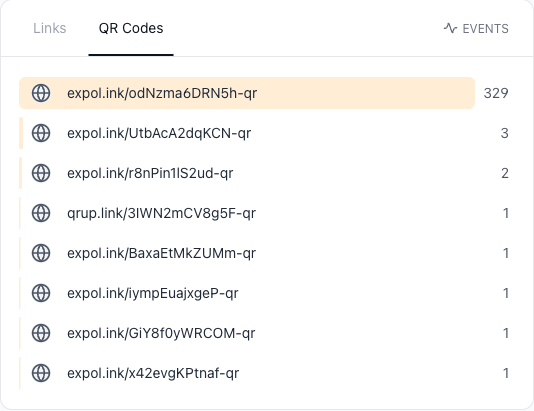
Consider an agent listing one property with a yard sign out front, a rider on the corner pointing down the street, and a stack of open-house flyers on the kitchen counter. Each printed piece carries its own dynamic real estate QR code, and each code has a different UTM tag.
Every code opens the same live listing, but the agent can now compare which piece buyers actually scan — the front sign, the corner rider, or the flyer someone took home. When the price drops, the agent edits the destination once in CodeQR and every printed code updates instantly, so nothing has to be reprinted. If the listing goes under contract, the same codes can point to a "just sold" page that quietly markets the agent to the neighborhood.
This matters because most clients welcome tools like this: REALTORS® report 82% of their clients respond positively or very positively to technology used in the buying and selling process.[^1]
Best practices
- Print large enough for the scan distance. A rough rule is a code width of about 1/10th of the scan distance — a code meant to be read from three meters away needs to be roughly 30 cm wide. Yard signs read from the sidewalk should never carry a tiny code.
- Expect weather and glare to work against the code. QR codes carry built-in error correction — at the highest level, H, roughly 30% of a damaged or obscured code can still be recovered[^2] — but a bigger print and strong contrast are what keep a sign scannable from the sidewalk.
- Leave a clear quiet zone. Keep an empty margin of at least four modules (the small squares) around the code so the camera can find its edges. Signs that crowd the code against text or a border scan poorly.
- Keep strong contrast and check the brokerage name. Dark code on a light background scans best; avoid low-contrast brand colors. Several state real estate commissions require the brokerage name to appear prominently, so confirm your sign meets state and MLS advertising rules before printing.
- Choose dynamic over static. A static code locks the destination forever; a dynamic code lets you redirect and measure. For listings that change status, dynamic is the safer choice — compare options on the pricing page.
QR codes are a real habit now: more than 100 million U.S. smartphone users scanned one in 2025.[^3] For codes that travel with the buyer, like an agent contact card, you can also look at wallet passes.
[^1]: National Association of Realtors — REALTORS® report 82% of their clients respond positively or very positively to technology used in the buying and selling process. https://www.nar.realtor/newsroom/realtors-embrace-ai-digital-tools-to-enhance-client-service-nar-survey-finds [^2]: QR Code (Denso Wave) — QR code error-correction level H can recover roughly 30% of a damaged or obscured code, the highest of the four defined levels. https://www.qrcode.com/en/about/error_correction.html [^3]: Statista — More than 100 million U.S. smartphone users scanned a QR code in 2025, up from 89.5 million in 2022. https://www.statista.com/statistics/1337584/number-of-smartphone-qr-code-scanners-usa/