

A vcard qr code stores your contact details — name, phone, email, company — so one scan drops them straight into someone's phone contacts. Encode the whole record and the code turns dense and hard to read at business-card size, frozen after print. Encode a short link instead and it stays clean and stays editable.
What it's for
A vCard QR code turns a printed surface — a business card, a name badge, a shop window — into a one-scan handoff of your contact information. The person points their camera, taps the prompt, and your details land in a prefilled contact card they can save. It removes the retyping that kills most exchanges. More than 100 million U.S. smartphone users scanned a QR code in 2025, so the camera habit is already there.[^1]
How to create your vcard qr code
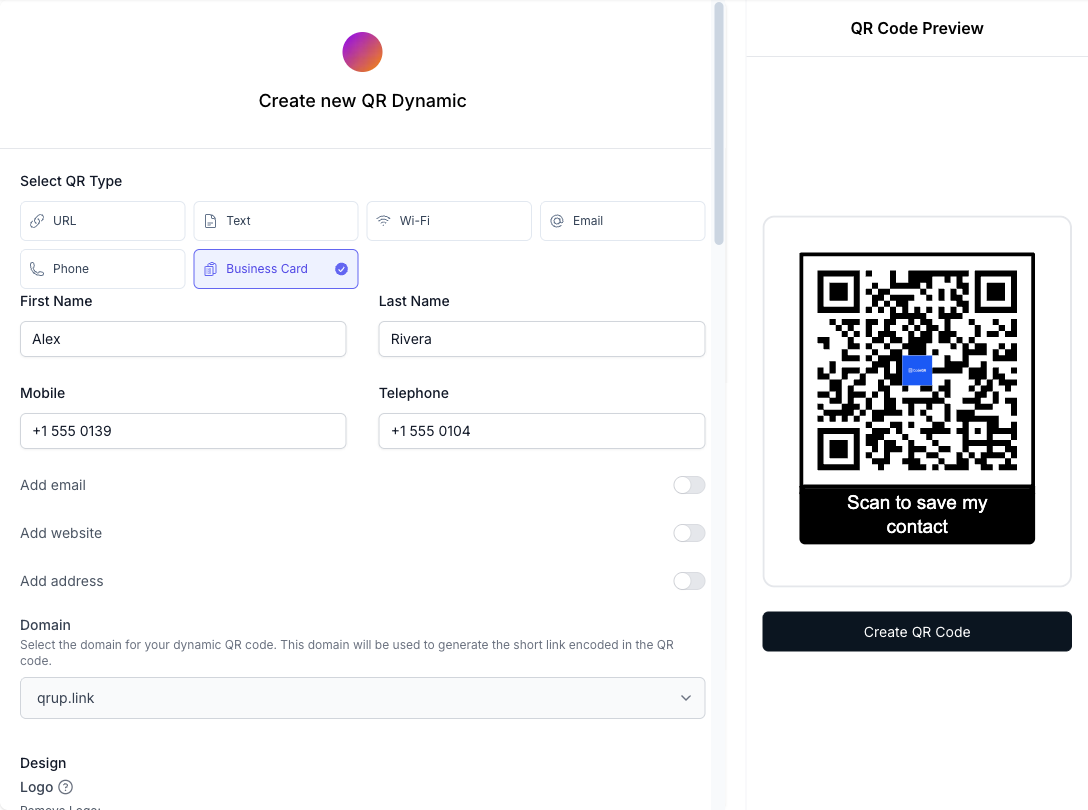
The embedded generator on this page produces URL-type QR codes. The full vCard editor — with dedicated name, phone, email, and company fields — lives in the CodeQR app, which is free to sign up for and includes 5 QR codes on the free tier.
- Open the vCard type in the CodeQR app. Sign up, pick the vCard QR type, and fill in your name, phone, email, and company. These fields map to a standard contact card that any phone can read.
- Keep the code dynamic. A dynamic short-link QR keeps the printed code low-density and lets you edit the contact details later. Learn how dynamic QR codes stay editable after print.
- Customize the design. Upload a logo, set brand colors against a light background for contrast, and add frame text such as "Scan to save my contact" so people know what the code does.
- Test on a real phone. Cards get handled, pocketed, and laminated, all of which costs scanning margin. Scan the code with a plain phone camera — and after adding a logo, scan again — before you commit to a print run.
- Save it to a wallet pass (optional). On a Business or higher plan (not available during a trial), export the same QR as a wallet pass for Apple or Google Wallet.
- Track scans. Use scan analytics to see which cards and events actually get scanned.
Practical example
Consider a recruiter who prints a stack of business cards for a two-day hiring fair. They generate a dynamic vCard QR code and put it on the card back at 2.5 cm square with a clear quiet-zone margin around it.
On day one, a phone number changes. Because the code is dynamic, the recruiter updates the number in CodeQR and every printed card now resolves to the correct contact — no reprint, no reorder. They can also tag the fair with a UTM parameter to compare scans from this event against scans from a later one, and see the difference in the dashboard instead of guessing. The mechanism is the value: one edit updates the whole batch.
Best practices
- Print at 2 cm or larger on a business card, and never below 2 cm for anything read at arm's length. Small dense codes fail more often than large simple ones.
- Leave a quiet zone. Keep a clear margin of at least four modules (roughly the width of four QR squares) around the code so the camera can find its edges.
- Expect handling damage and lamination glare. QR codes carry built-in error correction — at the highest level, H, roughly 30% of a damaged or obscured code can still be recovered[^2] — which is what keeps a scratched card scannable; size and contrast do the rest.
- Go dynamic, not static. A static vCard QR encodes the whole contact record, so module density climbs and the code gets hard to scan at card size — and it is locked once printed. A dynamic QR stays low-density and editable.
- Keep strong contrast. Dark code on a light background scans best. Skip low-contrast color pairs and busy photo backgrounds behind the code.
For wallet distribution, roughly 4.4 billion people used a digital wallet in 2025 — about 55% of the world's population — so a wallet pass meets a habit most contacts already have.[^3] See CodeQR pricing for which plans include wallet-pass export.
[^1]: Statista — More than 100 million U.S. smartphone users scanned a QR code in 2025, up from 89.5 million in 2022. https://www.statista.com/statistics/1337584/number-of-smartphone-qr-code-scanners-usa/ [^2]: QR Code (Denso Wave) — QR code error-correction level H can recover roughly 30% of a damaged or obscured code, the highest of the four defined levels. https://www.qrcode.com/en/about/error_correction.html [^3]: Juniper Research — Roughly 4.4 billion people used a digital wallet in 2025, about 55% of the world's population. https://www.juniperresearch.com/press/digital-wallet-users-to-surpass-three-quarters-of-global-population-by-2030/