

A QR code for donations is a scannable image that sends a supporter straight to your giving page, where they choose an amount and pay through the platform you already use. With CodeQR you design the code, point it at that page, and track which printed placement drove each scan — CodeQR never touches the money.
What it's for
A donation QR code closes the gap between a physical moment — a pew card, a fundraising mailer, a poster at an event — and the online form where the gift actually happens. Someone reads the card, scans with their phone camera, and lands on your giving page ready to pay. More than 100 million U.S. smartphone users scanned a QR code in 2025, so the gesture is now familiar to most people you are asking.[^1] It works because it removes typing: no long URL, no searching for your organization by name.
How to create your qr code for donations
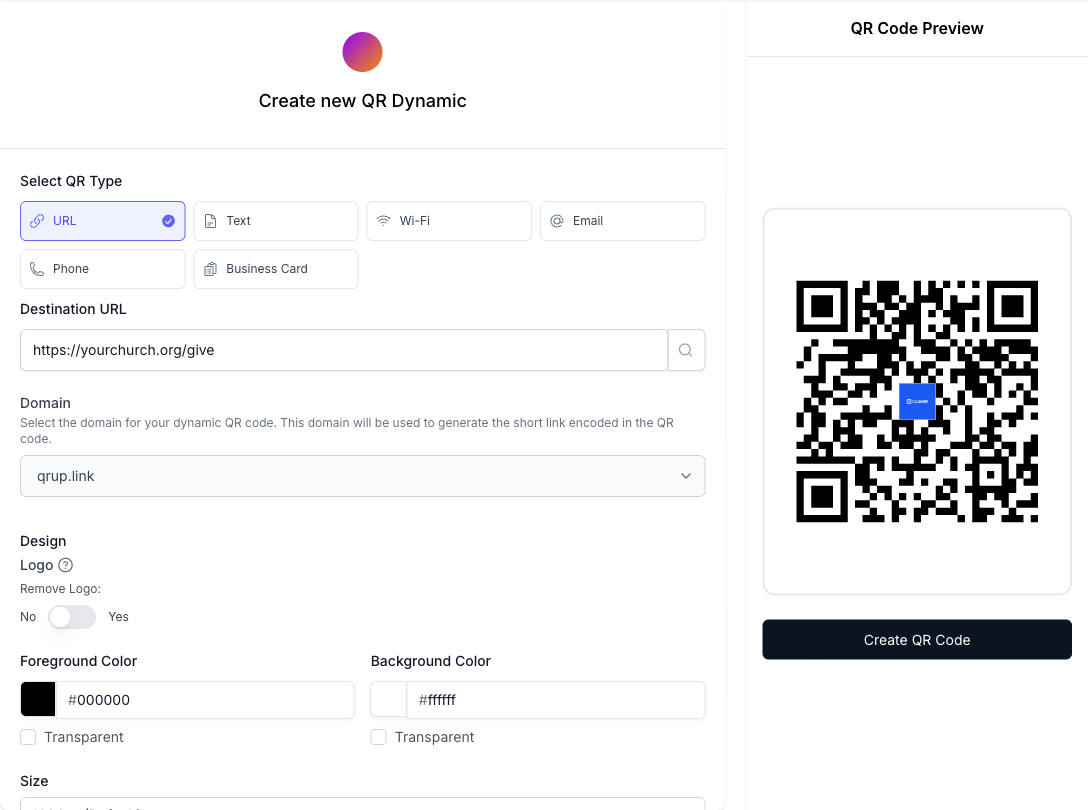
- Create a URL QR code. Open the CodeQR QR code generator and choose a URL type so the scan opens a web page. Keep it dynamic so the destination can change later without reprinting anything.
- Point it at your giving page. Paste the link to the giving or crowdfunding platform your organization already uses — the donor picks the amount and pays there. If you also want pledge details (name, email, a short message), a CodeQR form Page can collect them before sending the visitor on to your giving platform.
- Customize the design and frame. Upload your logo, set your brand colors, and add frame text like "Scan to give." A code with a label is scanned more readily than a bare black square. See what is adjustable under QR code design features.
- Add a UTM per placement. Give each printed item its own tag with the UTM builder — one for the mailer, one for the lobby poster, one for the counter card — so scans are attributed to the exact object that carried them.
- Print with the right size and contrast. Export at high resolution, keep the code at least 2 cm wide for a close-range card, and leave a clear quiet-zone margin. QR codes carry built-in error correction, so a laminated pew card keeps scanning through moderate wear.
- Track scans in analytics. Watch results by placement in conversion tracking and adjust your next print run toward what people actually scan.
Practical example
Consider a nonprofit preparing a year-end appeal. It prints three things: a mailed donation card, a poster for the lobby, and a small card by the front-desk counter. Each carries a QR code that points to the same giving page, but each code uses a different UTM tag.
Because the codes are dynamic, the organization can switch giving platforms next year without reprinting a single card — it just edits the destination in CodeQR, and every printed code keeps working. And because each placement has its own tag, the team can compare the mailer against the poster against the counter card and see which object earns its place. No result metric is promised here; the mechanism is what matters — one destination edit instead of a reprint, and per-object attribution instead of a guess.
If your organization is a place of worship, the same setup applies to offering envelopes and bulletin inserts; see the QR code for church page for that angle. In 2023, 77% of givers used at least one digital tool to donate to their place of worship, and digital giving made up 60% of total annual contributions.[^2]
Best practices
- Keep it dynamic, not static. A dynamic QR lets you swap the giving platform or fix a broken link after printing. Nonprofit mobile-driven revenue grew 48% in 2025, so the platform you print today may not be the one you want in two years.[^3] A static code would force a reprint.
- Count on error correction on tricky surfaces — within reason. QR codes carry built-in error correction; at the highest level, H, roughly 30% of a damaged or obscured code can still be recovered,[^4] which protects a code printed on a curved cup, a laminated card, or anything that scuffs.
- Size for scan distance. A counter card read at arm's length works at 2 cm wide; a lobby poster read from across a room needs to be much larger. When in doubt, print bigger and leave a generous quiet-zone margin.
- Say what the code does. Add frame text such as "Scan to give" and a one-line instruction. People give when they know the tap leads somewhere trustworthy.
- Be honest about fees. CodeQR charges no donation fees because it never touches the money — the gift flows entirely through your giving platform. See pricing for what CodeQR itself costs, which is separate from any transaction. If you also issue supporter passes, the wallet passes feature covers that.
[^1]: Statista — More than 100 million U.S. smartphone users scanned a QR code in 2025, up from 89.5 million in 2022. https://www.statista.com/statistics/1337584/number-of-smartphone-qr-code-scanners-usa/ [^2]: Lake Institute on Faith & Giving — In 2023, 77% of givers used at least one digital tool to donate to their place of worship, and digital giving made up 60% of total annual contributions. https://lakeinstitute.org/resource-library/insights/june-issue1-2024/ [^3]: M+R Benchmarks — Nonprofit online giving revenue grew 15% in 2025, while mobile-driven revenue grew 48%. https://mrbenchmarks.com/mobile-messaging/ [^4]: QR Code (Denso Wave) — QR code error-correction level H can recover roughly 30% of a damaged or obscured code, the highest of the four defined levels. https://www.qrcode.com/en/about/error_correction.html