
Track link clicks and QR code scans in Analytics
Open Analytics in CodeQR to see clicks on your short links and scans of your QR codes — what each number means, what counts, and how to verify it works.

By the end of this guide you will know where to see how many people clicked a short link or scanned a QR code, what each number in Analytics means, what CodeQR counts as a click or a scan, and how to check that a new link is being tracked.
Availability
- Plan: all plans. What changes with the plan is how far back you can look and which breakdowns are open: Free keeps 30 days and shows countries only; Starter keeps 90 days and adds devices, browsers, and referrers; Pro keeps 1 year and adds the UTM report and the Events log; Business and above have no date limit in the app (pricing).
- Tracked clicks per billing cycle: Free 1,000, Starter 6,000, Pro 30,000, Business 150,000, Scale 1,000,000 — the same numbers apply to QR scans. Your links keep redirecting after the limit; the limit is about how many events you can see in Analytics.
- Where: Analytics in the sidebar, the N clicks badge on a link card, the N scans badge on a QR code card, and Events for the event-by-event list.
Before you start
- Every short link and every dynamic QR code is tracked automatically. There is nothing to turn on.
- A static QR code cannot be tracked: its content is baked into the image and the scan never touches CodeQR. If you need scan counts, use a dynamic code — see Dynamic or static QR code: which one to use.
- Numbers are not instant. Data is cached for a few minutes; the app itself says: Data is cached for performance optimization. Updated analytics may take up to a few minutes to appear.
Steps
- Click Analytics in the sidebar. The page opens on the Overview tab with the last 24h selected.
- Read the six counters at the top: Total, Clicks, Scans, Views, Leads, and Sales. Clicks are short-link clicks, Scans are dynamic QR code scans, Views are visits to your Pages, and Total is the sum of the three. Leads and Sales only fill when conversion tracking is on. Click a counter to make the chart follow it.
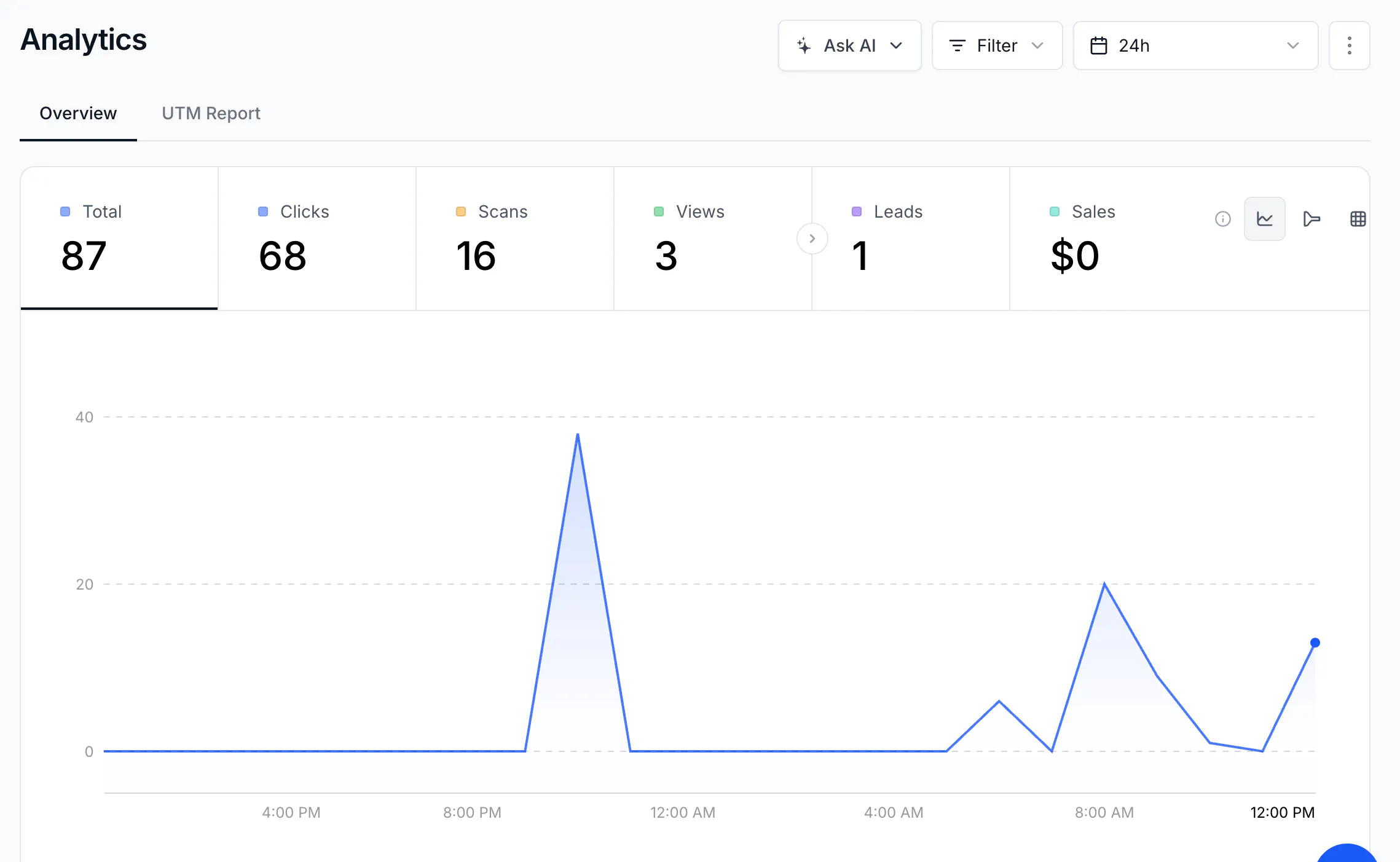
- Look at the chart. For 24h each point is one hour; for 7 dias and 30 dias each point is one day; for three months and longer each point is one month. Hover a point to read the exact value. The icons on the right switch between the line chart and the funnel chart, and open Events.
- Scroll down to the cards. Each card has tabs and lists values with a count and a bar: - Links / QR Codes — which links and codes got the events. When one link is selected, a third tab, URLs, shows the destinations it sent people to. - Source / Medium / Campaign / Content / Term — UTM parameters of your links (Pro and above). - Countries / Cities / Continents, Devices / Browsers / OS, and Referrers / Referrer URLs — where and how people clicked. See Find out where your clicks and scans come from.
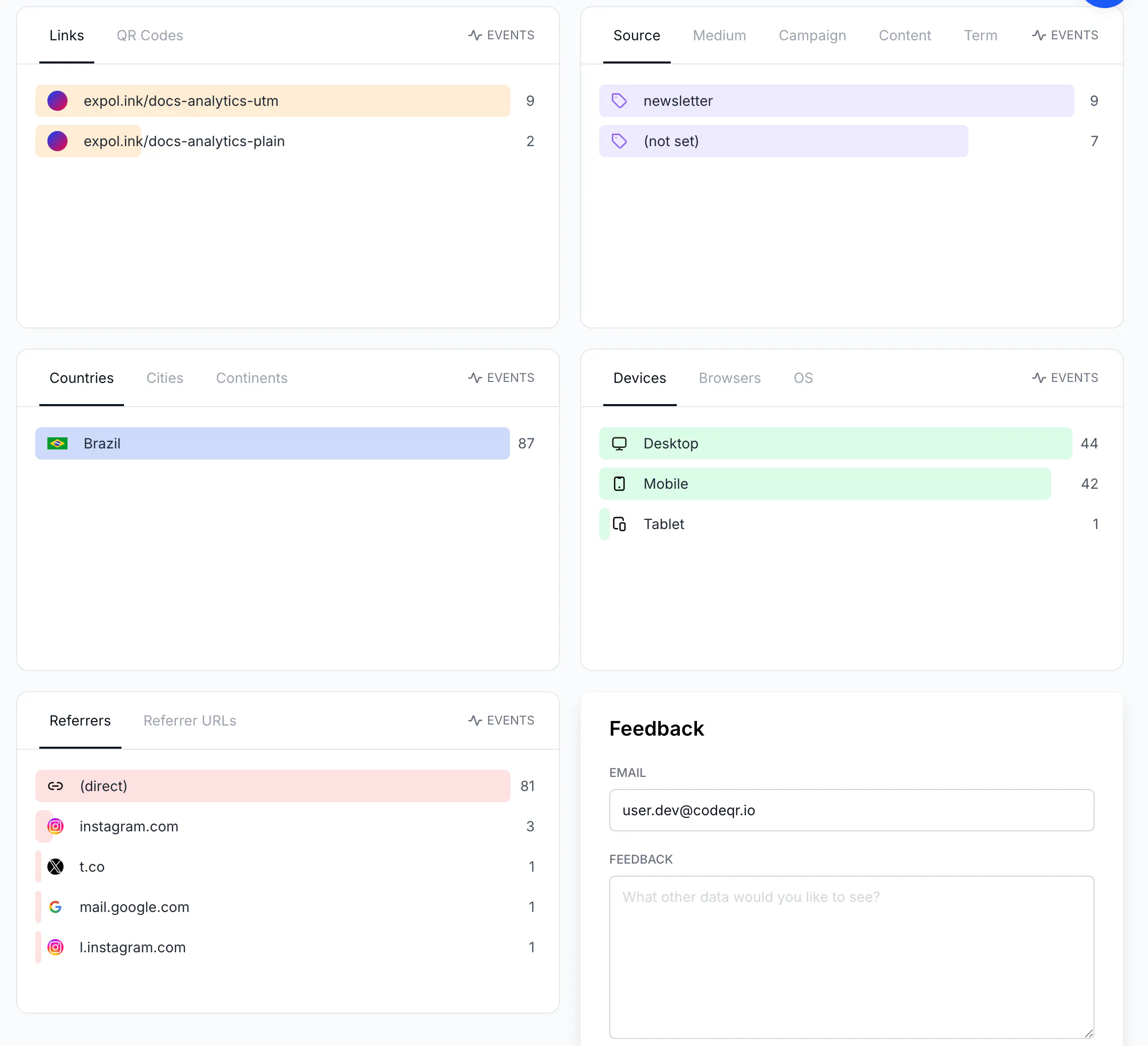
- Click any row in a card to filter the whole page by that value — for example Brazil in Countries or instagram.com in Referrers. The active filters appear next to the Filter button; Clear filters removes them. See Filter analytics by link, tag, and date range.
- To look at one link or one QR code, click its N clicks or N scans badge in the list. Analytics opens already filtered by it.

- To see the individual events (one row per click or scan, with country, device, and time), open Events in the sidebar (Pro and above). See Browse every click and scan in the Events log.
What counts as a click or a scan
- A click is counted at the moment CodeQR redirects the visitor to your destination — before the destination page loads. A scan is the same event for a dynamic QR code, because the code encodes a short link.
- The same visitor is counted once every 5 minutes for the same link. CodeQR sets a cookie (
cq_id) on the short domain; repeated opens within that window are not counted again. - Crawlers and link previews are not counted. Requests whose user agent identifies a bot — including WhatsApp, Facebook, Google, Bing, and anything containing
bot— are redirected but not recorded. That is why sending a link on WhatsApp does not add a click by itself. - Not counted: expired links (with or without an expiration URL), the password page (the click counts only after the correct password), banned links, unknown keys, and any request with
?codeqr-no-track=1in the URL — use that when you test your own links. - Counted even if you did not expect it: a
HEADrequest from a link checker or an uptime monitor, and any browser that does not identify itself as a bot. - Recorded with each event: destination URL, country, city, continent, device, browser, operating system, referrer, and whether it was a link click, a QR scan, or a page view. IP addresses are not stored.
Verify it works
- Open your short link on your phone (or run
curl -sI https://go.example.com/spring -A "Mozilla/5.0 (iPhone; CPU iPhone OS 17_5 like Mac OS X)"— the response isHTTP/2 302withlocation:set to your destination and aset-cookie: cq_id=…header). - Wait two to three minutes.
- In Analytics, keep 24h and click the link's badge, or use Filter → Link. Clicks shows
1; the chart shows the point in the current hour; Countries and Devices show your country and device. - Through the API, the same check is
GET https://api.codeqr.io/analytics?event=clicks&groupBy=count&interval=24h&linkId=<id>→{"clicks":1,"scans":0,"views":0,"leads":0,"sales":0,"saleAmount":0}.
Troubleshooting
I clicked my link and Analytics still shows 0
Wait a few minutes and reload; counters and the chart update within about two minutes, breakdown cards within five to ten. If you opened the link twice from the same phone within 5 minutes, that is one click. If you used ?codeqr-no-track=1, nothing is recorded. More causes in Clicks not showing or numbers that do not match.
The QR code was scanned but Scans did not move
Only dynamic QR codes are tracked. If the card shows the Static badge, the scan never reached CodeQR. If the code opens a display page (Wi-Fi, vCard, text), the scan is counted when the page opens; opening the same page again from the same phone within 5 minutes is not.
The counters and the cards show different numbers
The counters split Clicks, Scans, and Views; the cards below count all three together unless you set Filter → Trigger. Read the counters for totals per type and the cards for the distribution.