
Measure UTM campaigns on links and QR codes
Compare campaigns, sources and mediums across links and QR codes with the CodeQR UTM Report, export the CSV, and learn how UTM values are attributed.

By the end of this guide you will see clicks and scans per campaign, source, and medium across all your links and QR codes, export that table, and understand exactly which UTM values CodeQR attributes to each event.
Availability
- Plan: the UTM card and the UTM Report tab are complete from Pro. Free and Starter see a blurred preview with an Upgrade to Pro overlay.
- Where: Analytics → the Source / Medium / Campaign / Content / Term card, and Analytics → UTM Report tab. The Export CSV button lives on the UTM Report tab.
Before you start
- UTM parameters belong to the destination URL of the link or QR code, for example
https://example.com/spring?utm_source=newsletter&utm_medium=email&utm_campaign=spring-2026. Add them in the link builder's UTM section or paste a URL that already contains them; the values are stored with the link and shown as Source, Medium, Campaign, Content, and Term. - One short link = one set of UTM values. To compare channels, create one link per channel (or a QR code per placement) and give each its own
utm_source/utm_medium. Tag them to read them together — see Filter analytics by link, tag, and date range. - Parameters appended to the short link at click time (
go.example.com/spring?utm_source=whatsapp) are passed through to the destination but are not what the UTM report reads. They appear under the URLs tab of the link instead.
Steps
- Create or edit a link so its destination URL carries the UTM parameters. Save.
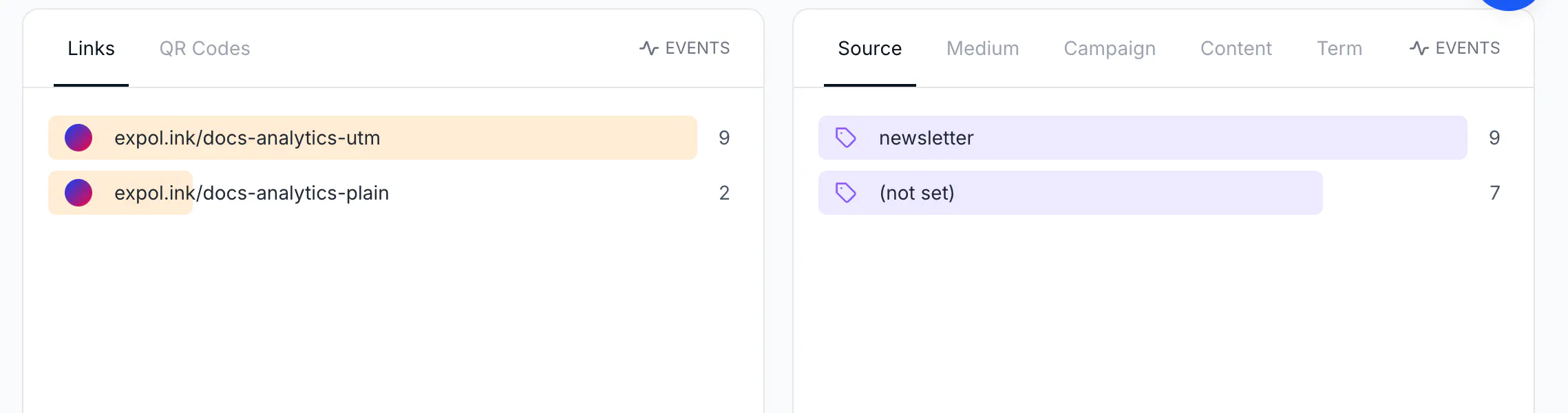
- Open Analytics and scroll to the Source / Medium / Campaign / Content / Term card. Each tab lists the values found on your links with the number of events; (not set) groups events on links without that parameter. Click a value to filter the page by it.
- Click the UTM Report tab for the full table: one row per link, with Short Link, Destination, Source, Medium, Campaign, Content, Term, Clicks, Scans, and Total. Only links and QR codes that carry at least one UTM parameter are listed. The date range and filters from the toolbar apply here too.
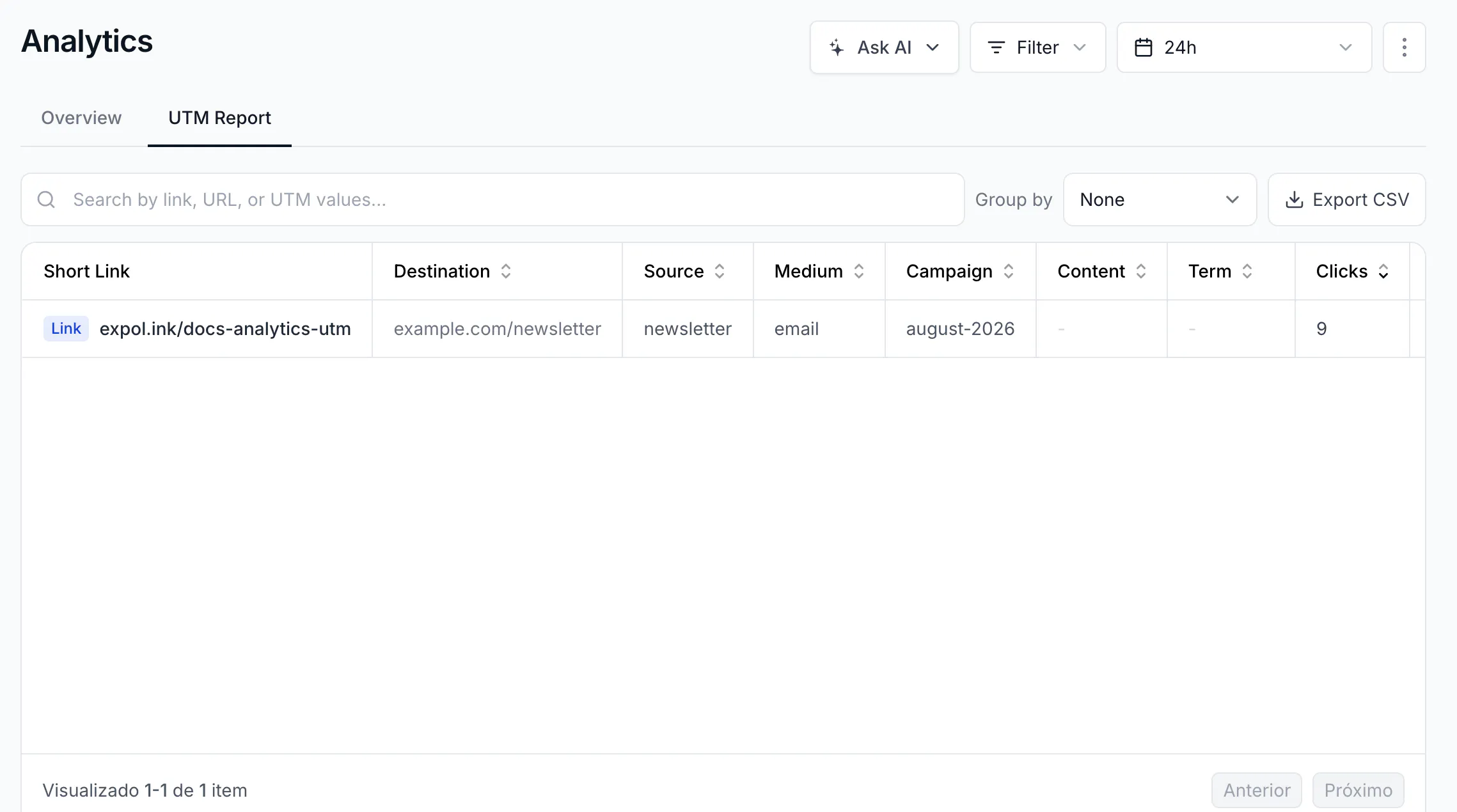
- Use Group by to roll rows up by UTM Source, UTM Medium, UTM Campaign, UTM Content, or Destination URL — for example to see all clicks of
utm_campaign=spring-2026across the ten links that carry it. None goes back to one row per link. - Type in Search by link, URL, or UTM values... to find a specific link or value. Click a column header to sort.
- Read the Totals footer: Clicks, Scans, Total, and Links for the current table.
- Click Export CSV to download the table. The file has the same columns (
Short Link, Destination, UTM Source, UTM Medium, UTM Campaign, UTM Content, UTM Term, Clicks, Scans, Total), one row per link, in UTF-8.
How UTM values are attributed
- The report reads the UTM values currently stored on the link. If you edit a link's UTM parameters, all its past events move to the new values — history is not frozen at click time. That is convenient when you fix a typo, and something to remember when you reuse a link for a new campaign: create a new link instead.
- Values are case sensitive and stored as typed:
Newsletterandnewsletterare two rows. - QR code scans are attributed the same way, from the destination URL of the code.
The same through the API
GET https://api.codeqr.io/analytics?event=clicks&groupBy=utm_sources&interval=30d returns [{"utm_source":"newsletter","clicks":9}]; groupBy=utm_mediums, utm_campaigns, utm_contents, utm_terms work the same, and utm_source=newsletter (or any other utm_*) works as a filter on every groupBy. When creating links through the API, put the parameters in the url; the response echoes them as utm_source, utm_medium, utm_campaign, utm_term, utm_content. See Read analytics from the API, MCP, and webhooks.
Verify it works
- Create a link to
https://example.com/spring?utm_source=newsletter&utm_medium=email&utm_campaign=spring-2026. - Open it once on your phone and wait two to three minutes.
- In Analytics, the Source tab shows
newsletter 1; UTM Report lists the link withnewsletter,email,spring-2026, and1click; Export CSV contains the same row.
Troubleshooting
My link is not in the UTM Report
Its destination URL has no UTM parameter. Edit the link and add at least one; the link appears in the report with all its past events.
The Source tab shows (not set) for a link that has UTM in the short link
Parameters added to the short URL at click time are forwarded to the destination but not read by the report. Put them in the destination URL of the link.
The counts changed after I edited a link's UTM values
Expected: the report always reflects the link's current values, including for old events. To keep the old campaign's numbers, leave the old link as it is and create a new one.
The card is blurred
The UTM card and the report are complete from Pro. Free shows one row and Starter three; the rest is blurred until you upgrade.