
Hair Salon QR Code: 9 Ideas for Booking, Portfolios and Reviews
See how to create a QR code for booking, portfolios, services, reviews, aftercare and contact for hairstylists and hair salons.


Someone sees a cut in a photo, gets a friend's recommendation, or walks past the salon. The interest is already there — the next step is finding available times, seeing the work, and getting in touch. A QR code for hair salons can shorten that journey by connecting business cards, mirrors, windows, packaging and promotional materials to a booking page, a portfolio, a service list, or reviews.
With CodeQR, you can create dynamic QR codes and landing pages, update links, and track interactions. That's useful for independent stylists, shared studios — including barbershops — and salons that change hours, campaigns and services throughout the year.
What makes a professional QR code for a salon
A professional QR code has three things: a clear call to action, an easy scan, and a mobile-ready destination. "Scan me" is an incomplete instruction. Use a message like "Book your appointment," "See cuts and color," or "Check services and prices" instead. People need to know why it's worth pointing their camera.
The destination also has to deliver on that promise. If the code advertises booking, the first button should let someone book or message the team. If it advertises a portfolio, the images need to load quickly and be organized by type of service.
9 ways to use a QR code at a hair salon
1. Mobile booking
Place the code in the window, on business cards, at the counter, and on printed salon materials. It can open your booking system, WhatsApp (or a text message) with a ready-made note, or a page listing stylists and available times. Explain how confirmation works, and avoid asking for too much information before showing availability.
2. Portfolio of cuts, color and styles
Build a gallery with examples organized by category: short cuts, curly hair, color, bridal styles, updos and transformations. Use only authorized photos, and avoid filters that misrepresent the result. A lean page helps clients find references to talk through with their stylist.
3. An updatable service and price list
A printed price list can go out of date as soon as prices, timing or services change. A dynamic QR code can open a page your team keeps updated. Add notes for when a price depends on a consultation, hair length, volume or technique, so nothing is ambiguous.
4. Reviews and feedback
At the front desk or on a card handed out after the appointment, the QR code can open a short survey — try a dedicated feedback page — or your public review profile. Ask about punctuality, service, atmosphere and how clear the information was. Don't offer a reward only for positive reviews.
5. Aftercare and maintenance tips
After color, a chemical treatment, a cut or a style, the stylist can hand over a card linking to general aftercare guidance, recommended products, and a suggested time to come back. The content should be reviewed by the stylist and shouldn't promise the same result for every client.
6. Loyalty programs and campaigns
Use the code for a page with news, a waitlist, or a seasonal campaign. Instead of reprinting signage for every promotion, keep one dynamic QR code and update the destination. Explain how contact information will be used, and offer a simple way to opt out of messages.
7. A profile for each stylist
At salons with multiple stylists, each station or card can carry its own QR code with a portfolio, specialties, availability and contact. That cuts down on confusion and helps you see which materials drive traffic to each stylist.
8. Location, hours and practical information
The code can open a map, parking, accessibility information, hours and contact channels. This works well on partner materials — hotels, gyms and nearby shops. Review the information around holidays and special periods.
9. A page with social links, contact and content
A links page can bring together Instagram, TikTok, WhatsApp, booking, location and portfolio. Instead of listing several usernames on a card, the stylist shares one QR code and keeps every channel current.
CodeQR Pages can be used for contact, feedback, a photo gallery, and other actions connected to your QR codes and links.
How to create a QR code for your salon with CodeQR
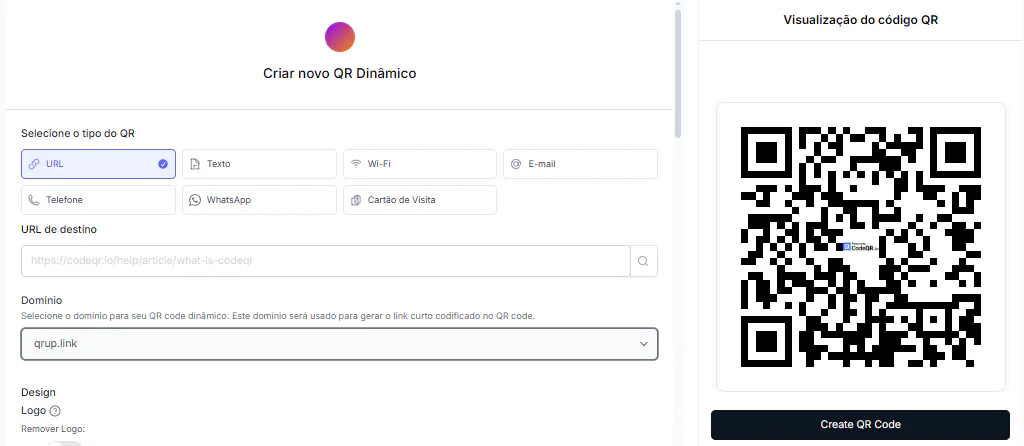
- Choose your goal. Start with one high-value action, like booking or your portfolio.
- Prepare the destination. Organize information in short blocks, use optimized photos, and keep the main button visible.
- Create a dynamic QR code for permanent materials, like a window display, mirror, business card or counter sign.
- Add your salon's brand colors. A custom logo in the center requires a paid plan — QR codes on the Free plan carry the CodeQR logo. Keep enough contrast and clear space around the code.
- Add a call to action next to the code — don't leave the image without context.
- Test it at actual size, at different distances, and under the salon's lighting.
- Name your codes by location and goal — for example, "Mirror 2 — feedback" and "Window — booking."
- Track visits and review pages, hours and campaigns regularly.
Where to place the QR code in your salon
- Window display: for booking, services or portfolio.
- Front desk: for Wi-Fi, feedback or the next available slot.
- Mirrors: for a stylist's profile or aftercare tips.
- Cards and vouchers: for contact and booking.
- Packaging and kits: for instructions, reorders or content.
- Partner materials: for a page specific to that partnership.
- Events and workshops: for sign-up, a materials list, or a certificate.
A page template for booking and portfolio
A simple page can start with the stylist's or salon's name, a line about the type of service offered, and a booking button. Next, show a short selection of work, the main services, location and contact channels. Visitors shouldn't have to read the whole business story before finding the action they came for.
- Top: name, city or neighborhood, and a "Book now" button.
- Portfolio: six to twelve images organized by service.
- Services: a clear description, approximate duration, and notes on when a consultation is needed.
- Practical information: address, hours, parking and accessibility.
- Trust: authorized reviews or testimonials, without exaggerated promises.
- Footer: privacy policy and official contact channels.
If there are multiple stylists, the main page can introduce the team and link out to individual profiles. That way each stylist keeps their own portfolio and availability while staying under the salon's identity. Test every button, and confirm the booking system keeps the selected stylist.
Static or dynamic QR code for a hair salon
A static code can work for one permanent destination. But schedules, prices, campaigns and portfolios change. A dynamic code lets you change the link without reprinting the material, and lets you track scans. On a window display, for example, the same code could open a bridal campaign one month and a holiday schedule the next.
That flexibility doesn't mean changing the purpose without warning. If the sign says "See our services," the new destination should still relate to services. For a completely different campaign, update the call to action too.
What metrics to track
- Scans by location: window, front desk, mirror or card.
- Forms or reviews completed.
- Peak scan times.
- Which stylists or pages get the most engagement.
To organize campaigns and materials, check out CodeQR for companies and SMBs, with dynamic QR codes, analytics and tools to organize your codes by project.
Privacy for photos, data and communication
Before publishing client photos, get proper authorization and explain where the image will be used. Avoid showing faces, conversations, client files or personal information in the background. When a form collects a phone number or email, state the purpose and limit the fields to what's necessary.
- Don't use client images without authorization.
- Don't publish conversations, client files or visible schedules in photos of the space.
- Avoid absolute promises about results, how long they'll last, or the transformation itself.
- Don't link to pages that ask for excessive data before explaining the service.
- Protect administrative links, and never use a public QR code for internal systems.
Common mistakes when creating a QR code for your salon
- Placing the code over a low-contrast hair photo.
- Using a slow page with oversized images.
- Sending people to a general profile without highlighting booking or contact.
- Printing a price next to a code whose page shows a different value.
- Not testing the code after switching booking systems.
- Mixing campaigns from different stylists in the same link without organization.
Start with booking and portfolio
To test the strategy, start with one booking QR code for the window and one portfolio code for business cards. Watch whether people understand the call to action, whether the page loads well, and whether visits turn into conversations. Then expand into reviews, aftercare and campaigns without losing that organization.
FAQ about QR codes for hair salons
What's the best QR code to put in the window?
A dynamic QR code that leads to a booking page, or to a page with services, portfolio and contact. The call to action in the window should point to the main action you want.
Can I put a price list on the QR code?
Yes. Use a page you can update, and note when prices depend on a consultation or hair characteristics. Keep prices consistent between the salon and the page.
Can the QR code open Instagram?
It can, but a page with booking, portfolio and contact usually offers more. Instagram can be one of the buttons on that page.
How do I create a QR code for each stylist at the salon?
Create one page and one code per stylist, with their name, specialties, portfolio and availability. Use a consistent naming pattern to keep the codes organized in your dashboard.
Where shouldn't I place the QR code?
Avoid curved or reflective surfaces, moving surfaces, areas with constant steam, or spots without enough room to scan from a normal distance. Also, don't cover the code with stickers, frames or objects.