
QR Code for Dental Practices: 9 Uses for Booking, Reviews and Patient Info
Learn how to use a QR code at your dental practice to simplify booking, directions, guidance, contact and feedback, with privacy safeguards for patient information.


A patient finds your practice's profile, checks the address, and decides to book a visit. The fewer steps between that decision and the appointment, the better the experience. A QR code for your dental practice can connect business cards, the front desk, printed materials and kit packaging to a contact page, a map, general guidance, or your booking channel.
The setup needs to stay simple and responsible. Dental and health information calls for extra care, and the code itself should never expose patient records, images or personal documents. With CodeQR's QR codes and pages, a practice can create destinations for different actions, update links, and track interactions without putting clinical information inside the QR code image.
How a QR code can help a dental practice
The main benefit is turning a physical touchpoint into an immediate digital action. At the front desk, a code can open a visit survey. On a business card, it can show contact details and directions. On a printed handout, it can lead to a general educational video. The value isn't in the code by itself — it's in the combination of context, call to action and destination.
A QR code also cuts down on long web addresses. Instead of asking a patient to type a URL, the practice shows a short message, like "Scan to confirm our address" or "Scan for general aftercare guidance." For content that changes, a dynamic QR code avoids reprinting and keeps the material useful.
9 QR code ideas for dental practices
1. Appointment booking
Put a QR code on business cards, the window display, printed ads and the front desk to open your booking system or a contact page. The destination should show office hours, available channels, and what happens after the request is sent. Avoid asking for detailed clinical information in public forms — keep intake history and sensitive documents for proper, protected systems.
2. Directions, parking and arrival
A code can open a map with directions, a landmark, parking instructions and accessibility information. This works well on printed reminders, business cards and local partnerships. Update the address whenever you change rooms or locations.
3. Digital business card
Point the QR code to a professional page — a digital business card — with the dentist's name, license number, services actually offered, phone, email, website and a Save contact button. A page in between keeps the printed card accurate even when a contact channel changes.
4. General pre-visit information
The code can open a page with administrative guidance: required documents, how early to arrive, a policy on companions, directions, and how to reschedule. Don't use generic content as a substitute for an individual evaluation or a dentist's specific clinical instructions.
5. Educational content after a procedure
Handouts given to patients can include a QR code linking to general educational videos or articles about hygiene and aftercare. The material should be reviewed by the practice and make clear it doesn't replace the individual guidance given during the visit. If something unexpected comes up, the patient should use the channels the practice provides or seek appropriate care.
6. Visit experience survey
On the way out, a discreet code can open a short survey about the front desk, punctuality, clarity of information and comfort. Stick to questions about the experience — never a diagnosis or a description of a health condition. Explain whether responses are anonymous and how the data will be used. A dedicated feedback page works well for this kind of internal survey.
7. Public reviews and local presence
A QR code can make it easier to reach your practice's profile on a review platform. Keep the call to action neutral — never offer a reward in exchange for a positive review. If you also want to hear complaints privately, offer two options: a public review link and an internal feedback form.
8. Educational campaigns and prevention outreach
At schools, companies or events, the code can lead to educational materials, an interest form, or a page with the schedule for an outreach event. Create a separate campaign for each location — that way you can compare interest without mixing results from different materials.
9. A page with services, team and contact channels
A landing page can bring together practice information, your team, the specialties actually offered, insurance plans accepted (when relevant), address and contact details. CodeQR Pages let you build contact and feedback pages tied to your QR codes and campaign data.
See how CodeQR Pages work — they can bring together information, simple forms and action buttons in an experience built for mobile.
Dynamic QR codes for a dental practice: when they're worth it
A dynamic QR code makes sense for material that will stay in circulation while the content behind it keeps changing — cards, front-desk signage, brochures and patient kits. If the booking system changes or the guidance page gets updated, you can change the destination without printing a new code.
Beyond editing, a dynamic code lets you track scans. That helps you compare, for example, how many people booked through the business card versus the front-desk sign. Treat this data as a usage signal, not proof of a clinical or business outcome.
How to create a QR code for your dental practice with CodeQR
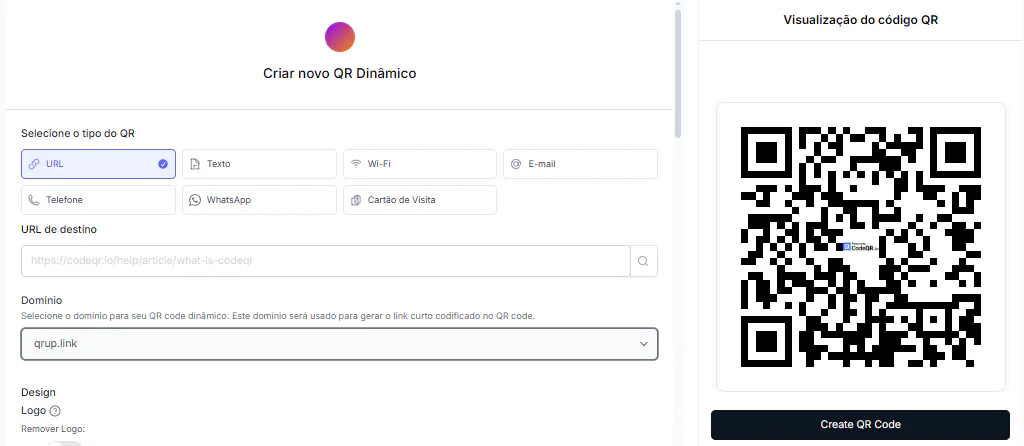
- Choose one purpose per code. Booking, directions, contact and satisfaction surveys each need their own message and destination.
- Prepare the destination page. Use clear language, large buttons and up-to-date information, without exposing personal or clinical data.
- Create a dynamic QR code when you need to change the destination or track scans.
- Add your practice's brand colors, keeping enough contrast, margin and legibility.
- Give your codes organized names, like "Card — booking" and "Front desk — feedback."
- Test on Android and iPhone, at different distances and under the room's actual lighting.
- Track the data and review the destination periodically. A code that works technically can still lead to outdated content.
Privacy, images and health information
Health information counts as sensitive personal data under most privacy laws. Because of that, a QR code on public material should never open a spreadsheet, folder or form that exposes clinical information. Use systems with proper authentication and access controls for records, exam results and patient documents.
Before publishing patient photos or testimonials, check the advertising and consent rules of your dental board and any privacy law that applies to your practice. Review communication materials with your practice's compliance lead before publishing.
- Don't put a patient's name, diagnosis or record number in the visible text around a QR code.
- Avoid public forms for collecting extensive clinical data.
- Ask for consent when needed and state the purpose of any data you collect.
- Don't use identifiable patient photos without authorization and a review against professional rules.
- Don't promise outcomes, guarantee treatment results, or use misleading comparisons.
- Keep clear channels open for questions and situations that need professional attention.
How to tell if your QR code strategy is working
Start by defining the goal. For a booking code, track scans and completed requests. For a directions code, watch for map clicks and arrival questions. For a survey, look at response rate and comment quality.
- Scans by material and by location.
- Form submissions received.
- Peak scan times.
- Bookings confirmed through your scheduling tool.
Practices running several campaigns can use CodeQR for companies and small businesses to organize QR codes, links and pages, and analyze physical-to-digital touchpoints in one place.
Short calls to action that help patients understand the code
The line next to a QR code shapes how it's understood. At the front desk, "Rate your visit" makes clear the destination is a survey. On a card, "Book online or message our team" sets expectations upfront. On an educational handout, "Scan for general aftercare guidance" avoids suggesting the code contains an individual prescription.
- Card: "Book your appointment from your phone."
- Front desk: "Confirm our address and hours."
- After your visit: "See the general aftercare guidance our team gave you."
- Survey: "Tell us about your visit."
Avoid alarming calls to action, outcome promises, or messages that pressure the patient. The text should match the destination and stay legible at the material's final printed size. Whenever the content changes, review the printed line around the code too.
Start with one simple, useful QR code
An efficient project can start with two codes: one for booking on the business card, and one for feedback at the front desk. After testing the experience and watching how it's used, the practice can expand into general guidance, campaigns and contact pages. The priority should be making the journey easier without compromising privacy, clarity or professional ethics.
Common mistakes when using QR codes at a dental practice
- Using the same call to action for different destinations, leaving patients unsure what will happen.
- Printing the code too small, or over a low-contrast background.
- Linking to slow, non-responsive pages full of pop-ups.
- Keeping outdated instructions after hours, address or channels change.
- Collecting more information than necessary in open forms.
- Mixing up general educational content with individual patient guidance.
FAQ about QR codes for dental practices
Can I put a QR code on my practice's business card?
Yes. It can open booking, a map, a contact page, or the dentist's digital business card. Add a short call to action so people know what to expect.
Can the QR code open WhatsApp directly?
Yes, especially for administrative questions. You can link to WhatsApp or a text message with a ready-made note, and route the conversation to your front desk. For anything important, a page with hours and instructions in between cuts down on repeat questions.
Is it safe to use a QR code to deliver exam results?
A QR code can lead to a protected portal, but it shouldn't open a public file with health information directly. Security depends on the destination system, its authentication, and the controls the practice puts in place.
Does the QR code replace the dentist's chart or guidance?
No. It can complement a visit with general content and easier access to your channels, but it doesn't replace an evaluation, diagnosis, consent, or individual instructions.
How do I keep the code from going out of date?
Use a dynamic QR code, keep a list of active materials, and set up periodic reviews. Always test the destination after changes to your website, schedule or team.