

A QR code for a PDF is a scannable link that opens your document on any phone. With CodeQR you create a dynamic short-link QR that points to the PDF wherever it already lives — your website, Google Drive, or Dropbox — so you can swap the file or version later without reprinting, and every scan is tracked.
What it's for
A QR code for a PDF gets a printed or on-screen document into someone's hands without a URL to type. You put the code on a flyer, product box, business card, poster, or slide, and a scan opens the file. The reader sees a menu, a spec sheet, a manual, a resume, or an event program — whatever the PDF holds.
CodeQR encodes a short link to your PDF, not the file itself. The document stays wherever you host it, and viewing depends on that host's permissions and availability — a private Google Drive file will ask for access, while a public one opens straight away. Keeping this honest matters: if the link breaks or the sharing setting is wrong, the scan fails, so test the destination the same way your audience will reach it.
How to create your qr code for pdf
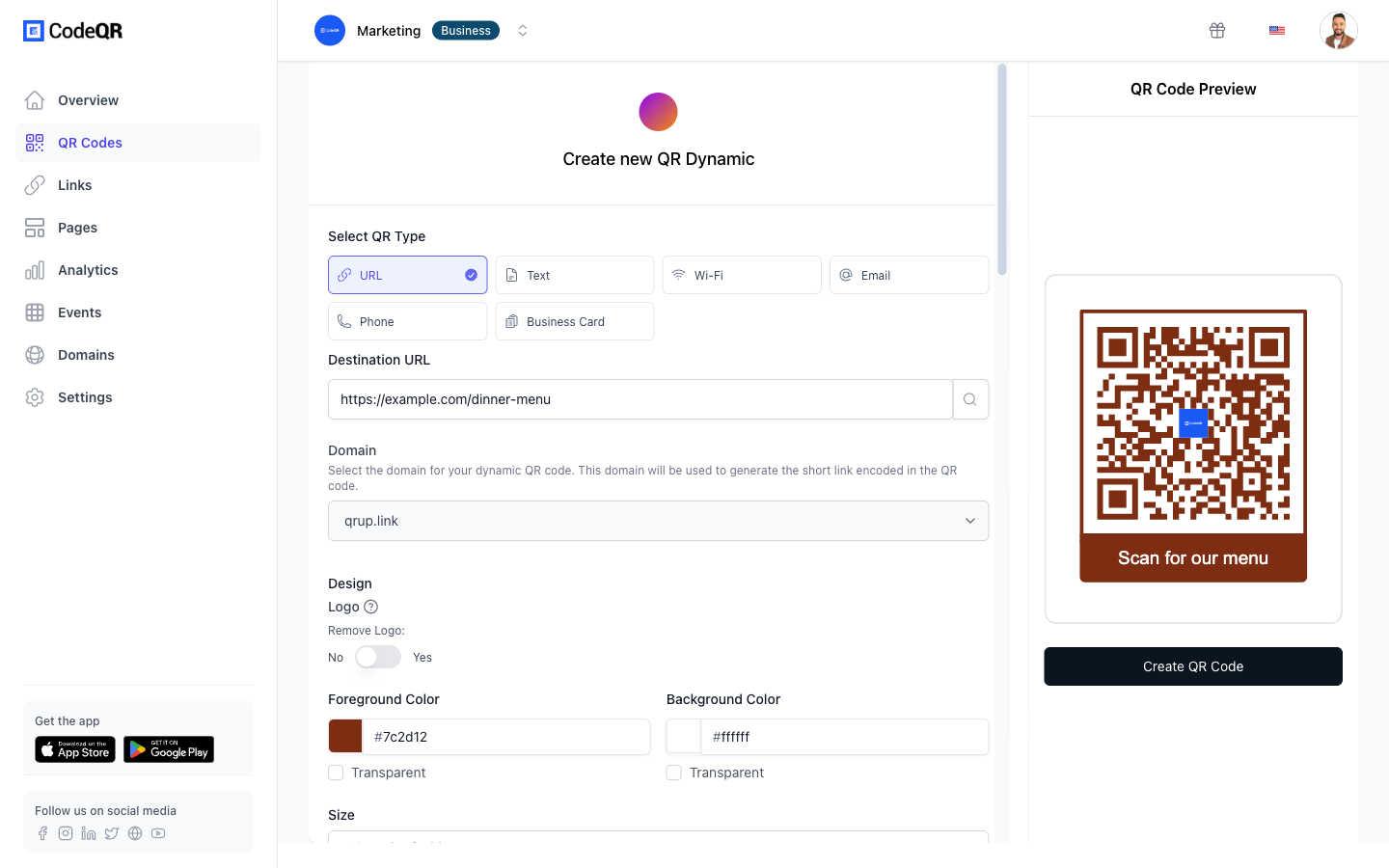
- Open the CodeQR generator and choose URL. Start a new code in the QR code generator and pick the URL type. A PDF QR points to a link, not to the raw file bytes.
- Paste the link to your hosted PDF. Copy the public share link from your website, Google Drive, or Dropbox and paste it in. CodeQR links to the file; it does not upload or store it.
- Keep the QR code dynamic. Turn on the dynamic short-link option so the code encodes a short URL. This lets you repoint it to a new PDF or a corrected version later — see how dynamic QR codes handle destination edits.
- Customize the design and frame text. Upload your logo, choose colors with strong dark-on-light contrast, and add a short frame label such as "Scan for the menu" so people know what they will get.
- Test on two phones, then download. Scan with two different devices to confirm the PDF loads, then download at high resolution. Use SVG for print so the code stays crisp at any size.
- Track scans after launch. Follow scan counts and locations, and pair the link with conversion tracking if the PDF sits behind a landing page you also measure.
Why dynamic matters here is technical, not just convenient. A static QR that encodes a long file URL — or worse, tries to pack the PDF's contents — raises module density until the pattern gets too fine to read at small print sizes. A short-link QR stays low-density and scannable at around 2 cm, which is what you need on a business card or product label. More than 100 million U.S. smartphone users scanned a QR code in 2025, up from 89.5 million in 2022, so the format is familiar enough that the failure people remember is the one that would not scan.[^1]
Practical example
Consider a hardware supplier printing an installation guide QR on the side of every product box. The box art goes to print months before the guide is finalized, and the guide gets revised whenever a part changes.
With a dynamic short-link QR, the printed code never changes while the PDF behind it can. When the supplier issues version 3 of the guide, they repoint the same code to the new file — no reprint, no recall of old boxes. They can host the PDF on their own site and keep the previous version reachable, or replace it outright.
Because the link is trackable, the supplier can add UTM parameters to compare which product line drives the most guide scans. If two box designs carry different codes, each one's scans stay separate, so the team can see which packaging prompts more people to open the manual — without inventing a survey. The mechanism is the point: one physical code, an editable destination, and clean per-origin counts.
Best practices
- Leave a quiet zone. Keep a clear margin of at least four modules (roughly four "pixels" of the code's smallest square) around the QR. Crowding it against text or an image edge is a common reason a scan fails.
- Trust error correction on rough surfaces — to a point. QR codes carry built-in error correction; at the highest level, H, roughly 30% of a damaged or obscured code can still be recovered, which helps on curved boxes, laminated cards, or anything that scuffs.[^2] Reprint once phones start hesitating on a worn code.
- Size for the scan distance. As a rule, a code needs about 1 cm of width for every 10 cm of scan distance. A 2 cm code works up close; a poster read from across a room needs to be much larger.
- Keep strong contrast and go dynamic. Dark code on a light background reads best; avoid light-on-dark and low-contrast color pairs. Choose dynamic over static so a wrong or outdated PDF link is a two-minute edit, not a reprint.
- Confirm the PDF's sharing settings. Viewing depends on where the file is hosted. Set the link to public (or the right access level) and open it in a private browser window to catch a permission wall before you print.
See what dynamic QR codes cost if you plan to run several PDF codes with tracking.
[^1]: More than 100 million U.S. smartphone users scanned a QR code in 2025, up from 89.5 million in 2022. Statista — https://www.statista.com/statistics/1337584/number-of-smartphone-qr-code-scanners-usa/ [^2]: QR code error-correction level H can recover roughly 30% of a damaged or obscured code, the highest of the four defined levels. QR Code (Denso Wave) — https://www.qrcode.com/en/about/error_correction.html