

A QR code menu is a printed square barcode — on a table tent, sticker, or window sign — that opens your restaurant's menu on a diner's phone when scanned. To make one, host your menu online, then create a dynamic URL QR code that points to it so you can update the menu later without reprinting.
What it's for
A QR code menu removes the paper handout. A diner points a phone camera at the code and your menu opens in their browser. More than 100 million U.S. smartphone users scanned a QR code in 2025, so the habit is well established and needs no app.[^2] CodeQR generates and tracks the code; you host the menu itself.
How to create your qr code menu
CodeQR is not a menu builder and not an ordering or POS system. It links to the menu you host and tracks the scans — so first publish your menu somewhere with a stable link, then use the QR code generator to point at it.
- Host your menu online. Publish it as a web page or a PDF with a fixed URL. This is the destination your code will open.
- Create a dynamic URL QR code. In CodeQR, choose a URL QR code and paste your menu link. Keep it dynamic so the destination stays editable after printing.
- Customize the design and frame. Upload your logo, pick brand colors with high contrast against the background, and add frame text such as "Scan for our menu."
- Export at print size. Pick a print-resolution export size and leave a clear quiet-zone margin around the code. Error correction is what saves a code that gets wiped, greasy, or laminated: the highest level, H, recovers roughly 30% of an obscured code, and even a mid-level code tolerates some wear.[^1]
- Print and place the table tents. Put the code where a seated diner looks first, keep it well lit, and leave a clear margin around it.
- Track scans. Open CodeQR analytics to read scans by day, hour, city, and device, and edit the destination whenever the menu changes.
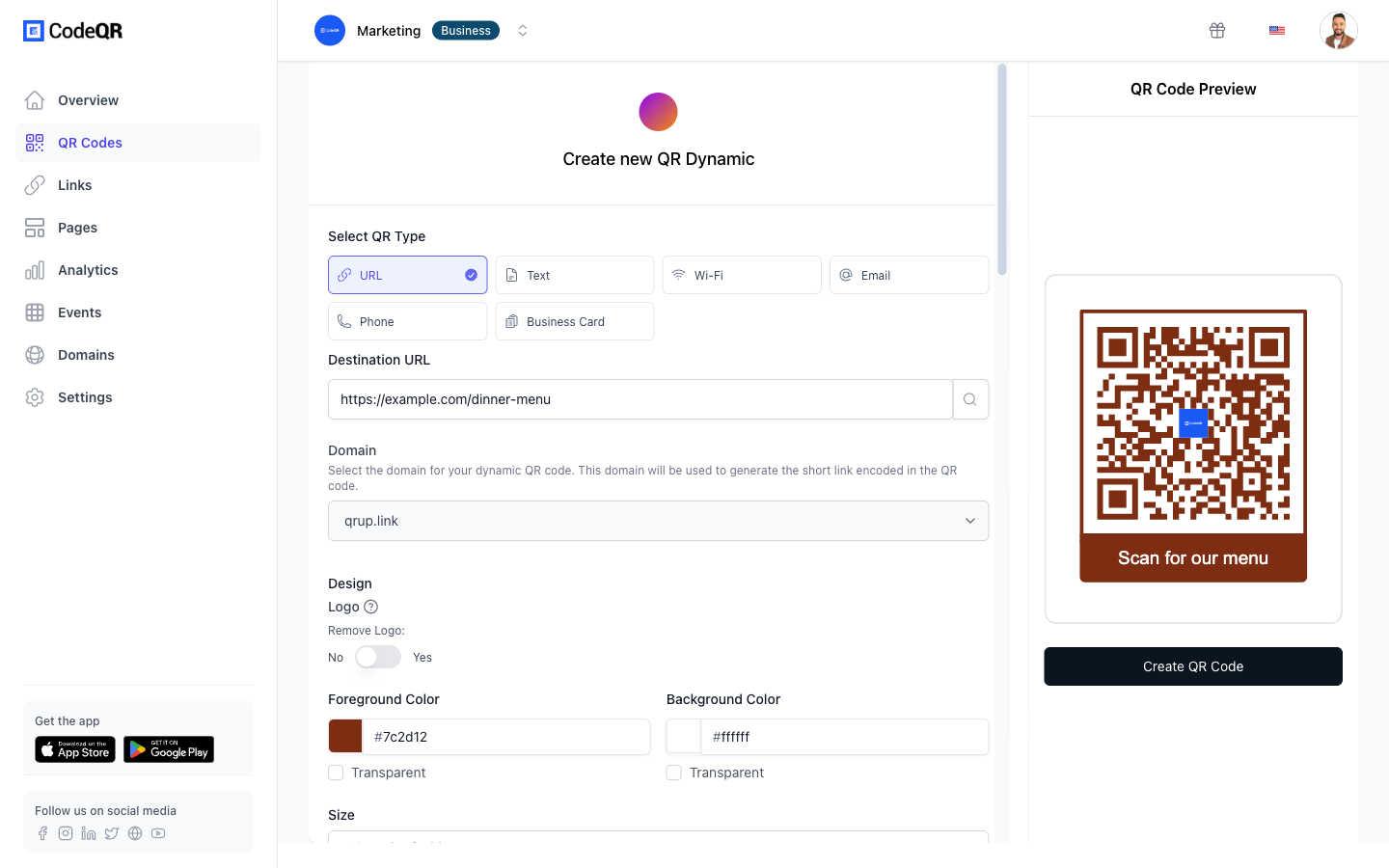
Practical example
Consider a café printing table-tent QR codes for every table. The owner hosts the menu as a single web page and creates one dynamic URL QR code in CodeQR that points to it. The table tents are printed once.
When the kitchen swaps a seasonal dish or raises a price, the owner edits the destination link inside CodeQR. Every printed code now opens the updated menu — no reprint, no reprogramming. The old paper cost of reprinting menus each time a price moved disappears.
The café can also give the window sticker a different tracking link than the table tents using the UTM builder, then compare which placement gets scanned more in conversion tracking. That comparison is the point: the owner learns where scans actually come from instead of guessing.
Best practices
- Print at least about 2 cm wide for a table tent read at arm's length; go larger for wall or window signs scanned from farther away, and leave a quiet-zone margin on all four sides so cameras lock on.
- Expect the table to abuse the code. Every QR code carries error correction, which is why a smudge, water ring, or scratch usually doesn't break the scan — at the highest level, H, roughly 30% of an obscured code can still be recovered.[^1] Reprint a tent card once the code is scuffed enough that phones hesitate.
- Keep strong contrast. Dark code on a light background scans best; avoid low-contrast color pairs and busy photo backgrounds behind the code.
- Choose dynamic over static. A dynamic code lets you change the menu link without reprinting — essential when prices and dishes change. See pricing for the plans that include dynamic codes and analytics.
- Don't imply ordering. CodeQR links to your hosted menu and tracks scans; it is not a POS or ordering system, so frame text should say "menu," not "order here." If you later issue loyalty or offer passes, that lives in wallet passes, separate from the menu code.
[^1]: QR code error-correction level H can recover roughly 30% of a damaged or obscured code, the highest of the four defined levels. (QR Code / Denso Wave, https://www.qrcode.com/en/about/error_correction.html) [^2]: More than 100 million U.S. smartphone users scanned a QR code in 2025, up from 89.5 million in 2022. (Statista, https://www.statista.com/statistics/1337584/number-of-smartphone-qr-code-scanners-usa/)