

Bitly and TinyURL are both mature URL shorteners, but their free tiers diverge sharply: TinyURL's free plan gives 30 links a month with no analytics dashboard while its links never expire[^2], and Bitly's free plan runs with ads, capping you at 5 links and 2 QR codes a month with no data history[^1]. Pick by which limit you hit first.
What people are deciding between
Bitly and TinyURL both turn long URLs into short ones, and both have been doing it for years. Bitly leans toward marketing teams that want branded links, QR codes, and click analytics in one dashboard. TinyURL leans toward people who want a quick, no-friction short link — and, on its free plan, more of them per month than Bitly allows. The overlap is the core job: shorten a link, share it, and (on paid tiers) track it.
Side-by-side: Bitly vs TinyURL
| Axis | Bitly | TinyURL |
|---|---|---|
| Free-plan limits | 5 links + 2 QR codes per month, served with ads[^1] | 30 links per month[^2] |
| Analytics depth on free | No data history on the free plan[^1] | No analytics dashboard on the free plan[^2] |
| QR codes included | 2 QR codes per month on free[^1] | Varies by plan |
| Custom domains | Available on paid plans; varies by tier | Available on paid plans; varies by tier |
| Pricing (entry paid tier) | Paid tiers above free; city- and device-level data on Premium at $100/mo billed annually[^3] | Pro at $13/mo, which is where analytics begins[^2] |
| Link expiration | Varies by plan | Free links do not expire[^2] |
Where Bitly wins
- Bitly bundles QR codes into the free plan — 2 per month — so you can generate a code without paying, something TinyURL's free plan does not lead with[^1].
- Bitly's analytics, once you reach a paid tier, go deep: city-level and device-type click and scan data are available on Premium[^3].
- Bitly is built around branded short links and campaign tracking, which fits teams already running UTM-tagged marketing. A UTM builder pairs naturally with that workflow.
Where TinyURL wins
- TinyURL's free plan allows 30 links a month, six times Bitly's 5-link free cap[^1][^2] — better if your need is volume, not analytics.
- TinyURL's free links do not expire, so a code or link printed today keeps resolving without a paid subscription[^2].
- TinyURL's free plan has no ads on its links, whereas Bitly's free plan is served with ads[^1].
Practical example
Consider a café printing table-tent QR codes that point to a digital menu. On Bitly's free plan, the café gets 2 QR codes a month and no data history, so it cannot look back and compare which table-tent design pulled more scans[^1]. On TinyURL's free plan, the café can make more short links but has no analytics dashboard to measure any of them[^2].
The mechanic that matters here is dynamic editing: if the café wants to swap the menu URL after printing — without reprinting the tent cards — it needs a code whose destination can change. That is a plan-level feature on both tools, so the café should confirm which tier unlocks it before committing to a print run. Error-correction level H, which recovers roughly 30% of a damaged code, is the setting to use for surfaces that get coffee-stained[^4].
If neither fits, here's a third option
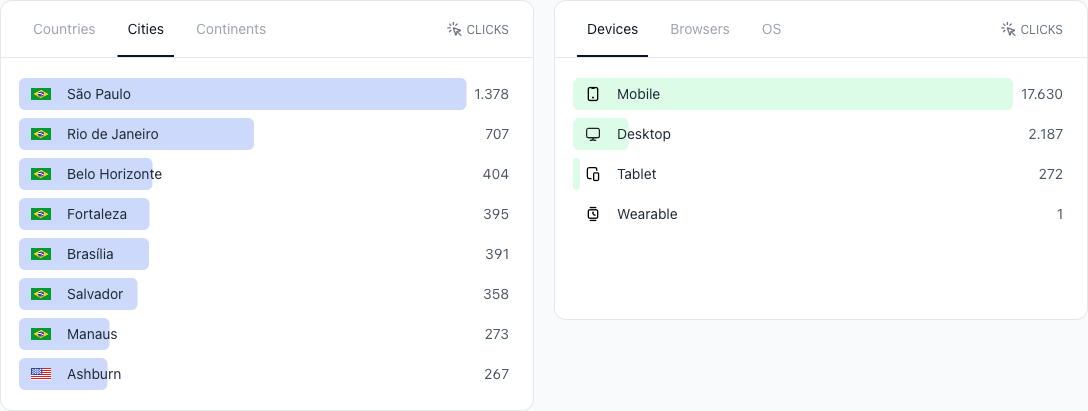
If the deciding factor is dynamic QR codes with analytics that stay available without a $100/month tier, CodeQR is worth a look as a third path. Its short links carry dynamic QR codes you can re-point after printing, conversion tracking rather than raw click counts, and wallet passes for Apple and Google Wallet. With more than 100 million U.S. smartphone users scanning a QR code in 2025, the ability to edit a destination and measure results matters[^4]. You can also test the QR code generator before deciding.
[^1]: Bitly, "Pricing" — free plan served with ads, 5 links and 2 QR codes per month, no analytics data history. https://bitly.com/pages/pricing (verified 2026-07-11). [^2]: TinyURL, "Pricing" — free plan provides 30 links per month with no analytics dashboard and links that do not expire; analytics starts on Pro at $13/mo. https://tinyurl.com/app/pricing (verified 2026-07-11). [^3]: Bitly, "Pricing" — city-level and device-type click and scan data available only on the Premium plan, at $100/mo billed annually. https://bitly.com/pages/pricing (verified 2026-07-11). [^4]: Statista — more than 100 million U.S. smartphone users scanned a QR code in 2025, up from 89.5 million in 2022. https://www.statista.com/statistics/1337584/number-of-smartphone-qr-code-scanners-usa/ (verified 2026-07-11).
References
- [1]Bitly pricing— Bitly · 2026-07-11
- [2]TinyURL pricing (free plan has no analytics dashboard; Pro $13/mo)— TinyURL · 2026-07-11