
Share a public analytics page for a link or QR code
Turn on the public analytics page of a short link or QR code in CodeQR, send the stats URL to a client without giving account access, and turn it off.

By the end of this guide you will have a public web page that shows the analytics of one short link or one QR code — counters, chart, countries, devices, referrers — that anyone with the URL can open without a CodeQR account, and you will know how to close it again.
Availability
- Plan: all plans. The public page shows the same cards your plan unlocks in Analytics.
- Where: Analytics with one link or QR code selected → ⋮ → Compartilhar Analytics. Also available on the public page of a link's root domain.
Before you start
- The page is public by URL: anyone who has
https://<domain>/stats/<key>can open it while the switch is on. There is no password. Share it like you would share a read-only report. - The page shows numbers and breakdowns, not personal data: no IP addresses, no names, no click IDs.
- The URL is predictable (
/stats/+ the link's key), so treat turning the switch on as publishing.
Steps
- Open Analytics and select the link or QR code: click its N clicks / N scans badge in the list, or use Filter → Link or QR Code.
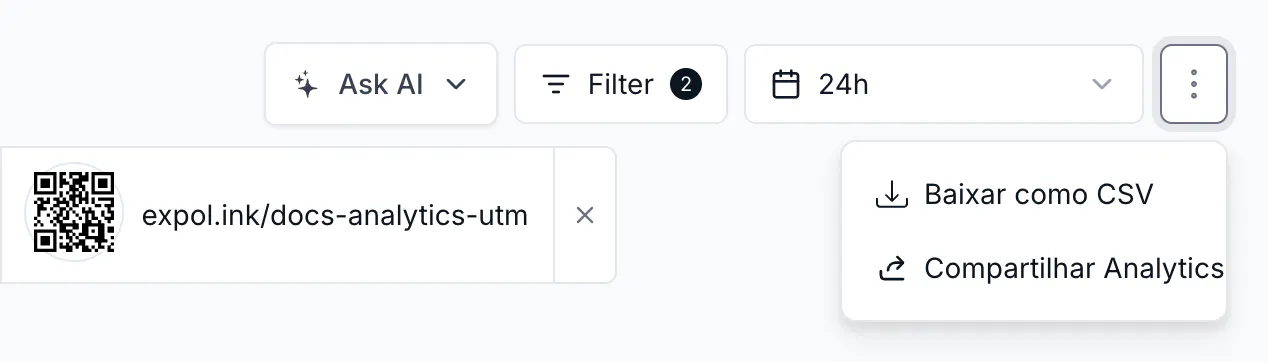
- Click the ⋮ button at the right of the date range and choose Compartilhar Analytics.
- In the popover Compartilhar análises para <your link>, turn on Página de Análises Públicas. The toast confirms the change.
- Copy the URL under Compartilhar Link — it has the form
https://go.example.com/stats/springfor a link andhttps://go.example.com/stats/spring-qrfor a QR code — and send it.
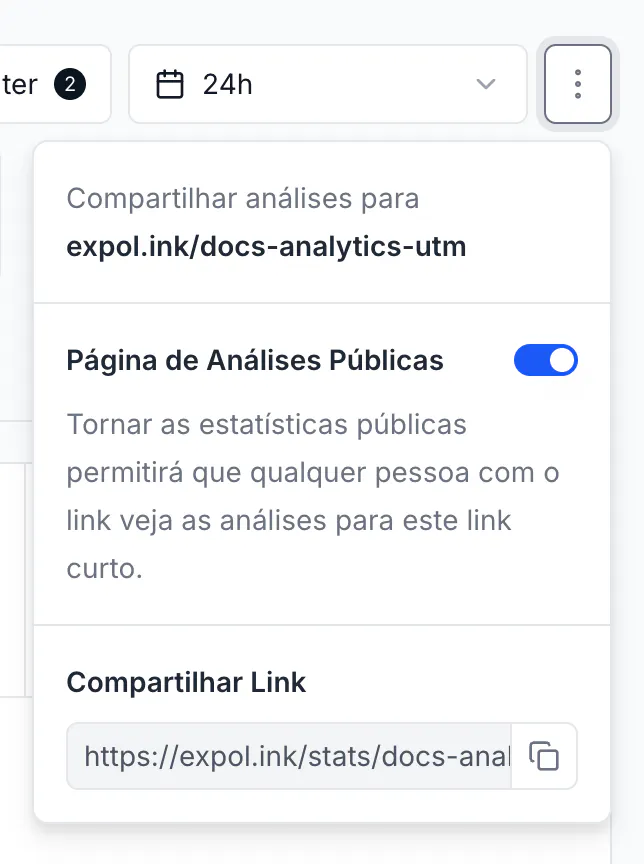
- To stop sharing, open the same popover and turn the switch off. The URL then returns a not-found page.
What the visitor sees
The link's short URL as title, the Total / Clicks / Scans / Views counters and the chart, the date range control, and the Countries / Cities / Continents, Devices / Browsers / OS, Referrers / Referrer URLs, and Links / QR Codes cards — for that link only. Leads, sales, and the UTM report are not shown. The cards follow the same plan rules as your dashboard.
The same through the API
PUT https://api.codeqr.io/analytics?domain=go.example.com&key=spring with the body {"publicStats": true} turns the page on; false turns it off. The response is the updated link, including "publicStats": true. Every link and QR code object from GET /links and GET /qrcodes carries the publicStats field, so you can list which ones are public.
Verify it works
- Turn the switch on and copy the URL.
- Open it in a private browser window (no CodeQR session). The page loads with the counters and the chart for that link.
- Turn the switch off, reload the private window: the page is gone.
Troubleshooting
The ⋮ menu has no Compartilhar Analytics item
The item appears only when one link or QR code is selected. Select it first (badge in the list, or Filter → Link).
The public page shows no numbers
Give it a few minutes after the first clicks (same delay as the dashboard) and check the date range on the page — it opens on the last 24 hours. If the link had no events in that window, widen the range.
I do not want search engines to find the page
Share the URL only where you need it and turn the switch off when the campaign ends. Anyone with the URL can open the page while it is on.