
Make a multi-language QR code
Make one multi language QR code that opens a page in each visitor's phone language. Set up Language rules in CodeQR, with the limits to know first.

A multi language QR code is one printed code that opens the page in the visitor's own language. The browser on the phone says which language it prefers, usually the phone's own. CodeQR reads that when the code is scanned and follows the rule you wrote for it, using Language rules in Smart Rules. A hotel, a restaurant group or a museum prints one code and keeps one set of pages behind it.
Availability
- Plan: Smart Rules are on Business and above (pricing). To try them, choose Business under PLAN TO TRIAL in the plan step of onboarding, then click Start Free Trial. The selector starts on Pro, and a workspace gets one trial.
- Before you print: codes created during a no-card trial stay on the free short domains. Create the code you will print after checkout.
- Codes: dynamic QR codes of type URL. Short links have the same section. A static code can't use rules.
Set it up
This example is a menu. Visitors with a phone in Portuguese, Spanish or German get that menu, and everyone else gets the English one. If your code opens a menu, see also QR code for menu.
- Open QR Codes and click Create QR Code.
- In Select QR Code format, choose Dynamic and click Continue.
- In Select QR Type, keep URL.
- In Destination URL, paste the page for every other language, for example
https://example.com/menu-en. - Turn on Smart Rules.
- Set the first rule to Language, is, Português, and paste the Portuguese page in its Destination URL.
- Click Add rule and repeat for Español and Deutsch.
- Click Create QR Code.
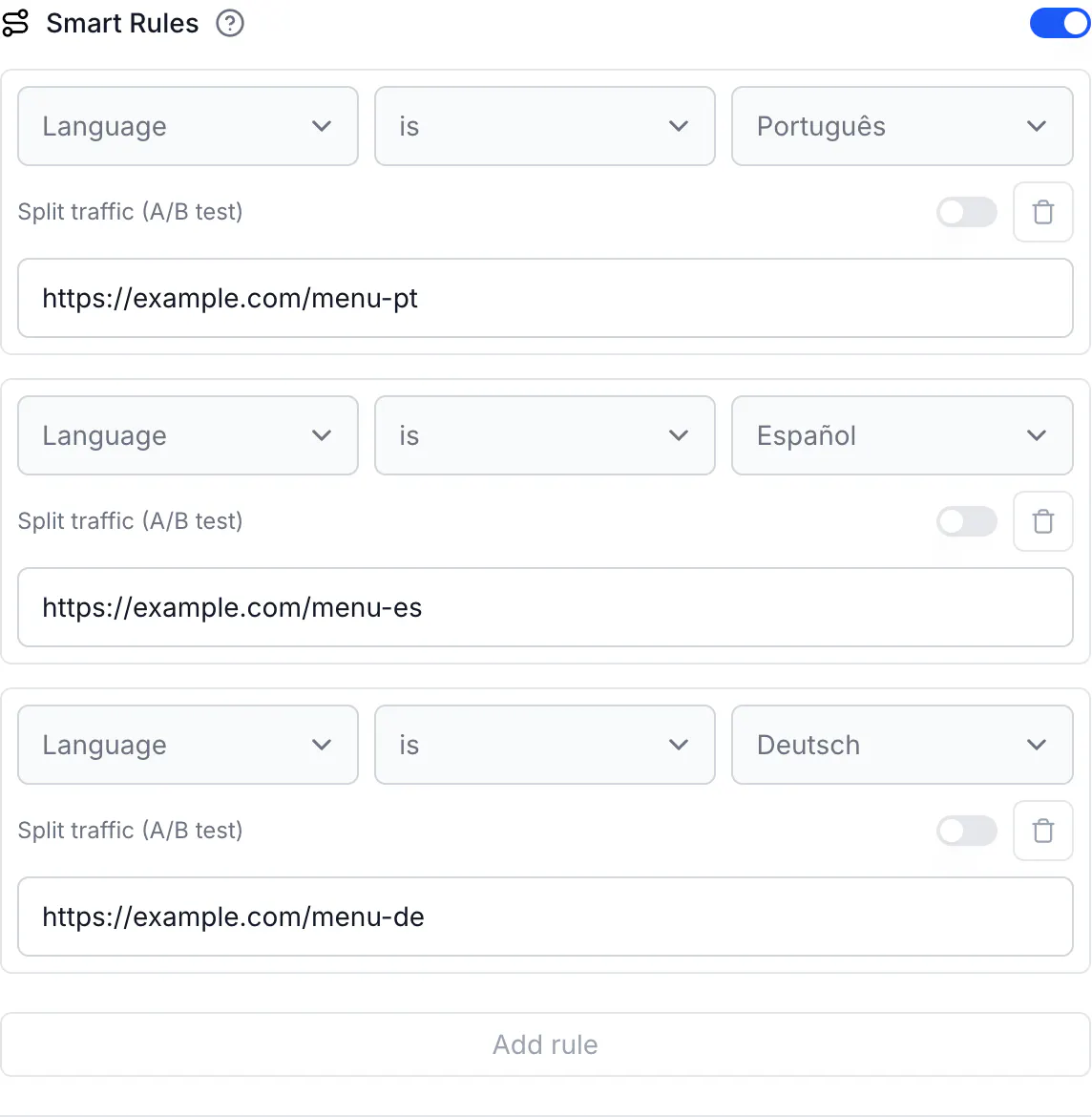
Destination URL is the page for every visitor no rule catches, so make it the language most of your visitors can read.
The ten languages
A Language rule can use these ten, listed as they appear on screen: Português, English, Español, Français, Deutsch, 中文, Русский, Italiano, 日本語 and 한국어. They have the same names in every interface language.
A visitor whose phone uses any other language goes to Destination URL.
What to watch for
- Portugal and Brazil read as one language:
pt-BRandpt-PTboth count as Português. To send Brazil and Portugal to different pages, use a Country rule instead. - The phone's language is not the visitor's location. A German tourist in your lobby in Lisbon, with a phone set to German, still gets the German page. To choose by where someone is, use Country. See Geo redirect by country, region, city, or language.
- Add a rule for each language your visitors use. A phone can list several languages in order of preference, and CodeQR checks only the first one it supports. With French first and German second, a visitor goes to Destination URL when you have a German rule but none for French. German is never tried.
- The code doesn't translate anything. You need a menu, a leaflet or a page in each language, and the rule points to it.
- Rules run from top to bottom and the first match wins. A code holds up to 20 rules.
Do the same via API
curl -X POST https://api.codeqr.io/qrcodes \
  -H "Authorization: Bearer codeqr_xxxxxxxxxxxxxxxxxxxxxxxx" \
  -H "Content-Type: application/json" \
  -d '{
    "type": "url",
    "static": false,
    "domain": "go.example.com",
    "key": "menu",
    "url": "https://example.com/menu-en",
    "rules": [
      { "attribute": "language", "operator": "equals", "value": "pt", "url": "https://example.com/menu-pt" },
      { "attribute": "language", "operator": "equals", "value": "es", "url": "https://example.com/menu-es" },
      { "attribute": "language", "operator": "equals", "value": "de", "url": "https://example.com/menu-de" }
    ]
  }'
Through MCP, create_link and update_link accept rules. The QR code tools don't, so use the API or the editor for a code.
Verify it works
Scan the code with a phone set to each language. To test from a computer, send the header a phone sends and read where the code redirects:
curl -sI -H "Accept-Language: es-MX" https://go.example.com/menu | grep -i '^location'
# location: https://example.com/menu-es
curl -sI -H "Accept-Language: fr-FR,de;q=0.9" https://go.example.com/menu | grep -i '^location'
# location: https://example.com/menu-en
In the second request French comes first and has no rule, so the visitor gets Destination URL, and German is never tried. The URLs tab in the code's Analytics lists scans per page.
Common questions
It reads the language the browser on the visitor's phone asks for when the code is scanned, usually the phone's own. The visitor doesn't choose anything. CodeQR follows the rule for that language and opens the page you set for it.