
Connect CodeQR to Zapier, Make, n8n and IFTTT
Enable the CodeQR apps on Zapier, Make, n8n and IFTTT from Settings → Integrations, what each can trigger and do, and the fallback when a field is missing.

CodeQR has an official app on Zapier, Make and IFTTT and a community node on n8n. This guide enables each one, lists exactly what it can trigger and do, and shows the escape hatch for anything the modules do not cover.
Availability
- Plan: every plan can connect the four platforms. What the platform then does follows the normal rules: created links and QR codes count against your quota; event triggers follow the webhook tiers (created/updated/deleted events from Pro; clicks and scans from Business).
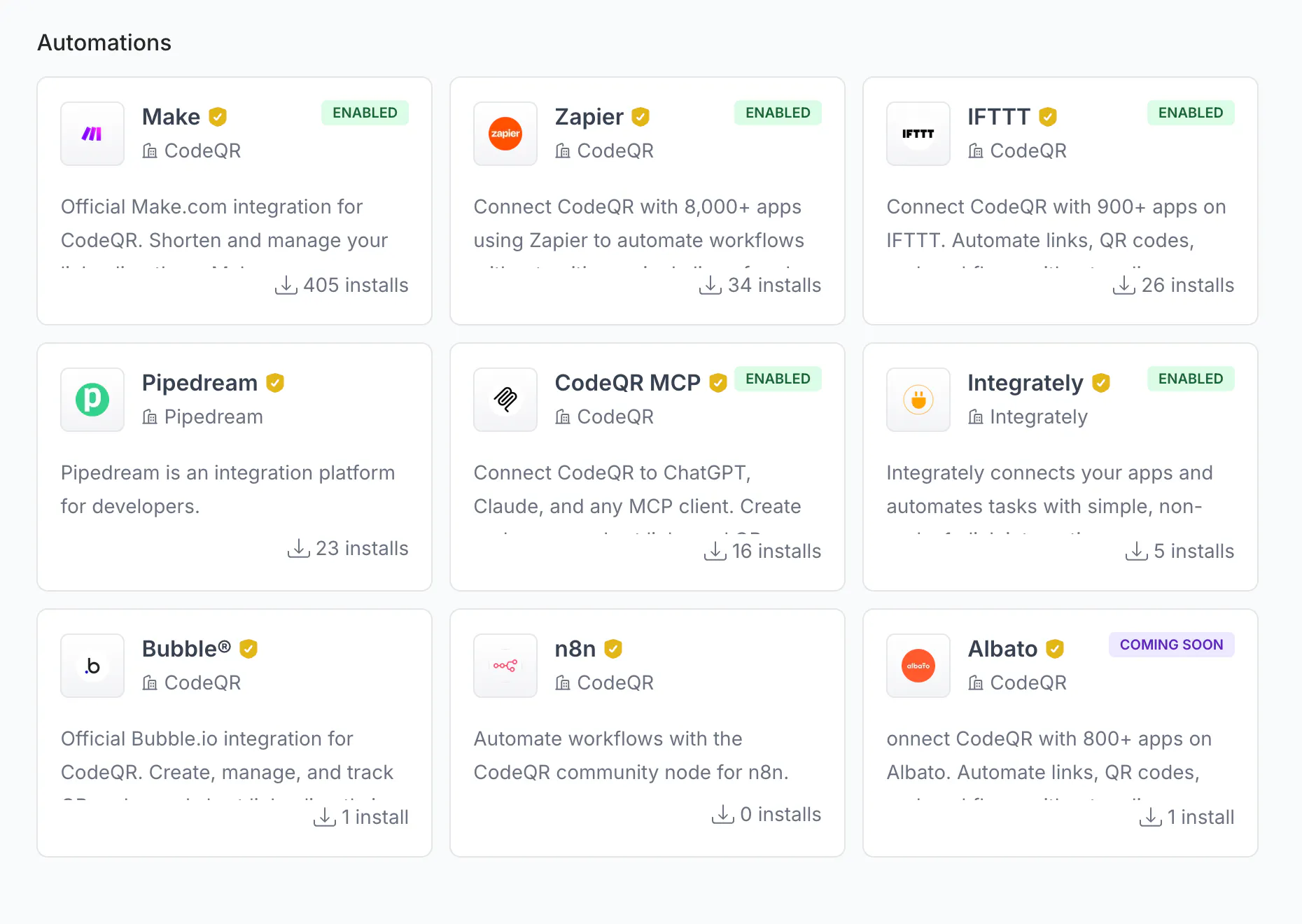
- Where: Settings → Integrations, section Automations. Cards show the number of installs and an ENABLED badge once connected; COMING SOON cards (Albato) cannot be enabled yet.
Before you start
- You need an account on the platform (Zapier, Make, n8n, IFTTT). The CodeQR side is free.
- Only n8n asks for an API key; the other three authorize through a consent screen and create their own scoped key, which then appears in Settings → API Keys.
- Decide which workspace to connect. The authorization is per workspace; to automate two workspaces, connect twice.
Zapier
- In Settings → Integrations, open Zapier and follow the website link
zapier.com/apps/codeqr/integrations, or start from Zapier and search for CodeQR - Link and QR Analytics. - When Zapier asks to connect your account, allow access to the workspace; the card turns ENABLED.
- Build the Zap. Triggers are polling — Zapier checks for new data every 15 min on the Free plan: New Link, New QR Code, New Page. Actions: Create a Link (URL required; Key, Domain, External ID, Flexible, Tag IDs, Tag Names, Title, Description, Image URL, Video URL, Proxy, Pre-Redirection Page, Page ID, Page URL, Rewrite, iOS, Android, Allow Indexing, Comments, Expiration Date, Expired Redirect URL, Geo-Targeting, Public Stats), Create a QR Code (QR Code Type required; Static/Dynamic, Show Logo, URL, Text, E-mail, Phone, Background Color, Foreground Color, Size, Track Conversion, Title, Description, Image URL, Expiration Date, Public Stats), Delete Link, Delete QR Code, and the searches Retrieve Link and Retrieve a QR Code (by ID, External ID, or Domain + Key).
- There is no click or scan trigger on Zapier. For per-click automations use a webhook to a Zapier "Catch Hook" URL (Business plan) — see Send link and QR code events to your app with webhooks.
Make
- Open Make in Settings → Integrations and click Enable (or start from Make: app CodeQR - Link and QR Analytics, marked Verified and Official Vendor). Allow Make to access the workspace.
- Modules available: Create a Link, Create a QR Code, Delete a Link, Delete a QR Code, Search Link and Retrieve a QR Code, the instant trigger Watch Webhook Events ("Triggers when an event occurs in your CodeQR account, such as link creation, updates, or tracking activities"), and Make an API Call for any endpoint the modules do not expose.
- Watch Webhook Events registers a CodeQR webhook for you; pick the events in the module (all fourteen event types can be selected for Make). Plan tiers apply exactly as for a webhook you create by hand.
- The Make card also offers a coupon (Request Coupon) for existing Make users and links to Make Academy, templates and the community.
The older article CodeQR & Make.com Integration: Automate Workflows walks a full scenario; the module list above is the current one.
n8n
- Install the community node in n8n: Settings → Community nodes → Install →
n8n-nodes-codeqr(n8n 1.54.4 or newer, Node.js 18.10 or newer). - Create a CodeQR API key with Links → Write and QR Codes → Write (Create an API key and choose its permissions) and paste it into the node's credential.
- Operations: Links — Create Short Link, Get Link Information, Update Link, Delete Link; QR Codes — Generate QR Code, Get QR Code Data, Update QR Code Destination, Delete QR Code.
- Anything else — tags, folders, analytics, bulk — goes through n8n's HTTP Request node with
Authorization: Bearer <key>againsthttps://api.codeqr.io. The n8n card in Settings → Integrations only links to the package; enabling it there is optional.
IFTTT
- Open IFTTT in Settings → Integrations, click Enable and allow access — or connect from
ifttt.com/codeqrwhen you build the applet. - Two actions exist, no triggers or queries: Create a link and Generate a QR Code. Typical applets: shorten every new WordPress post, RSS item, YouTube video or calendar event.
- Keys you type in the Create a link action get a random 5-character suffix (
launchbecomeslaunchx7Kq2), so two applets never collide.
Pipedream
Pipedream is the third most installed platform here, and the one that works least like the others: there are no prebuilt CodeQR steps to pick from. Enable on the CodeQR card opens pipedream.com/apps/codeqr in a new tab and nothing else — it does not connect the two accounts, and the card keeps offering Enable afterwards.
What you build there is an ordinary HTTP call:
- In your Pipedream workflow, add an HTTP / Webhook step and choose Send any HTTP request.
- Method POST, URL
https://api.codeqr.io/links. - Under headers, add
Authorizationwith the valueBearer <your API key>andContent-Type: application/json. - Body:
{"url": "https://example.com", "domain": "go.example.com"}— the same fields the rest of this guide uses.
Store the key in Pipedream's environment variables rather than typing it into the step, so it does not travel in the workflow's export.
Integrately, Albato, Bubble
These cards link to the platform's own listing — Albato is COMING SOON and Bubble is a plugin. They use the same REST API underneath, so the field names in this guide and in Create your first short link with the CodeQR API apply.
Disconnect a platform
Open the card in Settings → Integrations, click ⋮ next to INSTALLED BY and choose Uninstall Integration, then Confirm (This will remove the integration from your workspace. Are you sure you want to continue?). Deleting the platform's key in Settings → API Keys also cuts access, but the card keeps showing ENABLED until you uninstall it here.
Verify it works
- Run the scenario or Zap once with a test row or a manual trigger.
- The link or QR code appears in Links / QR Codes with the destination you mapped.
- In Settings → API Keys, the platform's key shows a fresh Last used time.
Troubleshooting
The Zapier trigger "found no data" or fires late
Zapier's CodeQR triggers poll every 15 minutes on Zapier's Free plan (faster on paid plans). Create a link, wait for the next poll, or press "Test trigger" after the link exists.
The Make module I need (update a link, list links) is not there
Use Make an API Call with the endpoint from the reference — for example PUT /links/{id} with {"url": "…"}. The in-app Make description still mentions update and upsert modules; the current Make app has the eight modules listed above.
"The provided key does not have the required permissions…" inside n8n
The API key you pasted was created Read-Only or without the resource. Create a new key with Write on Links and QR Codes and update the credential.
The Domain drop-down of the action is empty
The workspace connected to the platform has no custom domain yet, or the platform cached the list before you added one. Reconnect the account or type the domain; the shared domains work without any setup.
I connected the wrong workspace
Uninstall from the card (⋮ → Uninstall Integration) and enable again while the right workspace is selected in the dashboard switcher.