
Send link and QR code events to your app with webhooks
Create a CodeQR webhook, pick the events, verify the CodeQR-Signature header, handle retries and failures, and read the delivery log — with a real payload.

A webhook is an HTTP POST that CodeQR sends to a URL you own the moment something happens — a link is created, a QR code changes, a lead arrives, someone clicks. By the end of this guide you have a webhook receiving signed events, you can prove each event is genuine, and you know what CodeQR does when your endpoint fails.
Availability
- Plan: Pro and above for created/updated/deleted events on links, QR codes and pages, and for Lead created / Sale created. Link clicked, QR Code scanned and Page visited — and attaching a webhook to specific links, codes or pages — need Business or above.
- Where: Settings → Developer Settings → Webhooks. Only the workspace owner can create, edit or delete webhooks; members can read the list and the logs. Reference: Webhooks on docs.codeqr.io.
Before you start
- A public HTTPS URL that answers
2xxquickly. For a first test use a request inspector such ashttps://webhook.site(it gives you a unique URL and shows what arrives) or expose a local server with a tunnel. - Decide the events you need. Project-level events fire for every link, code or page in the workspace; link-, QR-code- and page-level events fire only for the ones you attach.
- One webhook per URL per workspace: creating a second webhook with the same URL updates the first.
Steps
- Open Settings → Webhooks and click Create Webhook.
- Fill Name (up to 30 characters) and URL. The Signature secret is generated for you (
whsec_+ 32 hex characters) — copy it into your server's environment now; it stays visible on the webhook's page later, and it is what you will use to verify deliveries.
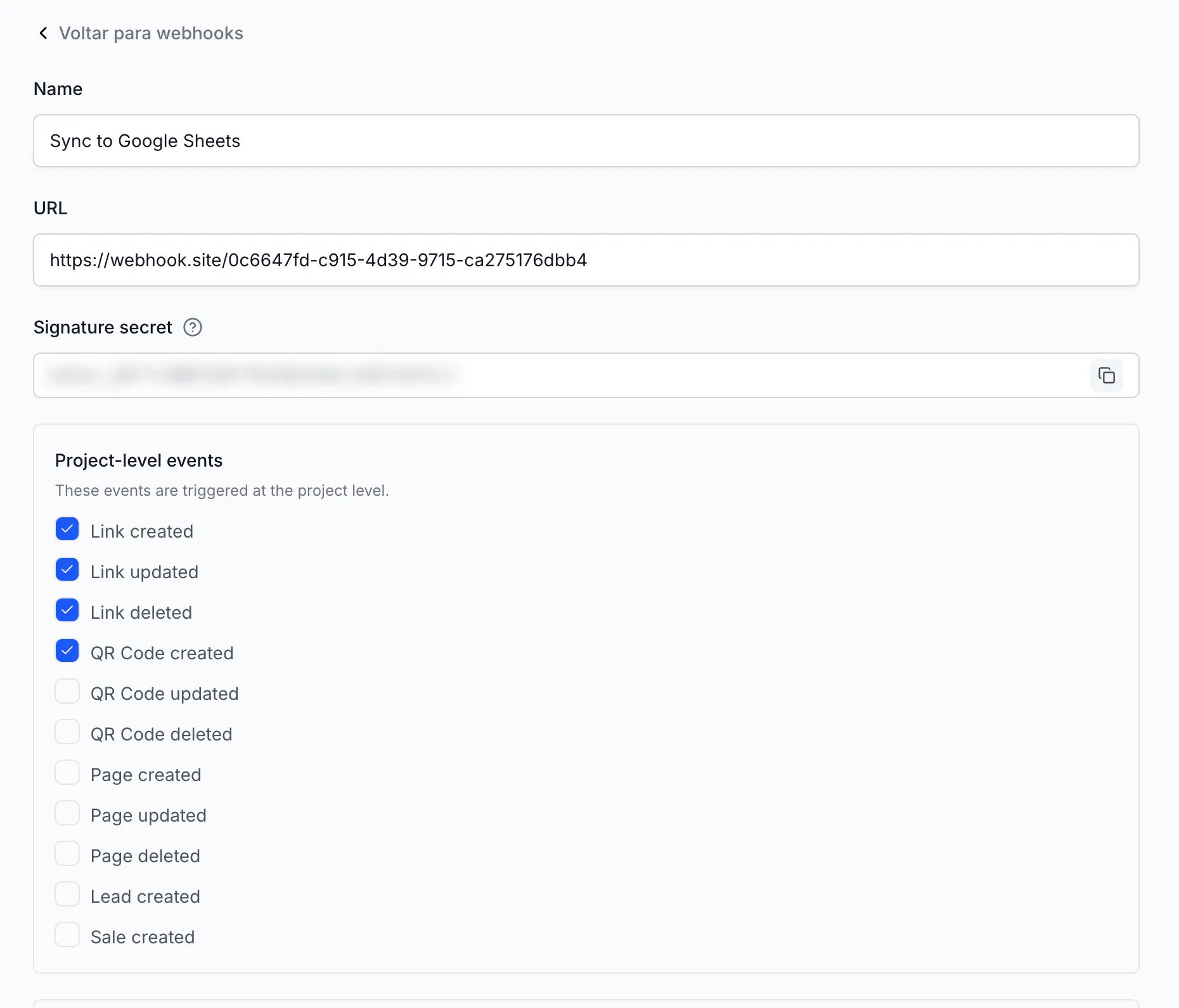
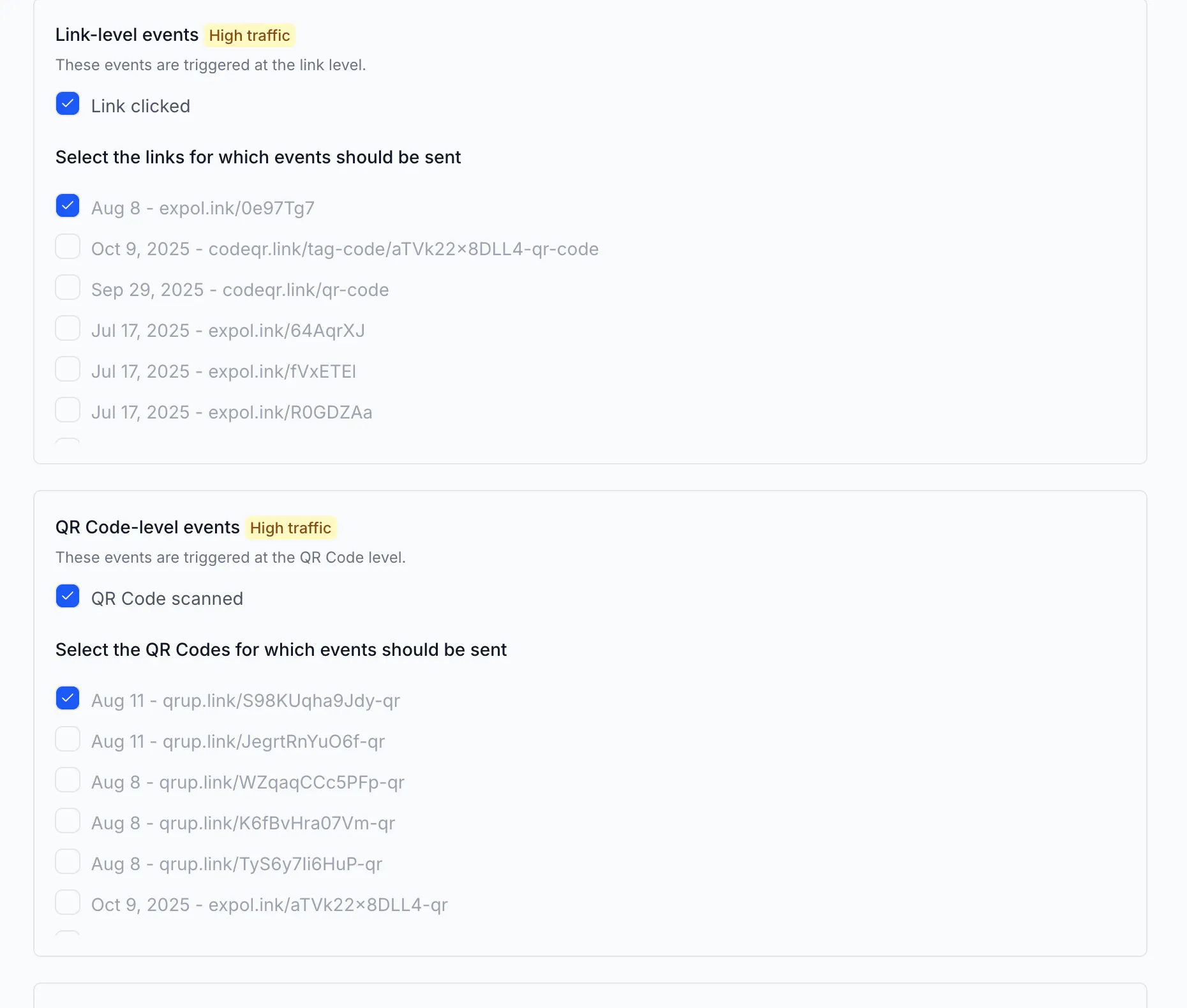
- Tick the events: - Project-level events — These events are triggered at the project level.: Link created, Link updated, Link deleted, QR Code created, QR Code updated, QR Code deleted, Page created, Page updated, Page deleted, Lead created, Sale created. - Link-level events (High traffic) — Link clicked; ticking it reveals Select the links for which events should be sent with every link listed as
<date> - <domain/key>. Tick the links you want. - QR Code-level events (High traffic) — QR Code scanned, with the same picker for QR codes. - Page-level events (High traffic) — Page visited.
- Click Create webhook. The list shows the new webhook as Ativado (the status labels are in Portuguese in every language today).
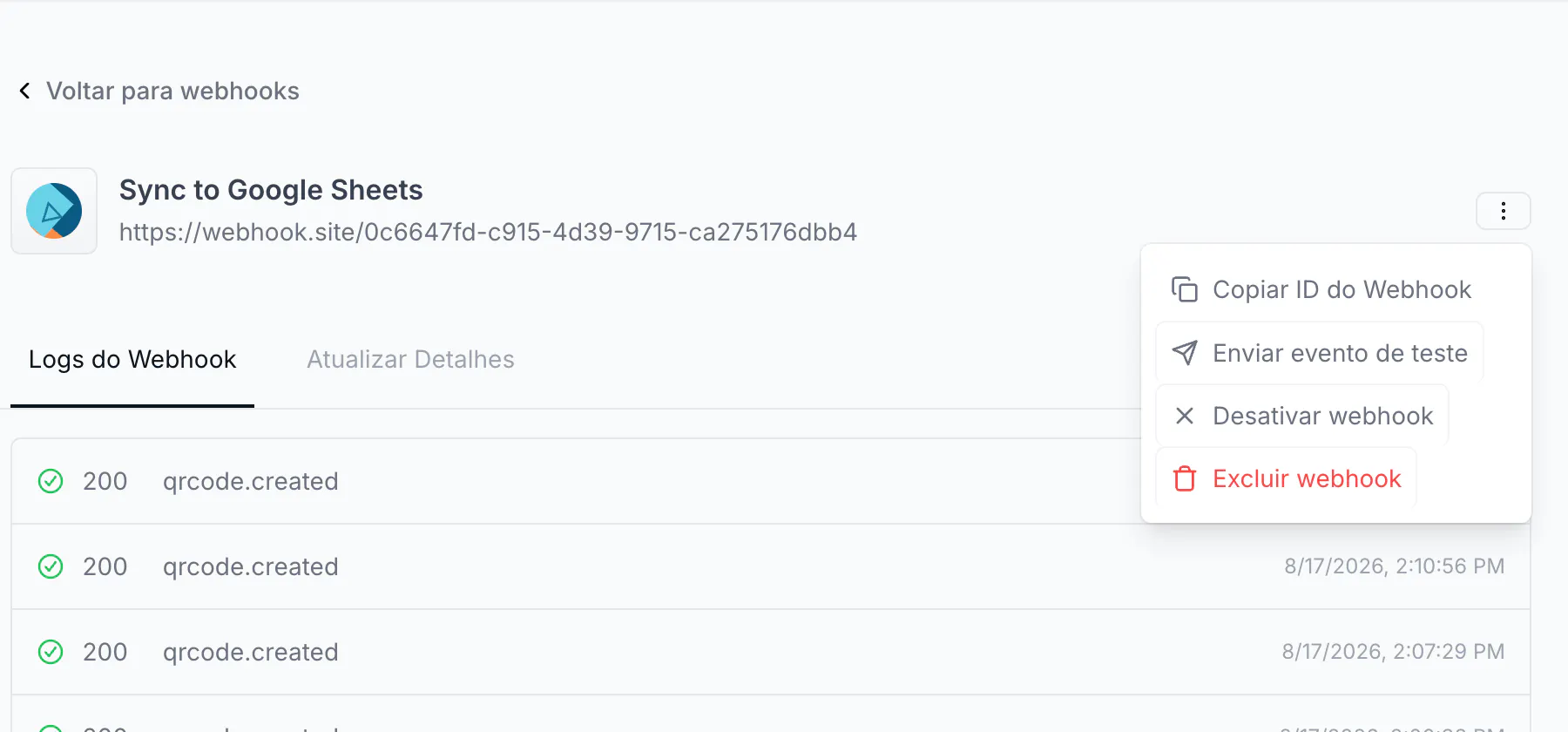
- Open the webhook. ⋮ (Abrir opções) offers Copiar ID do Webhook, Enviar evento de teste, Desativar webhook and Excluir webhook; the tabs are Logs do Webhook and Atualizar Detalhes.
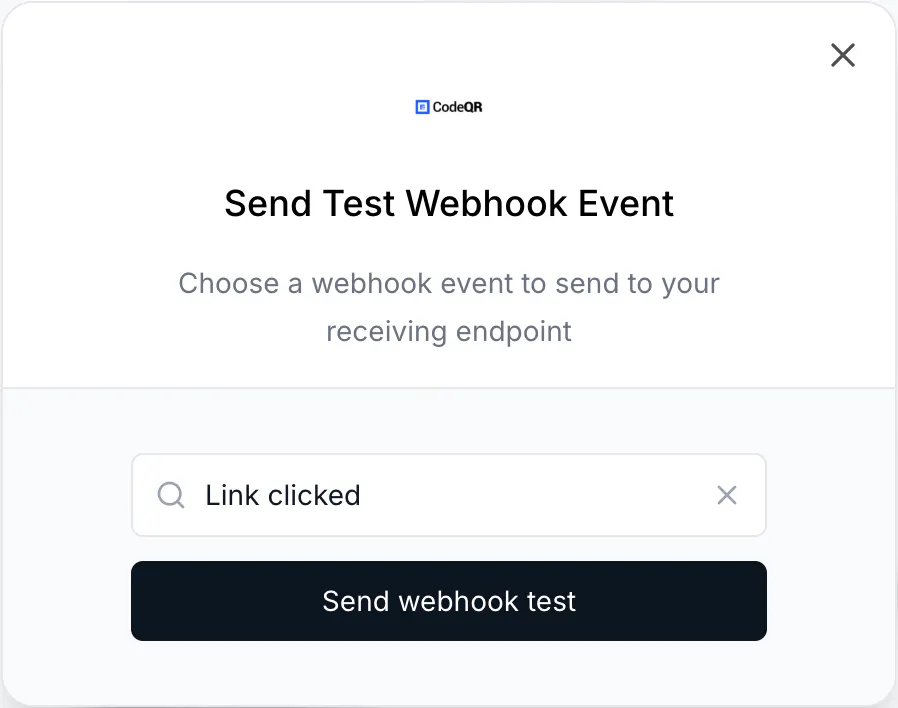
- Send a test: Enviar evento de teste → choose an event in Send Test Webhook Event → Send webhook test. Your endpoint receives a sample payload for that event.
- Create a link (in the dashboard or with the API). Within a few seconds a real
link.createdevent lands, and the row appears in Logs do Webhook with the HTTP status your endpoint returned; click a row to see Response and Request.
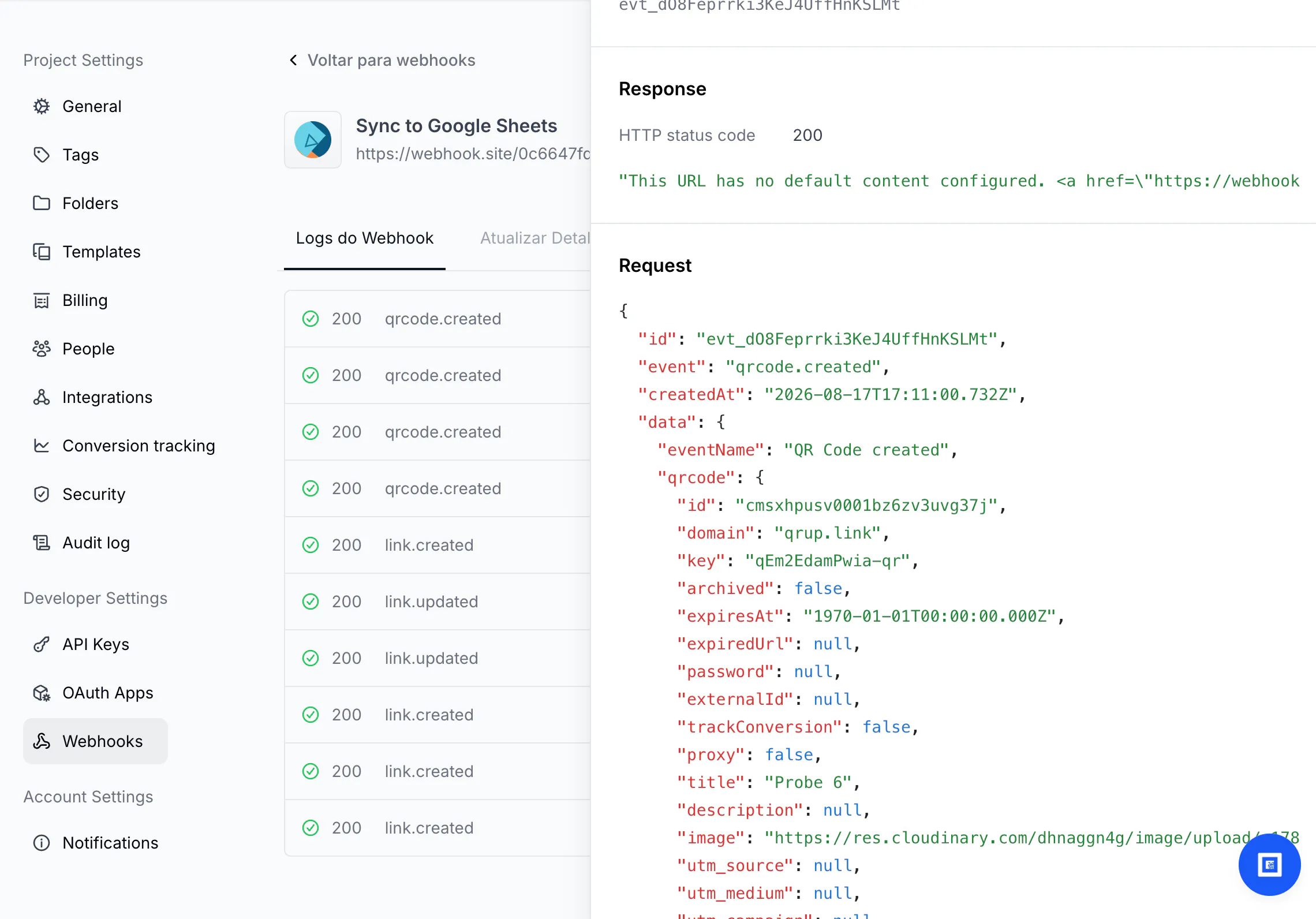
What you receive
Headers:
Content-Type: application/json
User-Agent: Go-http-client/2.0
CodeQR-Signature: b66393f98f01e7cba58a20ea4654ee66c5c72ff3a8e09db4fcd73624560e4b25
CodeQR-Project-Id: cm73y7wm100008j24i1b137wr
Body — the envelope is always id, event, createdAt, data; inside data you get eventName and the object the event is about (link, qrcode, page, customer for leads, sale) and, for clicks and scans, an interaction object with the click details (country, device, browser, referer, click_id). A real link.created delivery, trimmed:
{
  "id": "evt_YT2m0xh9aUWRTV1FkfNTvrvls",
  "event": "link.created",
  "createdAt": "2026-08-17T16:53:22.473Z",
  "data": {
    "eventName": "Link created",
    "link": {
      "id": "cmsxh367q0003wu8tzav2adsp",
      "domain": "go.example.com",
      "key": "docs-summer",
      "url": "https://example.com/summer-sale?utm_source=newsletter&utm_medium=email&utm_campaign=summer",
      "shortLink": "https://go.example.com/docs-summer",
      "externalId": null,
      "tags": [],
      "clicks": 0,
      "createdAt": "2026-08-17T16:53:20.822Z",
      "updatedAt": "2026-08-17T16:53:20.822Z"
    }
  }
}
The link object is the same shape the API returns; qrcode events carry the QR code object (type, static, colors, image…). Full field lists per event: Webhook events.
Verify the signature
CodeQR-Signature is the HMAC-SHA256 of the raw request body, keyed with your whsec_… secret, as lowercase hex. Compute it over the exact bytes you received — before any JSON parsing or re-serialisation — and compare with a constant-time comparison. Both snippets below were checked against real deliveries.
Node.js (Express, raw body):
import crypto from 'node:crypto';
import express from 'express';

const app = express();
app.post('/codeqr', express.raw({ type: 'application/json' }), (req, res) => {
  const expected = crypto
    .createHmac('sha256', process.env.CODEQR_WEBHOOK_SECRET)
    .update(req.body) // Buffer with the raw bytes
    .digest('hex');
  const received = req.get('CodeQR-Signature') || '';
  const ok = received.length === expected.length &&
    crypto.timingSafeEqual(Buffer.from(received), Buffer.from(expected));
  if (!ok) return res.status(401).send('bad signature');

  const event = JSON.parse(req.body);
  // handle event.event / event.data here, then answer fast
  res.status(200).send('ok');
});
Python:
import hmac, hashlib

def is_valid(raw_body: bytes, header: str, secret: str) -> bool:
    expected = hmac.new(secret.encode(), raw_body, hashlib.sha256).hexdigest()
    return hmac.compare_digest(expected, header)
Reject anything that does not verify; a request without the header is not from CodeQR.
Retries, duplicates and failures
- Deliveries are queued and retried when your endpoint answers
4xx/5xxor times out, so the same event can arrive more than once. Useid(evt_…) as an idempotency key and ignore repeats. - Answer
2xxwithin a few seconds and do the heavy work afterwards; a slow endpoint is treated as failing. - After 5, 10 and 15 consecutive failures the workspace owner receives an e-mail (Webhook is failing to deliver); at 20 the webhook is disabled and the owner receives Webhook has been disabled. Fix the endpoint, then re-enable it from ⋮ → Ativar webhook on the webhook page. Successful deliveries reset the counter.
- Zapier and Make endpoints that answer
410unsubscribe the webhook — that is how those platforms turn a trigger off.
Do the same via API
With a key that has Webhooks → Write (owner-only):
curl https://api.codeqr.io/webhooks \
  -H "Authorization: Bearer codeqr_••••••••••••••••••••••••"
returns each webhook with id, name, url, secret, triggers, linkIds, qrcodeIds, pageIds, disabledAt. POST /webhooks creates one (name, url, triggers, optional linkIds/qrcodeIds/pageIds, optional secret); PATCH /webhooks/{id} and DELETE /webhooks/{id} edit and remove. Make's Watch Webhook Events module and the Pluga integration create webhooks this way for you.
Verify it works
- Create a link. Your endpoint logs one POST; Logs do Webhook shows a
200row forlink.createdwithin seconds. - Your signature check accepts it. Change one byte of the secret and it must fail.
- Send the same event id twice through the test button and confirm your handler processes it once.
Troubleshooting
Signature never matches
You hashed the parsed and re-serialised JSON, or a framework already turned the body into an object. Hash the raw bytes (Express express.raw, Next.js await req.text(), Django request.body); make sure you use this webhook's secret, not another webhook's or the API key.
The webhook is Desativado
Twenty consecutive failed deliveries disable it (you got two e-mails before). Fix the endpoint — check Logs do Webhook for the status codes — and re-enable from ⋮ → Ativar webhook.
No event arrives for clicks or scans
Link clicked and QR Code scanned only fire for the links and codes you ticked in the picker, and only on Business and above. Also see the note at the top: at the time of writing these deliveries were being blocked by a server-side validation bug (fix in review); created/updated/deleted events are unaffected.
The test event for "Link clicked" has no click details
The test payload contains the link object only; real click events add interaction. Test with a real click on an attached link.
Bulk-created links did not trigger link.created
Links created through POST /links/bulk did not fire the event in our test; single creates and dashboard creates did. Trigger your automation from the bulk response instead.
The form says "This webhook is managed by an integration"
Webhooks created by Zapier, Make or Pluga can only have their triggers and attached links changed here; the URL belongs to the platform. Change or remove them from the platform side.