
QR Codes for Videographers: Showreels, Client Delivery and Events
Learn how videographers use QR codes for showreels and client delivery. Get ideas, metrics to track and how to create one free on CodeQR.


Video is a digital medium, but a lot of business contacts still start with a card, an event, packaging, a printed proposal or an in-person referral. A QR code lets someone watch the right showreel without having to search for your name or scroll through a channel full of unrelated work.
The same code can support briefs, quotes, delivery and event promotion. To work well, the page needs to load fast, highlight just a few videos, and respect permissions around footage, music, brands and client materials.
With QR codes, short links and pages from CodeQR, you can bring together landing pages, short links and visitor data in one organized flow. For a videographer, that turns cards, printed materials, events and messages into contact points you can update and track.
Why use a QR code as a videographer
A single showreel rarely fits every audience. A company wants corporate videos; a couple is looking for wedding work; an agency wants campaigns and product content. Segmented codes let you show relevant work and measure which printed material generated interest.
Day to day, a QR code can also organize brief forms and delivery pages. Public links, though, shouldn't expose raw footage, embargoed videos or client data — convenience needs to come with access control and documentation.
9 practical QR code ideas for videographers
These ideas follow the journey from introduction to delivery. In each case, pick a destination that fits the audience and the rights involved.
1. Segmented showreel
Build pages for events, advertising, corporate work, product, real estate or social content. A card used at a corporate trade show can open business-focused projects, while material for wedding planners shows weddings. Give context to the work and state your role in the production.
2. Card and media kit
The code can open a page with your main showreel, services, coverage area, team and contact info. Skip heavy autoplay video — use thumbnails and one clear call to action.
3. Production brief
At networking events or in a proposal, link to a form asking for format, goal, deadline, location and how you'll follow up. Don't ask for confidential files on the first contact — use the answers to prepare for the meeting.
4. Quotes and scheduling
A page can explain your process, what you need from the client, and how to check availability. Individual pricing and terms should be shared appropriately, not left on a public link.
5. Events and video screenings
On signage, badges or cards, the code can open a teaser, a gallery, a schedule or a sign-up page. Check signal, lighting and how much time people have to scan on site.
6. Final delivery
A QR code on packaging, a drive or a card can lead to a protected area, download instructions or a selection page. Don't use an open URL for private material or content that isn't cleared yet.
7. Behind the scenes
Promotional materials can open behind-the-scenes footage, interviews or your creative process. Confirm authorization from the crew, participants, locations and the client before publishing.
8. Partner campaigns
Create separate codes for agencies, production companies, venues and vendors. This helps you identify where interest comes from and show a portfolio suited to that partnership.
9. Post-project surveys and referrals
After delivery, the code can open a survey about communication, organization and timelines, plus a referral page. Never make support or delivery conditional on a positive review.
What to link the QR code to
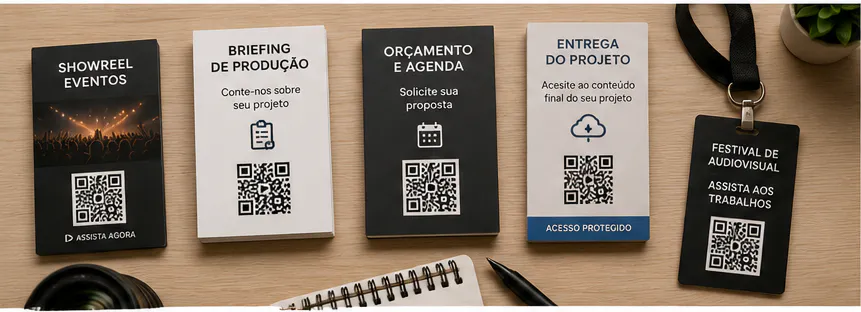
For a portfolio, the page should narrow down choices and get people to the most relevant work fast. For delivery, the destination needs to protect files and make access terms clear.
Use optimized video, light thumbnails, a short description and a quote button. If the material is hosted on an external platform, check its privacy settings, ads and uptime.
On client projects, document who controls the page and for how long. Confidential content should require authentication, and older versions need to be archived instead of staying live as the main destination.
You can use CodeQR Pages to organize contact info, links, forms and one main call to action without building a page from scratch.
Where to place the QR code
The code works best on stable materials, close to your audience. On a screen or in a video, give people enough time, and also offer a short link as a backup.
- Cards, media kits, proposals and printed portfolios.
- Badges, signage, booths and event materials.
- Delivery packaging, thank-you cards and physical kits.
- Posters, exhibitions, festivals and showcases.
- Materials from partners like agencies, venues and wedding planners.
- Presentations and campaign reports with appropriate access.
- Screens and videos, with a pause, good contrast and a backup link.
Avoid showing the code for just a few seconds or over moving footage. On printed materials, test size and contrast; at events, factor in distance, lighting and available connectivity.
How to create a professional QR code for a videographer
Plan the QR code alongside the showreel or landing page — not as an afterthought at the end of the layout process.
- Define the audience and the action: watch, request a quote, fill out a brief or access delivery.
- Pick a few relevant videos and optimize them for mobile loading.
- Confirm permissions, privacy and how long links stay valid.
- Use a dynamic QR code so you can swap the showreel, calendar or page.
- Customize it with enough contrast and margin.
- Add a specific call to action, like "Watch the corporate showreel."
- Name it by segment, partner, event and date.
- Test it on phones, connections and real viewing conditions.
Static or dynamic QR code: which one to choose
The choice between a static and a dynamic code depends on how stable the destination is, how long the material will be in circulation, and whether you need to track performance.
A static code stores the address permanently. It can work for something that truly never changes, but any update to your showreel, hosted video, form, calendar or delivery page means printing a new code. That's worth thinking about for materials that stay in circulation for months.
With a dynamic QR code, the printed image stays the same while you can change the destination from your dashboard. You can also track scans and compare campaigns. Those numbers show interest, and should be combined with clicks, form submissions or contacts to judge business results.
Metrics that help you evaluate results
Track the full path: scan, open, watch and reach out. Each step can point to a different problem.
- Scans by card, event, partner or segment.
- Plays and clicks on your featured videos.
- Brief or quote forms submitted.
- Contacts by type of showreel.
- Visits to delivery pages and instructions.
- The gap between a visit and a completed action.
A lot of visits with few plays can point to slow loading or a weak selection of work. Plays with no follow-up contact might call for a clearer call to action. Compare similar materials, and never share a client's metrics without authorization.
How to keep track of multiple QR codes
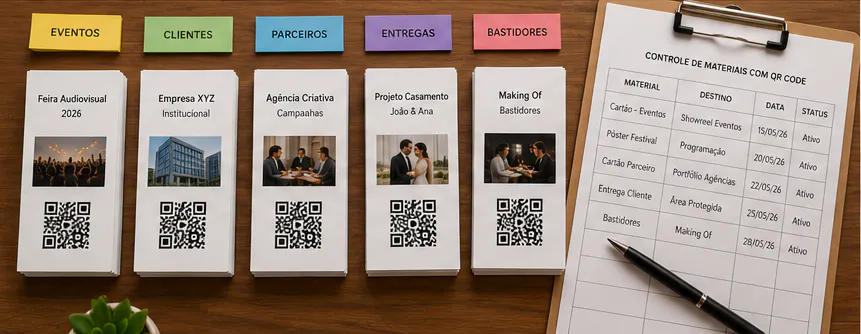
As a videographer starts using codes across different materials, it matters to know where each one was published and what it's meant to do.
Use names with context, an action and a date, like "agency alpha — event card — advertising showreel — 2026-08." On Pro and above, group codes into folders for showreels, events, partners, briefs, deliveries and campaigns; on any plan, tags and a consistent naming convention work just as well. This makes it easy to find campaigns, compare periods, and stop an old code from ending up on the wrong material.
Keep a record of printed materials in circulation and decide who can edit destinations. When a campaign ends, redirect the code to something that still makes sense, or pull the material. Never leave a visitor looking at an error, an expired form or information with no one responsible for it.
Footage, music, brands and confidentiality
Video work involves rights and data belonging to a lot of people. Being technically available doesn't mean something is cleared for your portfolio or for promotion.
- Confirm authorization from clients, crew, locations, brands and other rights holders.
- Use music, fonts and assets with licenses that match how you're publishing.
- Don't expose rough cuts, raw files or embargoed projects.
- Protect private deliveries with the right access and a defined timeframe.
- Credit collaborators and describe your role in the production accurately.
- State the purpose of forms and campaigns, and get consent.
Keep a record of permissions and usage limits per project. When you change a QR code's destination, confirm the new content has permissions equivalent to what was originally advertised.
Mistakes that hurt QR code performance
Review these points before you publish or print. Small mistakes can hurt the scan, raise doubts, and undermine trust in the destination.
- Sending every visitor to a channel full of disorganized videos.
- Using a heavy page that's slow to load on mobile.
- Publishing work without authorization or credit.
- Exposing a private delivery on a public URL.
- Showing the QR code for too short a time in a video.
- Reusing the same code across every partner.
Frequently asked questions about QR codes for videographers
These questions help you choose between a showreel, a page, a form and delivery without compromising the scan or anyone's rights.
What's the best QR code destination for a videographer?
A page with a segmented showreel, services and contact info. For delivery, use a protected area with specific instructions.
Should I link to YouTube or my own page?
Your own page organizes context and the call to action; the video itself can still be hosted elsewhere. Check its privacy settings, ads and speed.
Can I use a QR code to deliver videos?
Yes, as long as the destination has the right access level and a clear timeframe. Don't use a public link for private content.
Can I swap the showreel after printing?
With a dynamic code, yes. Keep the new content consistent with the material's original call to action.
How do I know which event brought in a quote request?
Use a separate code for each event and compare scans, plays, form submissions and recorded contacts.
Show the right work at the right moment
For videographers, a QR code turns cards and events into instant access to a relevant showreel. It can also organize briefs and delivery when the destination is secure and clearly explained.
Start by segmenting your portfolio and testing a lightweight page. Organize codes by context and keep permissions up to date. That way, the tool extends your presentation without creating risk for clients and participants.
Create a free CodeQR account and turn your videography materials into trackable contact points.