
QR Codes for Auto Repair Shops: Quotes, Booking and Aftercare
Learn how auto repair shops use QR codes for quotes and booking. Get ideas, metrics to track and how to create one free on CodeQR.


An auto repair shop gets contacts through its storefront, referrals, business cards, local ads, fleet partnerships and customers who've already had work done. In each of these moments, a driver is looking for something different: directions, hours, an initial estimate, a status update or aftercare guidance.
A QR code can simplify that access without making someone type a phone number or hunt for the right page. It works best when it leads to a clear page, and when vehicle and customer documents stay protected in the shop's own systems.
With CodeQR's QR code solution, you can bring together dynamic QR codes, short links, pages and visitor data in one organized flow. For an auto repair shop, that turns cards, printed materials, events and messages into contact points you can update and track.
Why use a QR code at an auto repair shop
Auto repair work mixes urgency, technical questions and the need for trust. Sending everyone straight into a conversation can lead to messages with no useful details. A screening page can ask for the vehicle type, the service needed and a contact preference, without requesting documents or excessive data.
You can also create codes for aftercare, directions and partners. Separating each source helps you find out whether the storefront, a card handed out by an auto parts store, or a maintenance reminder drives more response. This data guides your outreach, but it doesn't replace a technical diagnosis or formal quote approval.
9 practical QR code ideas for auto repair shops
The ideas below connect outreach, customer service and aftercare. For individual information, use controlled channels and proper authentication instead of a public page anyone can reach.
1. Initial quote requests
The QR code can open a short form asking for the make, approximate year, the type of problem and how to follow up. Make clear the response is an initial estimate, and that a full diagnosis and final price depend on an inspection. Avoid asking for a photo ID, a full VIN or other unnecessary data.
2. Location, hours and shop contact info
On your storefront, a card or a partnership, link to a page with a map, hours, phone number, text/WhatsApp and the types of service you offer. Instead of just opening a map, give context so the driver can confirm the shop fits their needs.
3. Booking an inspection or maintenance
A page can organize appointment requests, service type and availability. State that a submission is a request, not automatic confirmation, in case scheduling depends on parts, a lift or a specialist.
4. Repair order with extra access
A printed code can lead to general instructions, contact channels or an authenticated area. Don't put vehicle history, owner data or dollar amounts on a public URL. The repair order and formal approvals should stay in the systems your shop already uses.
5. Maintenance reminders and aftercare
On the pickup receipt, the code can open general care tips, warranty info, a contact channel and a way to request the next scheduled maintenance. Avoid generic advice that could be read as a diagnosis. Identify the shop and the date the content was last updated.
6. Reviews and service surveys
After the service, use a QR code to ask about the front desk, how clear the quote was, timing and communication. A second step can point to a public review page, without making a warranty, a discount or service conditional on a positive review.
7. Partnerships with auto parts stores, parking lots and fleets
Create a code for each partner, with a page and message that fit. This lets you identify where contacts come from and update terms without pulling all the material. Keep a record of who authorized the promotion and for how long.
8. Seasonal campaigns
Maintenance pushes before road trips, rainy season, vacations or a change of season can use temporary pages. A dynamic code lets you swap the campaign later, as long as the printed call to action stays broad enough to remain accurate.
9. Basic car-care educational content
Posters or cards can link to videos about tire pressure, dashboard warning lights or general upkeep, always in general terms and with guidance on when to get a professional opinion. The content shouldn't encourage unsafe DIY work or replace the owner's manual.
What to link the QR code to
The destination should match where the driver is in the process. Outreach needs an introduction; aftercare needs guidance; individual documents need access control.
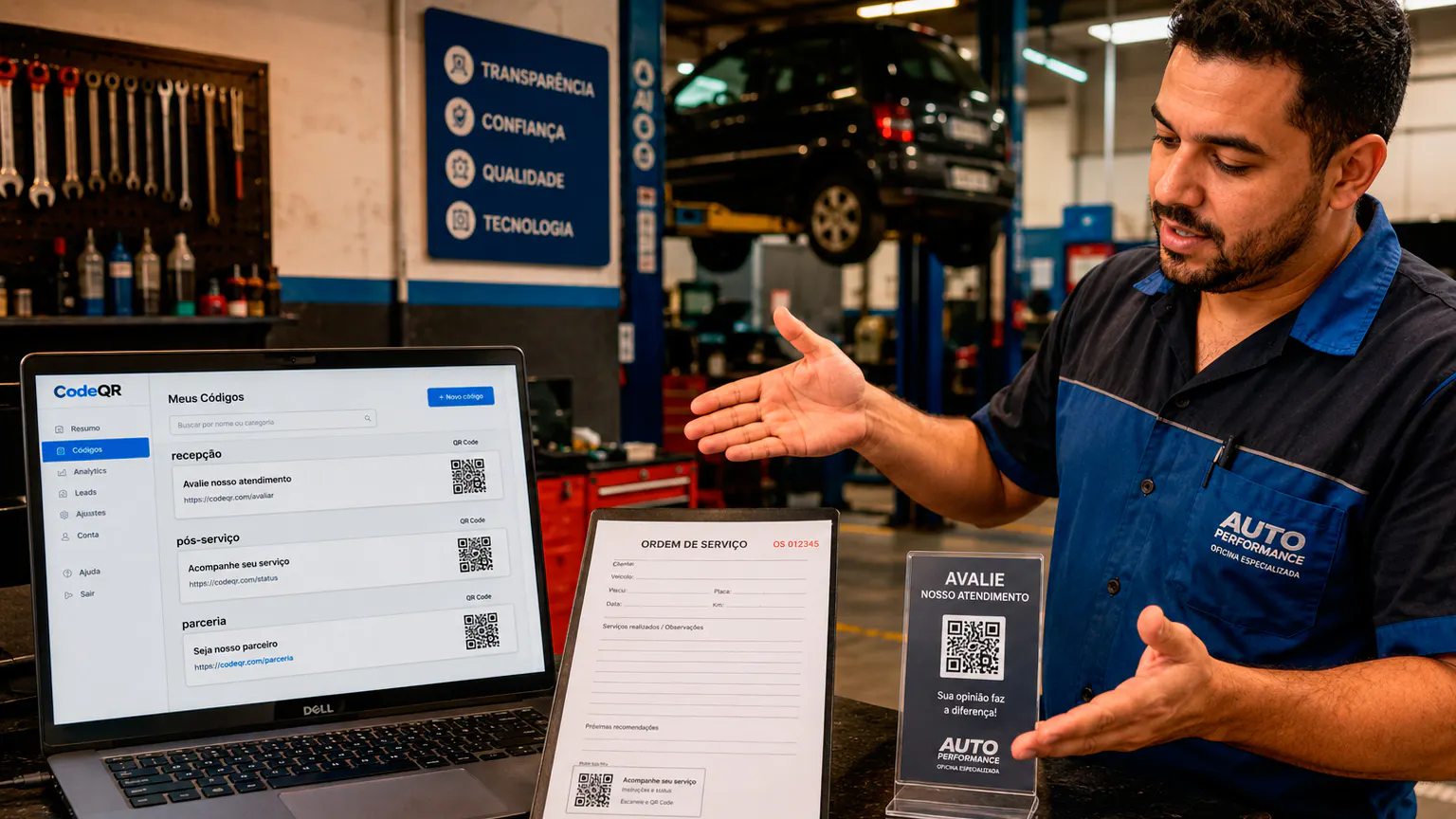
For new contacts, use a page with your services, makes or categories you work on, location, hours and a request button. A simple form helps you organize the response, but it shouldn't promise a fixed price without an inspection.
For existing customers, avoid public links with history attached. When there's a secure portal, the QR code can make it easier to reach the login screen. Also include a phone number or short link for anyone who can't scan.
You can use CodeQR Pages to organize contact info, links, forms and one main call to action without building a page from scratch.
Where to place the QR code
A shop has a lot of physical touchpoints, but the code needs to stay clean, well lit and tied to a specific action.
- Storefront, front desk and counter, sized for the viewing distance.
- Business cards, magnets, flyers and printed estimates.
- Aftercare cards and maintenance reminders.
- Materials from partners, fleets and local businesses.
- Internal stickers in a protected spot, without blocking signage or safety information.
- Car shows, fairs and inspection events.
- Email signatures and PDFs, with a short link as a backup.
Avoid printing on dirty, curved or reflective metal surfaces, or near heat and chemicals. Test the material once it's installed and replace it when it wears out.
How to create a professional QR code for an auto repair shop
Start by choosing an action your shop can actually deliver on and keep up to date.
- Pick the goal: directions, an initial quote, booking, aftercare or a survey.
- Build a mobile page with your shop's name and a clear instruction.
- Limit the form to what you need to organize the contact.
- Use a dynamic QR code for campaigns, hours and destinations that might change.
- Customize it with high contrast, without shrinking the scannable area.
- Add a call to action like "Request an estimate" or "See directions and hours."
- Name it by service type, partner and goal.
- Test the print, connectivity, form and phone number before you distribute it.
Static or dynamic QR code: which one to choose
The choice between a static and a dynamic code depends on how stable the destination is, how long the material will be in circulation, and whether you need to track performance.
A static code stores the address permanently. It can work for something that truly never changes, but any update to hours, a campaign, a form, a phone number, your location or an aftercare page means printing a new code. That's worth thinking about for materials that stay in circulation for months.
With a dynamic QR code, the printed image stays the same while you can change the destination from your dashboard. You can also track scans and compare campaigns. Those numbers show interest, and should be combined with clicks, form submissions or contacts to judge business results.
Metrics that help you evaluate results
This data helps you compare contact sources and spot bottlenecks. Tie each code to an action you can confirm at the shop.
- Scans by storefront, card, partner or campaign.
- Clicks on the map, phone number, text/WhatsApp and request button.
- Completed quote or booking forms.
- Contacts that turned into an in-person inspection.
- Repeat customers from an aftercare card.
- Times of day when digital demand is highest.
If your storefront drives a lot of map clicks but few calls, review your hours, directions and the services you're showcasing. If a partner sends few scans but a high conversion rate, that channel might be worth investing in. Don't assume a scan equals revenue without confirming it in your shop's own system.
How to keep track of multiple QR codes
As an auto repair shop starts using codes across different materials, it matters to know where each one was published and what it's meant to do.
Use names with context, an action and a date, like "north-side parts store — counter card — quote — 2026-08." On Pro and above, group codes into folders for your storefront, partners, campaigns, aftercare and internal materials; on any plan, tags and a consistent naming convention work just as well. This makes it easy to find campaigns, compare periods, and stop an old code from ending up on the wrong material.
Keep a record of printed materials in circulation and decide who can edit destinations. When a campaign ends, redirect the code to something that still makes sense, or pull the material. Never leave a visitor looking at an error, an expired form or information with no one responsible for it.
Privacy, documents and technical responsibility
Vehicle and owner data can identify someone and reveal their routines. A QR code should make access easier, without turning operational information into public content.
- Don't expose a license plate, VIN, ID, address or individual history on an open URL.
- Use authentication and permissions for documents and service tracking.
- Keep quotes, approvals, warranties and invoices in your shop's formal systems.
- Don't present educational content as a diagnosis of a specific vehicle's problem.
- Explain what forms are for, and limit collection to what you actually need.
- Review partners, destinations and phone numbers before keeping material in circulation.
If you integrate with a shop management system, define access and responsibilities clearly. A code found on a vehicle or repair order shouldn't let a third party look up a customer's data.
Mistakes that hurt QR code performance
Review these points before you publish or print. Small mistakes can hurt the scan, raise doubts, and undermine trust in the destination.
- Promising a final price on a page with no vehicle inspection.
- Putting history or owner data on a public link.
- Using a QR code that's dirty, too small or on a reflective surface.
- Sending people to a conversation without stating hours, service and location.
- Keeping an expired campaign or an old phone number on permanent material.
- Using the same code across every partner and losing track of the source.
Frequently asked questions about QR codes for auto repair shops
The answers below help you separate outreach, screening and individual information in a shop's day-to-day work.
What's the best QR code destination for an auto repair shop?
For new contacts, a page with your services, location, hours and an initial request. For existing customers, use a secure channel and avoid any individual document on a public page.
Can I use a QR code on the repair order?
It can work as extra access or an entry point to an authenticated area. It doesn't replace the order itself, customer approval, the quote, the warranty or the invoice.
Can I change the phone number after printing?
Yes, with a dynamic code, by updating the page or destination. Test the change and keep the printed call to action consistent.
How do I find out which partner brought in a customer?
Create separate codes for each auto parts store, parking lot or fleet, and record the source at check-in. Compare scans with confirmed reviews and services.
Can the QR code show a vehicle's history?
Only in a secure environment, with authentication and access control. A public URL printed on a vehicle or document isn't the right place for individual data.
Simplify service without exposing customer information
At an auto repair shop, QR codes can make directions, requests, partnerships and aftercare easier. Results improve when each code has its own purpose and drivers know exactly what they'll find.
Start with your storefront or business card, then expand to partners and aftercare. Organize your codes and keep documents in the right systems. That way, the shop gains speed without mixing up marketing, diagnosis and formal records.
Create a free CodeQR account and turn your auto repair shop materials into trackable contact points.