
QR Codes for Accountants: Client Intake, Events and Referrals
Learn how accountants can use QR codes for client intake, seminars and referrals without exposing client financial data. See practical ideas, metrics to track and how to create one free with CodeQR.


Accountants deal with business development, meetings, checklists, deadlines and a large volume of documents. A QR code can make it easier to reach a services page, a calendar or a document checklist, cutting down on long URLs and repeated instructions.
This use case demands a strict line between public information and client data. Cards, events and partner materials can lead to open pages; tax documents, credentials, payment slips and individualized files belong in secure systems and your firm's formal channels.
With a create custom QR codes, you can bring together professional QR codes, short links, pages and access data in one organized flow. For an accountant, that means turning cards, printed materials, events and messages into contact points you can update and measure over time.
Why use a QR code in your accounting practice
Business owners looking to switch or hire an accounting firm usually have questions about industry focus, onboarding process, required documents and communication channels. A dedicated page can answer the basics and lead into a conversation, without promising savings or a specific outcome before reviewing the situation.
For active clients, a QR code can point to general checklists, a public calendar and a resource hub. Separate codes by event, partner and material help you measure reach. Keep this kind of analysis limited to communication performance; never mix in financial or tax data.
9 practical uses of QR codes for accountants
The examples below focus on acquisition, education and organization. Anything individualized still needs authentication and should follow your firm's existing controls.
1. Services page by business profile
Build pages for sole proprietors and freelancers, retailers, service providers, independent professionals or growing companies, depending on who your firm serves. Explain general scope, region, service model and next steps, without claiming a specific structure is the best fit before you've reviewed the business.
2. Business contact form
Ask for name, company, city, industry, stage and preferred contact channel. Don't ask for a password, digital certificate, tax filing, detailed revenue figures or documents in this first form. Its job is to set up the conversation, not to replace an actual accounting assessment.
3. Initial meeting scheduling
A code on a card or at an event can open a page with available times and prep notes for the call. Say whether the meeting is a sales conversation, an onboarding session or a consultation, and which documents will be requested afterward through a secure channel.
4. Public checklist for starting or switching accountants
An educational resource can list common steps and documents, with a note that requirements vary by business type and location. Update the page whenever rules change, and don't present the checklist as a guarantee of compliance.
5. Events and talks for business owners
Share a presentation, calendar, supporting material or an interest form. Use a dedicated code per event and get consent for any follow-up. Avoid collecting detailed financial information in the room or through a public form.
6. Partnerships with associations and consultants
Cards at coworking spaces, trade associations, incubators or other partners can lead to dedicated pages. Track the source to evaluate the partnership, and never share a lead's data with third parties without being upfront about it.
7. Onboarding with general guidance
The QR code can open a guide to channels, deadlines, submission formats and who's responsible for what. Individualized documents still need to go through an authenticated portal or system. Keep a version and date so outdated instructions don't stay in circulation.
8. Public calendar and reminders
A page can bring together general dates, events and firm announcements. Client-specific deadlines depend on the individual case and shouldn't rely on a public page alone; use your formal channels for individualized obligations.
9. Experience survey and referrals
After service or onboarding, the code can open a short survey about communication and organization. Don't ask for financial details, and never make service conditional on a positive review. For referrals, explain how the contact information will be used.
Where to point your QR code
Your acquisition page should share enough to start a qualified conversation. The client portal needs to stay separate and protected.
Include the industries you serve, city or remote availability, general services, how to get in touch and a short form. Use educational content to answer common questions, but avoid advice that applies to a specific business without a proper review.
For checklists, show a review date and note that requirements vary. For individual documents and tasks, only point to the login page of your secure system, never to files reachable through a public URL.
CodeQR Pages can be used to organize contact details, links, forms and a main action without requiring you to build a page from scratch.
Where accountants can place a QR code
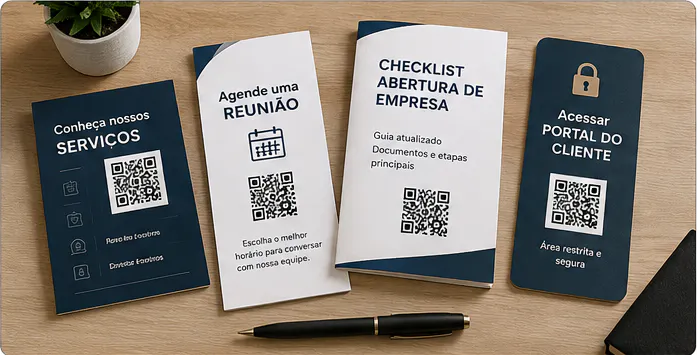
A QR code can show up on business development materials, as long as the call to action makes clear whether the destination is a services page, a checklist, an event or the client portal.
- Cards, institutional proposals and sales presentations.
- Materials for associations, coworking spaces, partners and business events.
- Talks, workshops and printed guides.
- Your office's reception area, for general information and contact channels.
- Onboarding kits and client handbooks, as a secondary resource.
- Public calendars, printed newsletters and educational materials.
- PDFs and emails, with a short link as a backup.
Don't print credentials, sensitive identifiers or direct URLs to files. On shared documents, check whether the code could be seen by third parties and whether the destination requires authentication.
How to create a professional QR code for accountants
The process should account for your business goal, changing rules and information security.
- Decide whether the code is for acquisition, an event, a checklist, onboarding or portal access.
- Separate public content from individualized information and documents.
- Build the page with your firm's identity, a review date and a main action.
- Use a dynamic QR code so you can update the checklist, calendar and channels later.
- Apply contrast and a professional look, without overdoing the visual design.
- Add a clear call to action, like "See our services" or "Get the current checklist."
- Name the code by partner, event, purpose and date.
- Test the destination, authentication, form and permissions before you distribute it.
Static or dynamic QR code: which one to choose
The choice between static and dynamic depends on how stable the destination is, how long the material will be in circulation, and whether you need to track performance.
A static QR code stores its destination permanently. It can work for something genuinely stable, but any change to a checklist, calendar, channel, event page or general guidance means generating and printing a new code. For materials that stay in circulation for months, that limitation is worth considering.
With a dynamic QR code, the printed image stays the same while you update the destination from your dashboard. You can also track scans and compare campaigns. Treat these numbers as signals of interest, and combine them with clicks, forms or contacts to judge business results.
Metrics that help you evaluate results
Use metrics to evaluate your channels and how clear your page is. Never bring tax, financial or client data into a marketing dashboard.
- Scans by card, partner, event or material.
- Clicks on services, calendar, checklist and contact.
- Business forms completed.
- Contacts that moved on to a meeting.
- Most-viewed educational materials.
- Source recorded during the sales process.
A partnership might produce few contacts with a strong fit, while an event might produce plenty of downloads and few meetings. Compare against the goal, and keep the data aggregated. You can't infer accounting outcomes or savings from page visits.
How to keep track of multiple QR codes
As an accountant starts using codes across different materials, it helps to know where each one was published and what it's meant to do.

Use names with context, action and date, like "business association — flyer — accountant switch — 2026-08." On Pro and above, group related codes into folders for acquisition, events, partners, checklists, onboarding and closed campaigns. This pattern makes it easier to find campaigns, compare periods and stop an old code from ending up on the wrong material.
Keep a record of what's in circulation and decide who can edit destinations. When a campaign ends, redirect the code to a relevant page or retire the material. Don't leave a visitor facing an error, an expired form or content with no clear owner.
Confidentiality, professional advertising and document security
Accounting work involves sensitive business information and regulated obligations. Your communication needs to respect confidentiality, the rules that apply to your license, and advertising limits.
- Don't promise lower taxes, savings or a specific outcome without review and analysis.
- Don't request passwords, digital certificates or sensitive documents in a public form.
- Keep files, payment slips and client-specific data in an authenticated environment.
- Identify your firm and its professionals according to the rules that apply.
- Update checklists and show a review date whenever regulations might change.
- Restrict access to client and partner reports and metrics.
Before publishing, review your profession's code of ethics and your licensing board's guidance. A QR code can improve communication, but it doesn't replace a contract, an assessment, technical responsibility or the official delivery channel.
Mistakes that hurt a QR code's effectiveness
Review these points before publishing or printing. Small mistakes can hurt readability, raise doubts and undermine trust in the destination:
- Putting a tax file or payment slip on a public URL.
- Asking for a digital certificate, password or document in the first form.
- Promising savings or a specific tax structure before reviewing the business.
- Keeping an outdated checklist live with no review date.
- Mixing codes from different partners and losing track of the source.
- Treating a public page as the only channel for individualized deadlines.
Frequently asked questions about QR codes for accountants
These questions help you keep marketing, education and individualized client service separate.
What's the best QR code destination for an accountant?
For new contacts, a page with your services, industries served, process and a short form. For clients, use only the entry point to a secure portal, never a public link to files.
Can I put a document checklist behind a QR code?
Yes, as a general and up-to-date reference. Show a date and note that requirements vary. Actual document submission should go through a secure channel.
Is it safe to put a QR code on an invoice or payment slip?
Treat this with extreme caution because of fraud and authenticity risks. Don't build improvised workflows; follow your firm's and the issuer's official systems and controls.
Can I update the checklist after printing?
With a dynamic code, you can update the destination. Keep versions, and check that the printed call to action still matches.
How do I know which event generated meetings?
Use a dedicated code per event, track scans and forms, and record the source in your sales pipeline. Don't tie these metrics to a lead's tax data.
Use the QR code to guide, not to expose documents
For accountants, QR codes can support acquisition, events, checklists and onboarding. The value comes from clarity and staying current, as long as data and documents stay in the right environments.
Start with a card or event material, use an informational page and organize your codes by source. By keeping marketing separate from individualized client service, your firm improves the client journey without compromising confidentiality or responsibility.
Create a free CodeQR account and turn your accounting materials into trackable contact points.