
How Smart Rules choose a destination — and why it differed
The exact order CodeQR evaluates Smart Rules, cloaking, iOS/Android and geographic targeting; how split traffic sticks; what bots and link previews get; geolocation accuracy; and a symptom-by-symptom troubleshooting list.

After reading this page you can predict where any visitor lands on a link or QR code with Smart Rules, explain a result that looked wrong, and fix the rule if it was. Steps to set up each kind of rule are in the how-to guides linked at the end.
The decision path
For every request to a short link (or a scan of a dynamic QR code) CodeQR checks, in this order:
- Before any destination is chosen — a wrong or missing password, an expired link, a banned link, or a Pre-redirection form that has not been filled in end the request here. Smart Rules never run for these.
- Custom link preview for crawlers — if the link has Custom Link Preview turned on (Starter and above) and the request comes from a known crawler, the crawler gets the preview page.
- Link Cloaking — a cloaked link always shows its Destination URL inside the cloak. Smart Rules are ignored; a rule's destination is never cloaked.
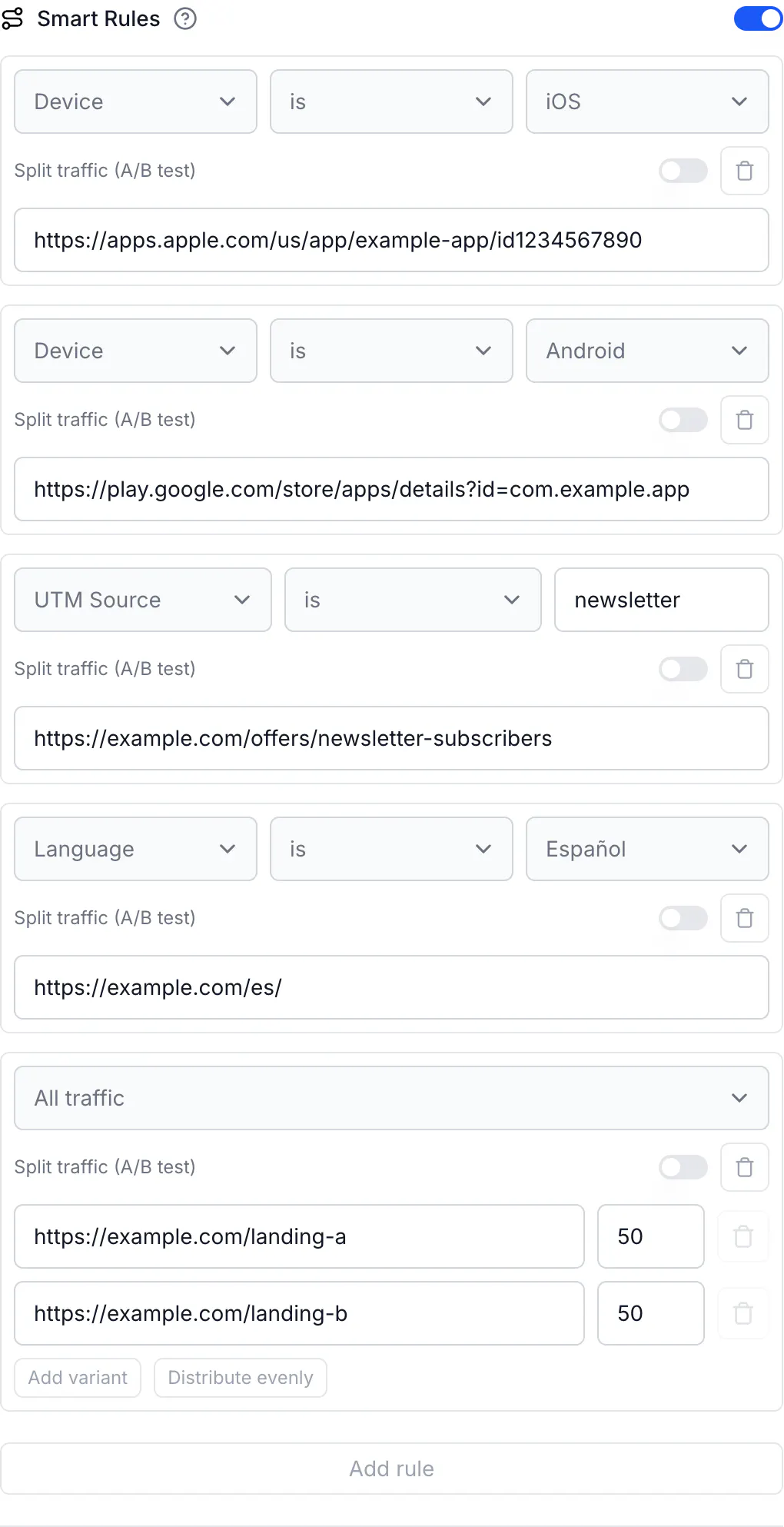
- Smart Rules — the rules run top to bottom. The first rule whose condition matches decides the destination (a fixed URL or one variant of a split). If none matches, evaluation continues.
- iOS Targeting, then Android Targeting, then Geographic Targeting — the older per-feature toggles, only if switched on.
- Destination URL — the link's main URL, the fallback for everyone else.
The chosen URL then receives the query parameters that were on the short link (?utm_source=…, ?ref=…); with Conversion tracking on, cq_id is appended. The response is an HTTP 302 redirect (301 for a root domain) marked must-revalidate, so browsers do not keep an old destination in their redirect cache.
Inside step 4: how a rule matches
- One condition per rule: attribute is / is not value. There is no AND. To express "iOS visitors from Brazil", put a Country is Brazil rule with the Brazilian iOS destination above the general Device is iOS rule — or accept that whichever rule comes first wins.
- The value is compared whole and case-insensitively.
newslettermatchesNewsletter;newsdoes not matchnewsletter. - If the request has no value for the attribute — location unknown, no referrer,
?utm_source=empty, browser language outside the ten supported — the rule does not match, whether it says is or is not. The visitor continues down the list. - An All traffic rule (no condition) matches everyone, always splits, and must be last: anything below it would never run.
- A rule that matches decides immediately. Rules below it are not consulted, even if they are "more specific".
What CodeQR reads from the request
- Device — Read from: the operating-system name in the browser's user agent · Consequences: iPad Safari reports itself as a Mac (macOS); Android tablets in Chrome's desktop mode report Linux; "Request desktop site" hides the mobile OS. There is no mobile/tablet value.
- Country, Region (state), City, Continent — Read from: the visitor's IP address, resolved by CodeQR's edge network · Consequences: VPNs, corporate proxies, mobile carrier gateways and privacy relays place the visitor where their exit address is registered. Country resolution is right for the vast majority; region and city are approximate — one widely used IP database publishes about 99.8% accuracy at country level, about 80% at region level and 66% at city level. Unknown location → no location rule matches.
- Language — Read from: the browser's
Accept-Languagelist: the first entry that is one ofpt en es fr de zh ru it ja ko, with the region stripped (pt-BR→pt) · Consequences: Location does not matter; a visitor in Brazil with the browser in English matches English. Safari and private windows send a single language. - Referrer — Read from: the
Refererheader's hostname without a leadingwww.· Consequences: Apps, messengers and QR scans send none; browsers send only the origin across sites, and nothing from HTTPS to HTTP or fornoreferrerlinks.l.facebook.comandfacebook.comare different values. - UTM Source/Medium/Campaign/Term/Content — Read from: the query string of the short link as clicked · Consequences: Parameters typed into the destination URL or added with the UTM Builder are not on the short link and do not trigger rules.
What this means for the data involved: the rule is evaluated from the request headers and the location derived from the visitor's IP address at the edge. The click that CodeQR records keeps the derived country, region, city and continent, the device, browser and operating-system family, the referrer and the destination URL — not the IP address, the full user-agent string or coordinates, which are written empty. The split test stores a first-party cookie (cq_id) on your short link's domain for 1 hour, or 30 days with conversion tracking. Nothing else is stored specifically for Smart Rules.
Split traffic: assignment and stickiness
A visitor's variant is a function of the link and their click ID, spread by the weights. The click ID is stored in the cq_id cookie scoped to the short link's path, so the same browser lands on the same variant for 1 hour, or 30 days when Conversion tracking is on. A private window, another browser or another device is a new visitor. Changing the weights changes the bucket boundaries, so some returning visitors switch. Bots get a bucket too but are not counted.
Bots, crawlers and link previews
- CodeQR recognizes common crawlers and preview fetchers by user agent (search engines,
facebookexternalhit, WhatsApp, Slack, Twitter/X, LinkedIn, ChatGPT and any agent that calls itself a "bot"). - Recognized crawlers still get a destination from your rules — unless the link has Custom Link Preview on, in which case they get the preview page. QR codes never serve the preview page.
- Recognized crawlers are not counted as clicks or scans. Fetchers that look like a normal browser (Apple's iMessage preview, some email security scanners) are counted like a person and are routed like one.
- A crawler has no phone OS and usually no
Accept-Language, and its IP is a data center: it typically matches no Device or Language rule and may match a Country rule for the data-center country. It receives that destination and, on a split, one variant — but leaves no click behind.
Cache and timing
- Saving a link or QR code updates the redirect immediately; there is no propagation delay.
- The
302redirect is not cached by browsers. If a visitor "still sees the old page", the cause is the sticky split cookie (above), a bookmark to the destination itself, or the destination page's own cache — not the short link. - Analytics deduplicate repeated clicks from the same visitor for a few minutes; the redirect still happens every time.
Analytics
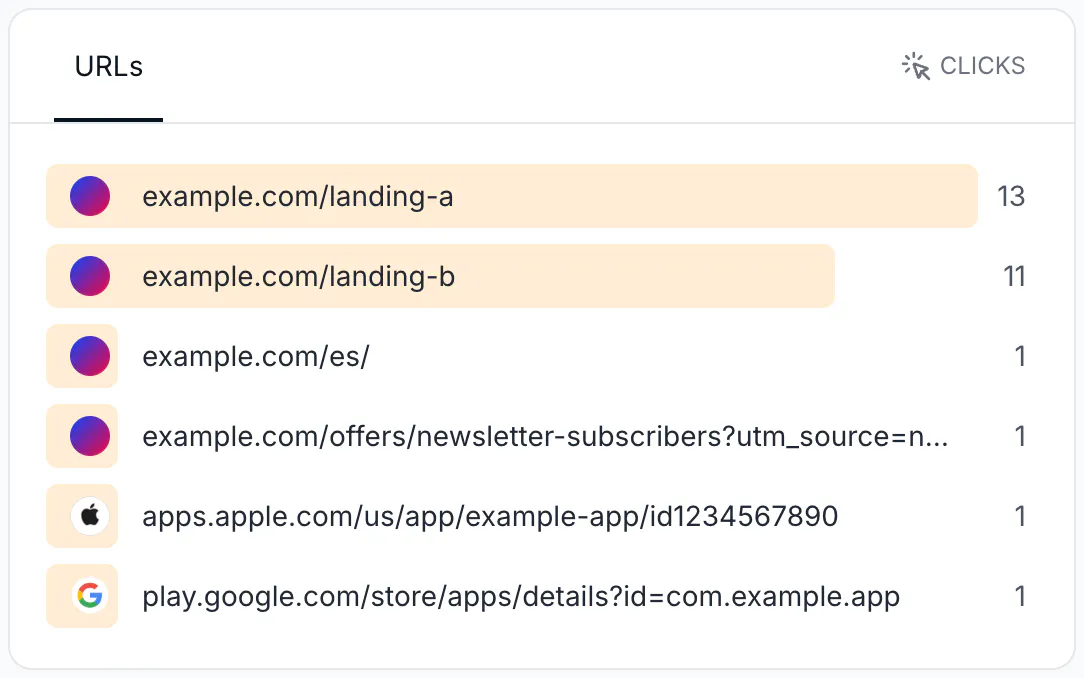
Only the final destination is recorded. Analytics for one link or QR code shows a URLs card with clicks (and, by event, leads and sales) per destination — that is how you see which rule or variant fired. Two rules or variants pointing to the same URL are indistinguishable. When Link Cloaking wins, the recorded URL is the cloaked Destination URL.
Troubleshooting
A visitor from country X landed on the page for country Y
Their traffic left through an address registered in Y — VPN, company proxy, mobile carrier gateway, privacy relay — or the IP database is stale for that address. Ask what network they were on; check the Countries card in Analytics to see where CodeQR placed the click. Keep the Destination URL usable for anyone, and do not put anything with legal or pricing consequences behind a City or Region (state) rule.
The rule never matches anyone
Compare the value with what the request carries: iOS/Android/Windows/Mac OS/Linux for Device (not mobile); BR not Brazil; SP not São Paulo or BR-SP; instagram.com not https://www.instagram.com/; a UTM that is on the short link, not on the destination. Full list in the reference.
Two rules apply to the same visitor — which one wins?
The one higher in the list. Drag order matters: put specific rules (city, campaign) above general ones (country, device). An All traffic rule can only be last.
I set both a Device is iOS rule and iOS Targeting
The Smart Rule wins; iOS Targeting, Android Targeting and Geographic Targeting are consulted only when no Smart Rule matched. You can leave the older toggles off.
Rules are on, but every visitor sees the Destination URL
Check Link Cloaking: a cloaked link ignores Smart Rules. Then check that the link is not expired or password-protected in a way that ends the request early. Then check the values (previous item).
The same person always gets the same variant
Expected: sticky assignment for 1 hour, or 30 days with conversion tracking. Test in a private window.
The link shows clicks before I shared it — or shows more clicks than people who could have clicked
Link previews (WhatsApp, Slack, iMessage, Facebook, LinkedIn, Telegram) and email security scanners fetch the URL. Recognized crawlers are not counted; fetchers that look like browsers are. Bursts of clicks seconds after sending an email or message are the signature.
The link preview shows my default page, not the country or store page
Preview crawlers rarely match a Device or Language rule and get the Destination URL (or a Country rule for their data center). The person who taps the link is routed on their own request.
A visitor in Brazil with an English browser got the English page
Language is the browser's language, not the location. If location should win, place the Country rule above the Language rule.
The Region rule never fires
Use the bare ISO 3166-2 code (SP, CA), never the name or the country-prefixed form.
The store opened but the app did not, or "the app didn't open" on iOS
App-opening links (Universal Links, App Links) are not honored behind a redirect by Apple or Google. Point rules to the store URLs (https://apps.apple.com/…, https://play.google.com/store/apps/details?id=…) and let the store hand off; never market:// or itms-apps://.
iPad users match macOS, not iOS
Safari on iPadOS identifies as a Mac. Decide whether Mac and iPad should share a destination and add a Device is macOS rule accordingly.
I changed a rule and the visitor still sees the old page
Rule changes are live immediately. If it is a split, the visitor's cookie keeps their variant for the sticky window. If it is a fixed URL, they are probably opening a bookmark or an app's cached copy of the destination page, or your own site cached the old content.
Analytics do not tell me which rule fired
Only destinations are recorded. Give each rule and variant its own URL (add a path or ?v=b) so the URLs card can tell them apart.
The API rejected my rules
403 on Free/Starter/Pro or on a static QR code; 400 unprocessable_entity for shape errors, with the failing rule's index in the message. The full list is in Create Smart Rules with the API, MCP, and automations.