
Split one link's traffic to A/B test destinations
Link rotator for A/B tests — split one short link or QR code between 2–4 landing pages by percentage, keep each visitor on the same variant, read clicks and conversions per destination, and end the test — in the app, API or MCP.

At the end of this guide, one short link or QR code works as a link rotator: it rotates visitors between two to four landing pages by the percentages you set, each visitor keeps seeing the same variant, and you read clicks — and, with conversion tracking, leads and sales — per destination.
Availability
- Plan: Business and above (pricing).
- Where: link builder → Smart Rules → the Split traffic (A/B test) switch on any rule, or an All traffic rule. Same section in the QR code editor for dynamic QR codes of type URL.
Before you start
- Two to four variant URLs. Give each variant a distinct URL (
/pricingand/pricing-b, not the same URL twice) — results are reported per URL. - Decide the share for each variant. Weights are whole numbers from 1 to 100 and must add up to 100.
- Optional: turn on Conversion tracking on the link (available on Pro plans and above, so every Business workspace has it). It extends how long a visitor sticks to a variant from 1 hour to 30 days and lets you compare leads and sales per variant.
Steps
- Open Links and click Add Link, or open an existing link and choose Edit.
- Enter variant A in Destination URL (it doubles as the fallback if you ever turn the test off).
- Turn on Smart Rules.
- In the first rule, open the attribute list and select All traffic. The rule switches to split mode with two Variant URL fields at 50 / 50.
- Enter variant A and variant B URLs.
- To test more pages, click Add variant (up to 4). Weights are redistributed automatically; click Distribute evenly to reset them, or type your own — the sum must be 100.
- Click Create link (or Save link).
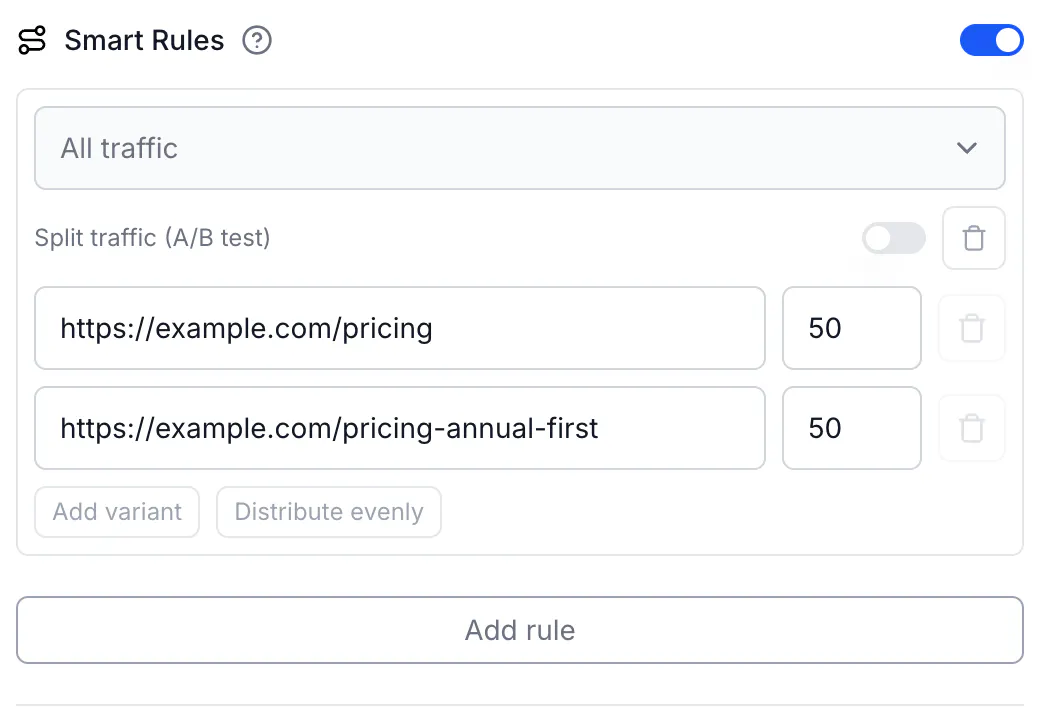
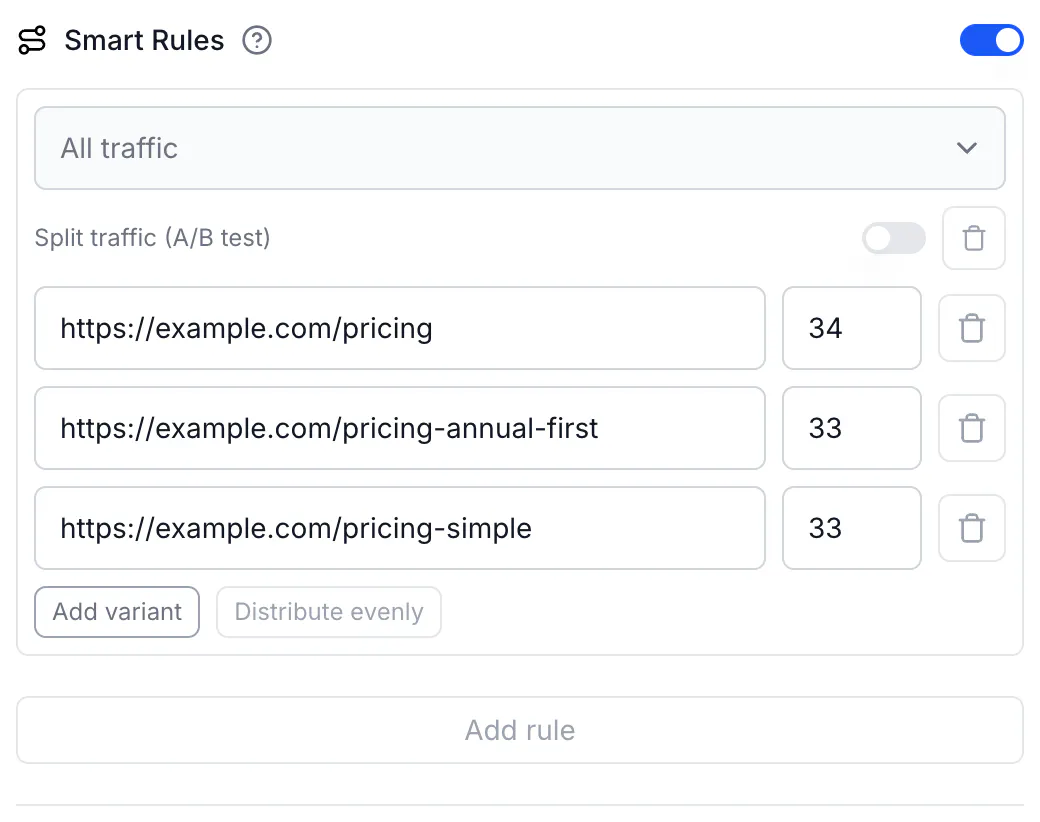
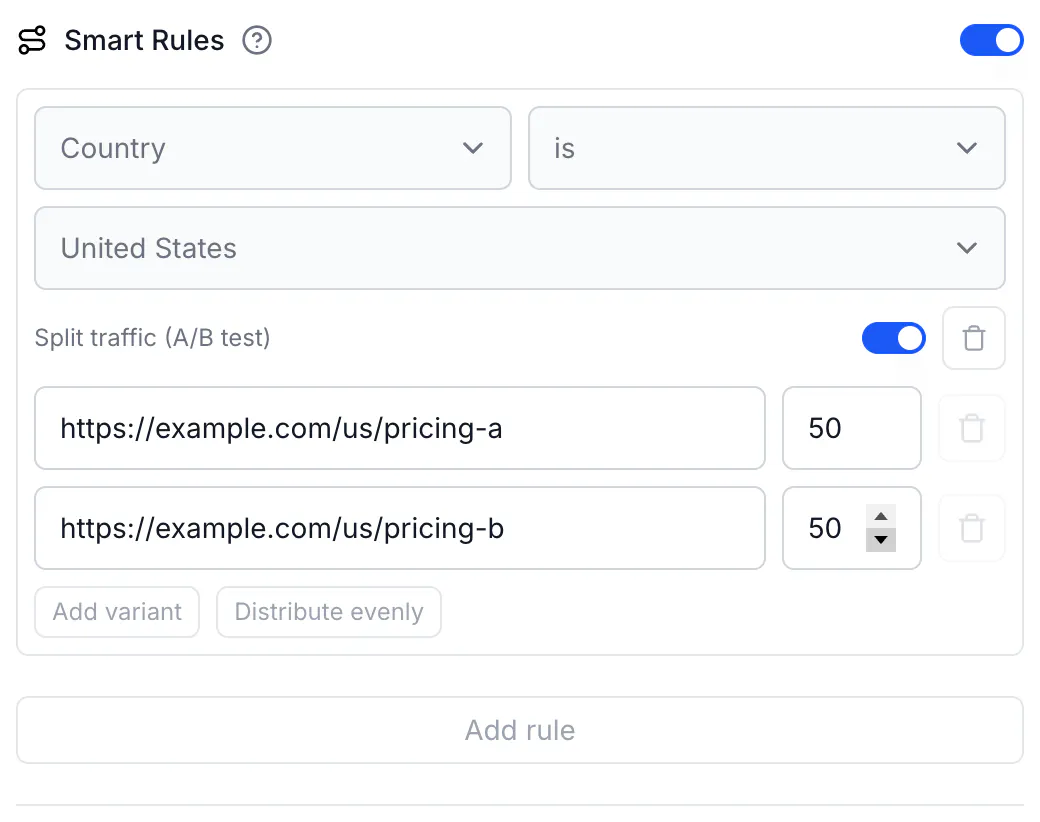
To split only part of your traffic — for example test two pages for US visitors and send everyone else to one page — keep a condition on the rule (Country is United States), turn on Split traffic (A/B test) on that rule, and fill in the variants. Rules with a condition and a split are evaluated in order like any other rule; an All traffic rule must be the last one.
How visitors are assigned
Each visitor is placed in a bucket by a hash of the link and their click ID; the buckets are distributed by your weights. The click ID lives in a cookie (cq_id) set on the short link's path for 1 hour, or 30 days when Conversion tracking is on, so the same person keeps landing on the same variant for that period. New visitors are spread according to the weights; with small numbers the split is only approximately even.
Read the results
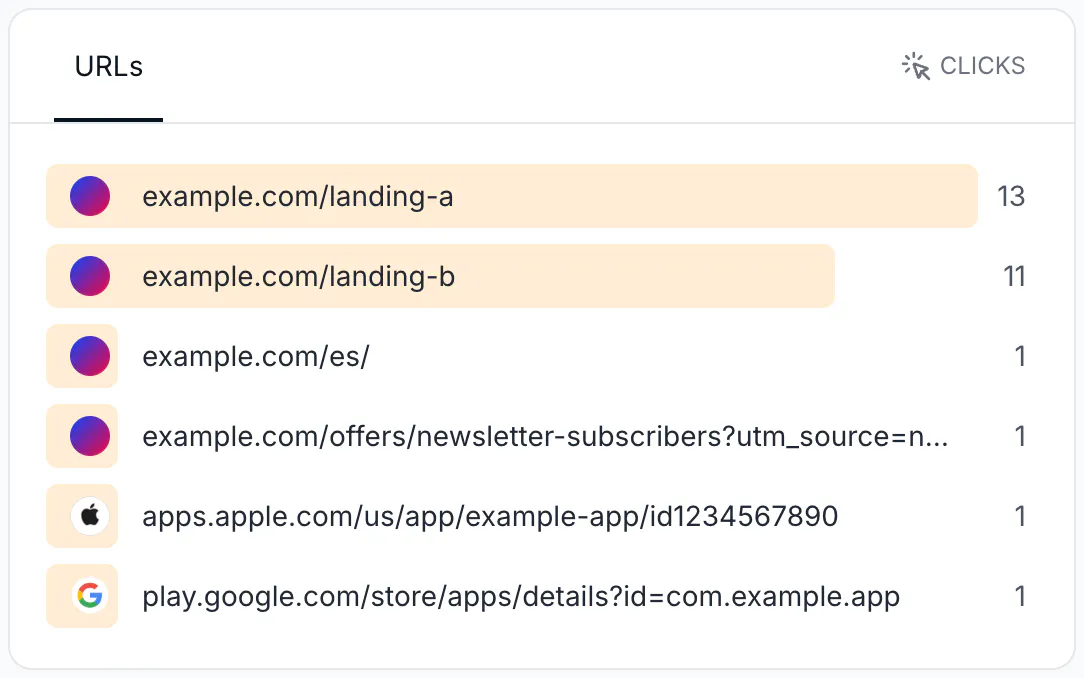
Open Analytics for the link. The URLs card lists clicks per destination — one row per variant URL. Switch the event at the top of the page to Leads or Sales to compare conversions per variant when conversion tracking is on.
End the test
Turn off Smart Rules (or remove the rule) and save: all traffic goes to the link's Destination URL. Set Destination URL to the winning page first if it is not already the fallback.
Do the same via API
An A/B test is one rule with no condition and a split. Update an existing link:
curl -X PUT https://api.codeqr.io/links/cmswk759f0001j41i0vj1vmfq \
  -H "Authorization: Bearer codeqr_xxxxxxxxxxxxxxxxxxxxxxxx" \
  -H "Content-Type: application/json" \
  -d '{
    "rules": [
      { "split": [
          { "url": "https://example.com/pricing",              "weight": 50 },
          { "url": "https://example.com/pricing-annual-first", "weight": 50 }
      ] }
    ]
  }'
Response (200 OK):
{
  "id": "cmswk759f0001j41i0vj1vmfq",
  "domain": "go.example.com",
  "key": "pricing",
  "url": "https://example.com/pricing",
  "archived": false,
  "expiresAt": null,
  "expiredUrl": null,
  "password": null,
  "externalId": null,
  "trackConversion": false,
  "proxy": false,
  "title": null,
  "description": null,
  "image": null,
  "video": null,
  "utm_source": null,
  "utm_medium": null,
  "utm_campaign": null,
  "utm_term": null,
  "utm_content": null,
  "rewrite": false,
  "doIndex": false,
  "banned": false,
  "flexible": false,
  "filled": false,
  "ios": null,
  "android": null,
  "geo": null,
  "rules": [
    {
      "split": [
        { "url": "https://example.com/pricing", "weight": 50 },
        { "url": "https://example.com/pricing-annual-first", "weight": 50 }
      ]
    }
  ],
  "userId": "cm73yc6m70002mtesulffnrgb",
  "folderId": null,
  "projectId": "cm73y7wm100008j24i1b137wr",
  "preRedirection": false,
  "pageId": null,
  "pageUrl": null,
  "isFormMandatory": false,
  "publicStats": false,
  "clicks": 0,
  "lastClicked": null,
  "leads": 0,
  "sales": 0,
  "saleAmount": 0,
  "createdAt": "2026-08-17T01:32:38.884Z",
  "updatedAt": "2026-08-17T01:32:59.384Z",
  "tagId": null,
  "comments": null,
  "notificationToken": null,
  "useAsTemplate": false,
  "tags": [],
  "shortLink": "https://go.example.com/pricing",
  "webhookIds": [],
  "qrCode": "https://api.codeqr.io/qr?url=https://go.example.com/pricing?qr=1"
}
Add "trackConversion": true to the same request for the 30-day window. A conditional split is a rule with attribute, operator, value and split (no url). To end the test, send { "rules": null } — the response then shows "rules": null and all traffic goes to url.
Validation you may hit (all 400, code unprocessable_entity): Split weights must add up to 100; A rule needs either a destination url or a traffic split, never both; A rule without a condition must split traffic; A rule without a condition matches all traffic, so it must be the last one. Weights must be integers between 1 and 100; a split has 2 to 4 variants.
Do the same via MCP
Ask your agent, connected to https://mcp.codeqr.io/mcp:
Run an A/B test on link cmswk759f0001j41i0vj1vmfq: 50% to https://example.com/pricing and 50% to https://example.com/pricing-annual-first.
update_link is called with:
{
  "linkId": "cmswk759f0001j41i0vj1vmfq",
  "rules": [
    { "split": [
        { "url": "https://example.com/pricing", "weight": 50 },
        { "url": "https://example.com/pricing-annual-first", "weight": 50 }
    ] }
  ]
}
To end the test, ask the agent to remove the rules; it sends "rules": null. The tool description states both behaviors, so agents do this correctly without extra instructions.
Do the same via automations
No Make, Zapier or Pluga module has a rules field. Use Make's Make an API Call module or an HTTP step with the PUT request above. To read results from an automation, call GET https://api.codeqr.io/analytics?event=composite&groupBy=top_urls&linkId=<linkId>&interval=30d — it returns clicks, leads and sales per destination URL (identify the link by linkId, or add type=link when you use domain and key).
Verify it works
From a terminal, each fresh request gets its own bucket; the same cookie always gets the same variant:
for i in 1 2 3 4 5 6; do curl -sI https://go.example.com/pricing | grep -i location; done
# a mix of https://example.com/pricing and https://example.com/pricing-annual-first

curl -sI -b "cq_id=testvisitor0001" https://go.example.com/pricing | grep -i location
curl -sI -b "cq_id=testvisitor0001" https://go.example.com/pricing | grep -i location
# the same destination both times
In a browser, open the short link in a private window several times (each private window is a new visitor). Then check the URLs card in Analytics.
Troubleshooting
I always land on the same variant
That is the sticky assignment: your browser holds a cq_id cookie for this short link for 1 hour (30 days with conversion tracking). Test with a private window or another browser, or delete the cookie for the short link's domain.
The split is not 50/50
With few clicks the split is only approximately even; it converges as clicks grow. Returning visitors do not get a new bucket while their cookie lasts. Link-preview fetchers and other bots receive a variant but are not counted as clicks. If one variant is consistently far off after hundreds of clicks, check that both destination pages load (a failing page can look like "fewer visits" in your own analytics while CodeQR counted the click).
I changed the weights and some returning visitors switched pages
Weights define the bucket ranges; changing them moves the boundaries, so a returning visitor's bucket can fall on the other side. Set the weights before you start sharing the link; to change them later, treat it as a new test.
A red message appears under the split
The messages are Weights must add up to 100%., Each weight must be a whole number between 1 and 100. and Every variant needs a URL. Fix the values in the rule; the message disappears when the split is valid. Click Distribute evenly to reset the weights.
Two variants show as one row in Analytics
Results are per destination URL. Two variants with the same URL are indistinguishable; give each variant its own URL (for example add ?v=b).
The API returns "A rule without a condition matches all traffic, so it must be the last one"
Move the split-only rule to the end of the rules array. Rules with a condition go first.
After 1 hour a visitor saw the other page
Expected without conversion tracking: the sticky window is 1 hour. Turn on Conversion tracking on the link for a 30-day window.