
CodeQR and Pluga Integration via Webhooks: Step by Step
Learn how to configure CodeQR integration with Pluga using webhooks to automate events such as clicks, scans and lead captures.

Introduction
If you use CodeQR to shorten links, create dynamic QR Codes, and capture leads, you can now automate workflows with other tools via Pluga Webhooks.
Pluga is a platform that allows you to connect different systems without the need for code, enabling process automation between applications and CRMs like Google Sheets, RD Station, HubSpot, Trello, Slack, and many others.
In this guide, you will learn how to set up the integration between CodeQR and Pluga using webhooks, allowing events such as link clicks, QR Code scans, and lead captures to be automatically sent to other tools.
What are Webhooks and How Do They Work in CodeQR?
Webhooks are mechanisms that allow a system to automatically send information to another system whenever a specific event occurs.
In CodeQR, you can configure webhooks to send real-time data whenever events occur, such as:
- Lead capture on a pre-redirect page.
- A dynamic QR Code scan.
- A short link click.
- Interactions recorded in the analytics dashboard.
How to Configure Pluga Webhooks to Receive Events from CodeQR
Follow these steps to integrate CodeQR with Pluga via Webhooks:
1. Creating a Webhook in Pluga
Log into your Pluga account (https://pluga.co).
1 - Click on "Create a new automation".
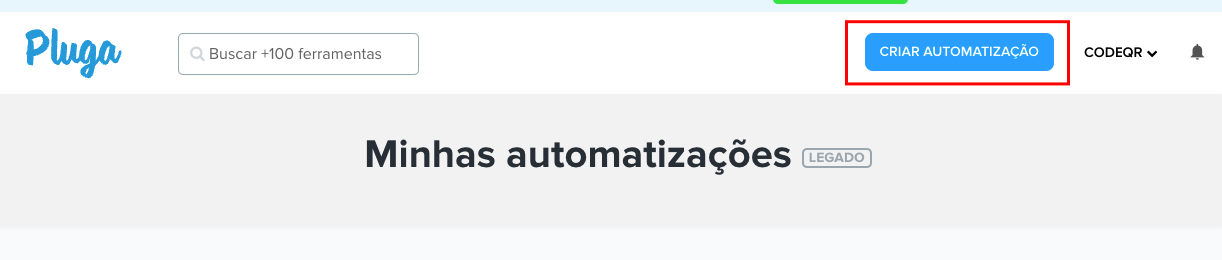
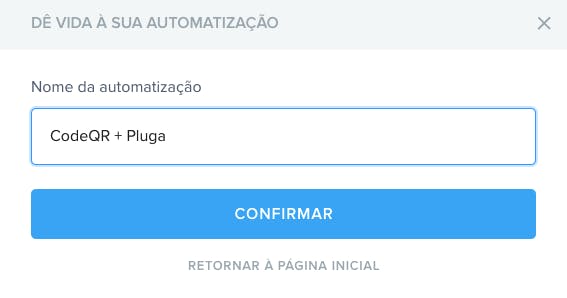
2 - On the next page, give this automation a name.
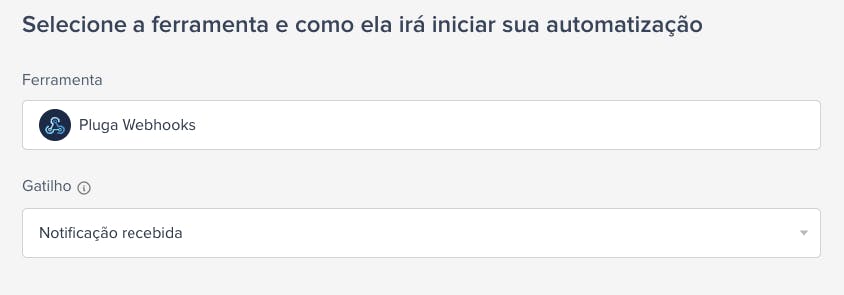
3- In the next step of the configuration, select Pluga Webhooks as the source tool and choose the trigger "Notification received".
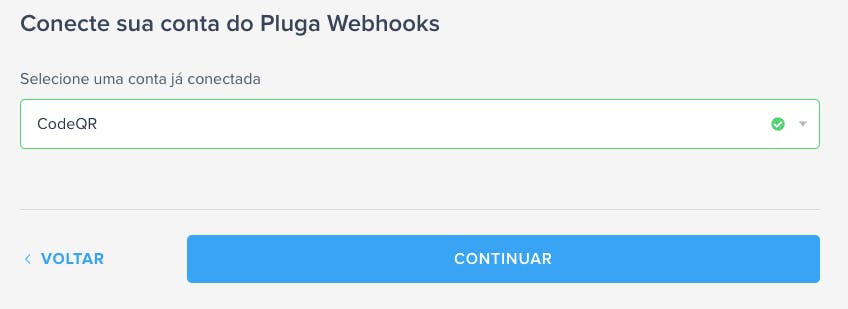
4 - Then, in the account connection step, select a connected account or connect a new one.
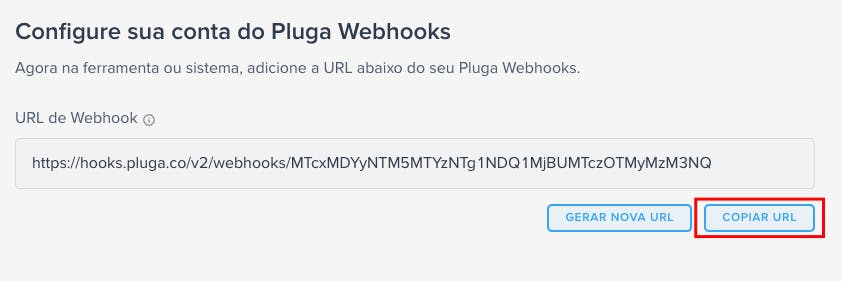
5 - Copy the URL generated by your automation.
2. Configuring the Webhook in CodeQR
Now, let's configure CodeQR to send events to Pluga.
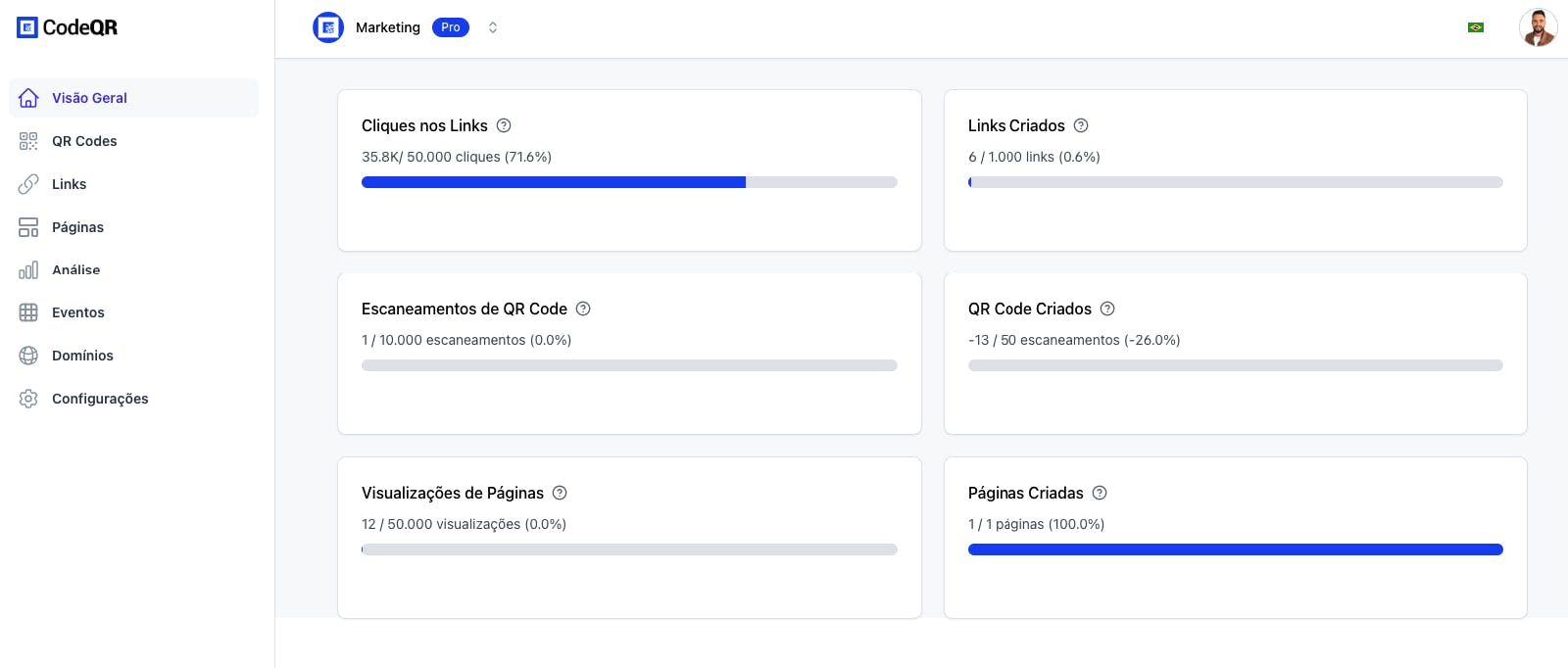
1 - Log into the CodeQR Dashboard.
2- Navigate to Settings > Webhooks, then click Create Webhook.
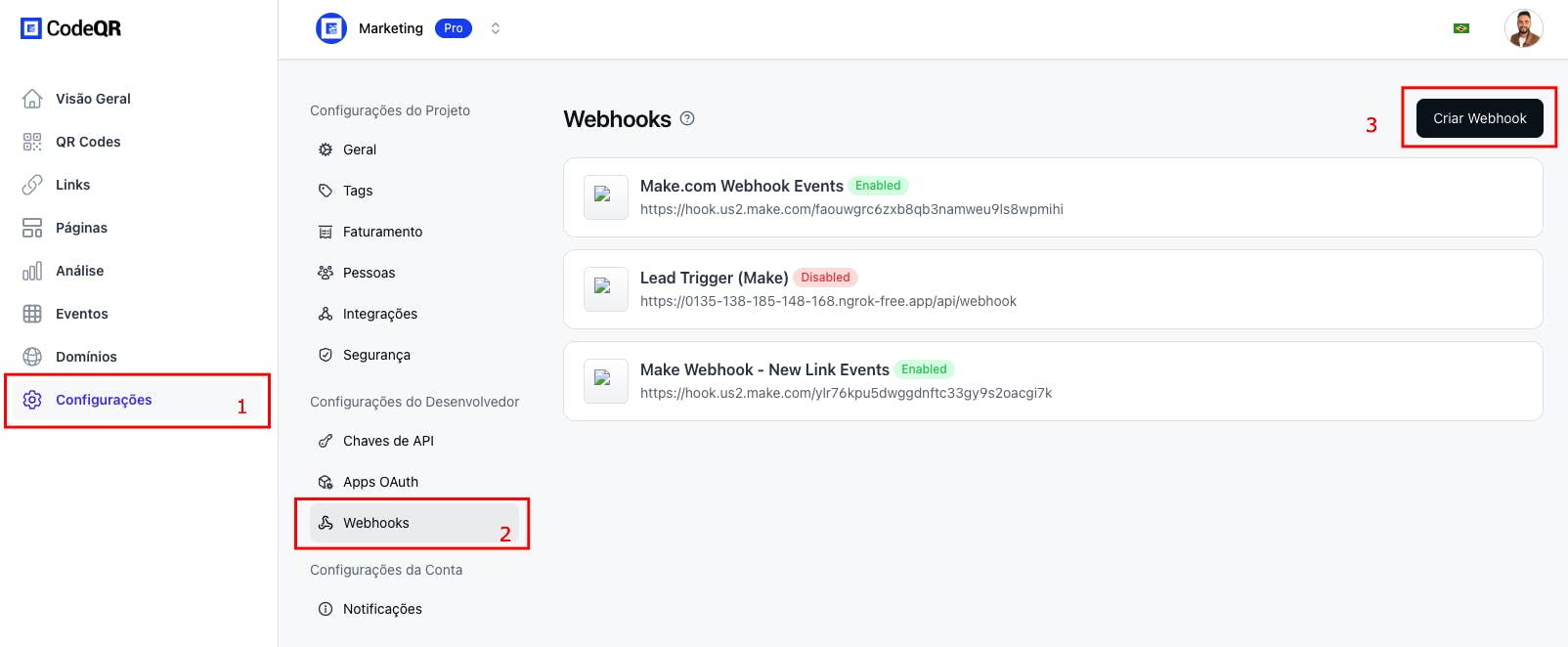
3 - Enter a name and paste the webhook URL generated by Pluga into the Webhook URL field.
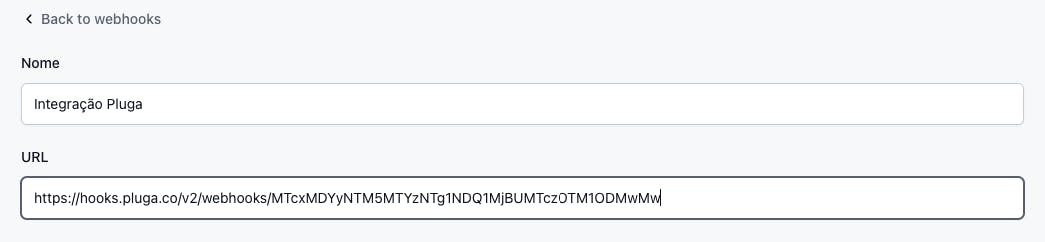
4 - Choose the events you want to activate and click Create Webhook.
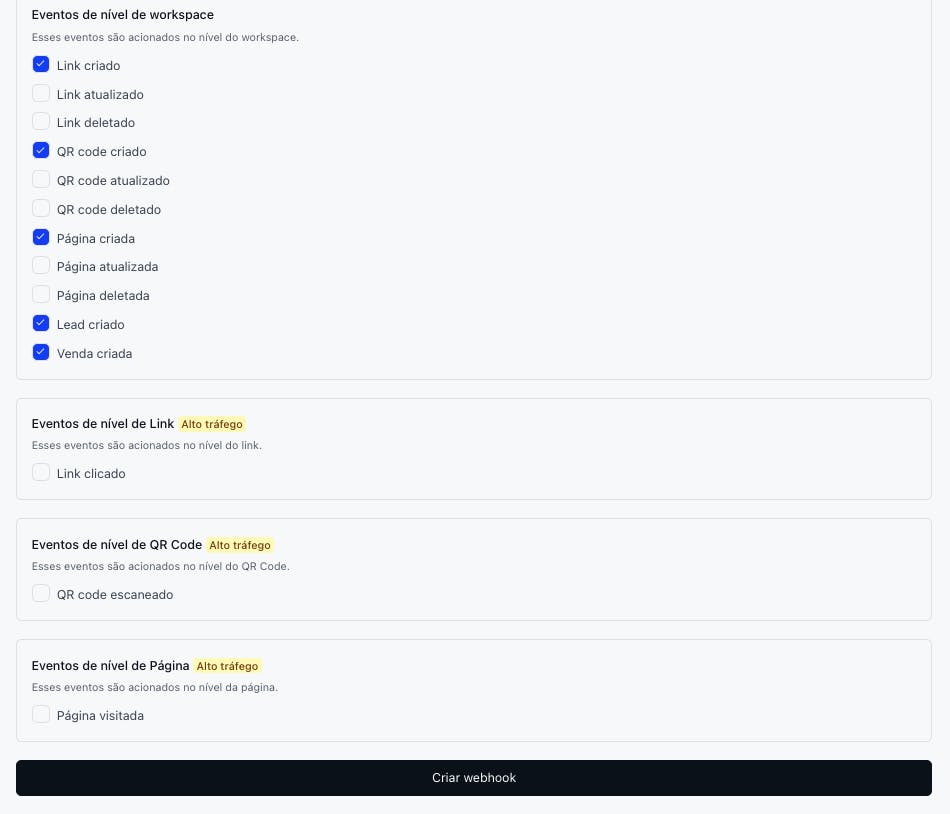
Done! CodeQR will now automatically send data to Pluga Webhooks whenever one of these events occurs.
5 - Go back to Pluga and click "Continue".
6 - In "Data sending model for notification", paste an example JSON from CodeQR and click "Continue".
Here is an example JSON you can copy and paste:
{
  "id": "evt_12345",
  "event": "event_name",
  "createdAt": "2024-08-30T09:53:50.343Z",
  "data": {
    "eventName": "Nome do Evento",
    "customer": {
      "id": "customer_12345",
      "name": "Nome do Cliente",
      "email": "cliente@exemplo.com",
      "avatar": "https://exemplo.com/avatar.jpg"
    },
    "interaction": {
      "id": "click_12345",
      "timestamp": "2024-08-30T10:16:12.124Z",
      "url": "https://exemplo.com",
      "ip": "192.168.0.1",
      "continent": "SA",
      "country": "BR",
      "city": "São Paulo",
      "device": "Desktop",
      "browser": "Chrome",
      "os": "Windows",
      "ua": "Mozilla/5.0 (Windows NT 10.0; Win64; x64) AppleWebKit/537.36 (KHTML, like Gecko) Chrome/127.0.0.0 Safari/537.36",
      "bot": false,
      "qr": false,
      "referer": "(direct)"
    },
    "link": {
      "id": "link_12345",
      "domain": "exemplo.link",
      "key": "abc123",
      "externalId": "external_12345",
      "url": "https://exemplo.com",
      "trackConversion": false,
      "archived": false,
      "expiresAt": "2025-08-30T09:53:50.343Z",
      "expiredUrl": "https://exemplo.com/expired",
      "password": "senha123",
      "proxy": false,
      "title": "Título do Link",
      "description": "Descrição do Link",
      "image": "https://exemplo.com/image.jpg",
      "video": "https://exemplo.com/video.mp4",
      "rewrite": false,
      "doIndex": false,
      "ios": "https://exemplo.com/ios",
      "android": "https://exemplo.com/android",
      "geo": "geo:37.7749,-122.4194",
      "publicStats": false,
      "tagId": "tag_12345",
      "tags": ["tag1", "tag2"],
      "comments": "Comentários sobre o link",
      "shortLink": "https://exemplo.link/abc123",
      "qrCode": "https://api.exemplo.io/qr?url=https://exemplo.link/abc123?qr=1",
      "utm_source": "utm_source_example",
      "utm_medium": "utm_medium_example",
      "utm_campaign": "utm_campaign_example",
      "utm_term": "utm_term_example",
      "utm_content": "utm_content_example",
      "userId": "user_12345",
      "clicks": 0,
      "lastClicked": "2024-09-05T16:36:15.000Z",
      "leads": 0,
      "sales": 0,
      "saleAmount": 0,
      "createdAt": "2024-08-26T16:41:52.084Z",
      "updatedAt": "2024-08-26T16:41:52.084Z",
      "projectId": "project_12345"
    },
    "qrcode": {
      "id": "qrcode_12345",
      "domain": "exemplo.link",
      "key": "qr_abc123",
      "archived": false,
      "expiresAt": "2025-08-30T09:53:50.343Z",
      "expiredUrl": "https://exemplo.com/expired",
      "password": "senha123",
      "externalId": "external_12345",
      "trackConversion": false,
      "proxy": false,
      "title": "Título do QR Code",
      "description": "Descrição do QR Code",
      "image": "https://exemplo.com/qrcode.png",
      "utm_source": "utm_source_example",
      "utm_medium": "utm_medium_example",
      "utm_campaign": "utm_campaign_example",
      "utm_term": "utm_term_example",
      "utm_content": "utm_content_example",
      "rewrite": false,
      "doIndex": false,
      "flexible": false,
      "filled": true,
      "ios": "https://exemplo.com/ios",
      "android": "https://exemplo.com/android",
      "geo": "geo:37.7749,-122.4194",
      "static": false,
      "type": "url",
      "contentStatic": "Conteúdo estático",
      "text": "Texto do QR Code",
      "email": {},
      "wifi": {},
      "url": "https://app.exemplo.io/",
      "phone": "+5511999999999",
      "vcard": {},
      "crypto": {},
      "sms": {},
      "facetime": {},
      "latlog": {},
      "logo": "https://exemplo.com/logo.png",
      "bgColor": "#ffffff",
      "fgColor": "#000000",
      "size": 1024,
      "level": "H",
      "showLogo": true,
      "src": "https://exemplo.com/logo.png",
      "height": 256,
      "width": 256,
      "excavate": true,
      "userId": "user_12345",
      "projectId": "project_12345",
      "publicStats": false,
      "scans": 1,
      "lastClicked": "2024-09-05T16:36:15.000Z",
      "leads": 0,
      "sales": 0,
      "createdAt": "2024-09-05T16:35:54.597Z",
      "updatedAt": "2024-09-05T16:35:54.597Z",
      "tagId": "tag_12345",
      "comments": "Comentários sobre o QR Code",
      "notificationToken": "token_12345",
      "tags": ["tag1", "tag2"],
      "shortLink": "https://exemplo.link/qr_abc123"
    },
    "page": {
      "id": "page_12345",
      "domain": "exemplo.link",
      "key": "p/abc123",
      "name": "Deixe seu feedback",
      "description": "O que achou do nosso atendimento?",
      "logo": "https://exemplo.com/logo.png",
      "image": "data:image/jpeg;base64,/9j/4AAQSkZJRgABAQAAAQABAAD/=",
      "imageBlurhash": "LKO2?U%2Tw=w]~RBVZRi};RPxuwH",
      "externalId": "external_12345",
      "trackConversion": false,
      "message404": "Página não encontrada",
      "type": "feedback",
      "pageTitle": "Compartilhe seu feedback",
      "pageSubtitle": "Alguma sugestão para melhorias adicionais? (opcional)",
      "pageBackgroundType": "gradient",
      "pageBackgroundStyles": {
        "backgroundColorTo": "#2f1265",
        "backgroundColorFrom": "#294c7c"
      },
      "pageFormType": "flat-color",
      "pageFromStyles": {
        "backgroundColor": "#FFFFFF"
      },
      "inputStyle": "rounded",
      "buttonType": "flat-color",
      "buttonStyles": {
        "backgroundColor": "#000000"
      },
      "submitButtonType": "flat-color",
      "submitButtonStyles": {
        "backgroundColor": "#000000"
      },
      "fontFamily": "font-poppins",
      "fontColor": "#000000",
      "items": {
        "fields": [
          {
            "id": "message",
            "name": "message",
            "type": "textarea",
            "label": "Mensagem",
            "enabled": true,
            "required": false,
            "placeholder": "Deixe sua mensagem"
          }
        ]
      },
      "views": 1,
      "lastClicked": "2024-09-07T21:36:01.000Z",
      "publicStats": false,
      "createdAt": "2024-09-07T21:32:37.309Z",
      "updatedAt": "2024-09-07T21:32:51.471Z",
      "hiddenLogo": false,
      "projectId": "project_12345",
      "userId": "user_12345",
      "notificationToken": "token_12345",
      "socialMediaLinks": {
        "facebook": "https://facebook.com/exemplo",
        "twitter": "https://twitter.com/exemplo",
        "instagram": "https://instagram.com/exemplo"
      },
      "feedbacksCount": 0
    }
  }
}
7 - Map the fields and customize the information that will be sent to your chosen tool, as shown in the gif below.
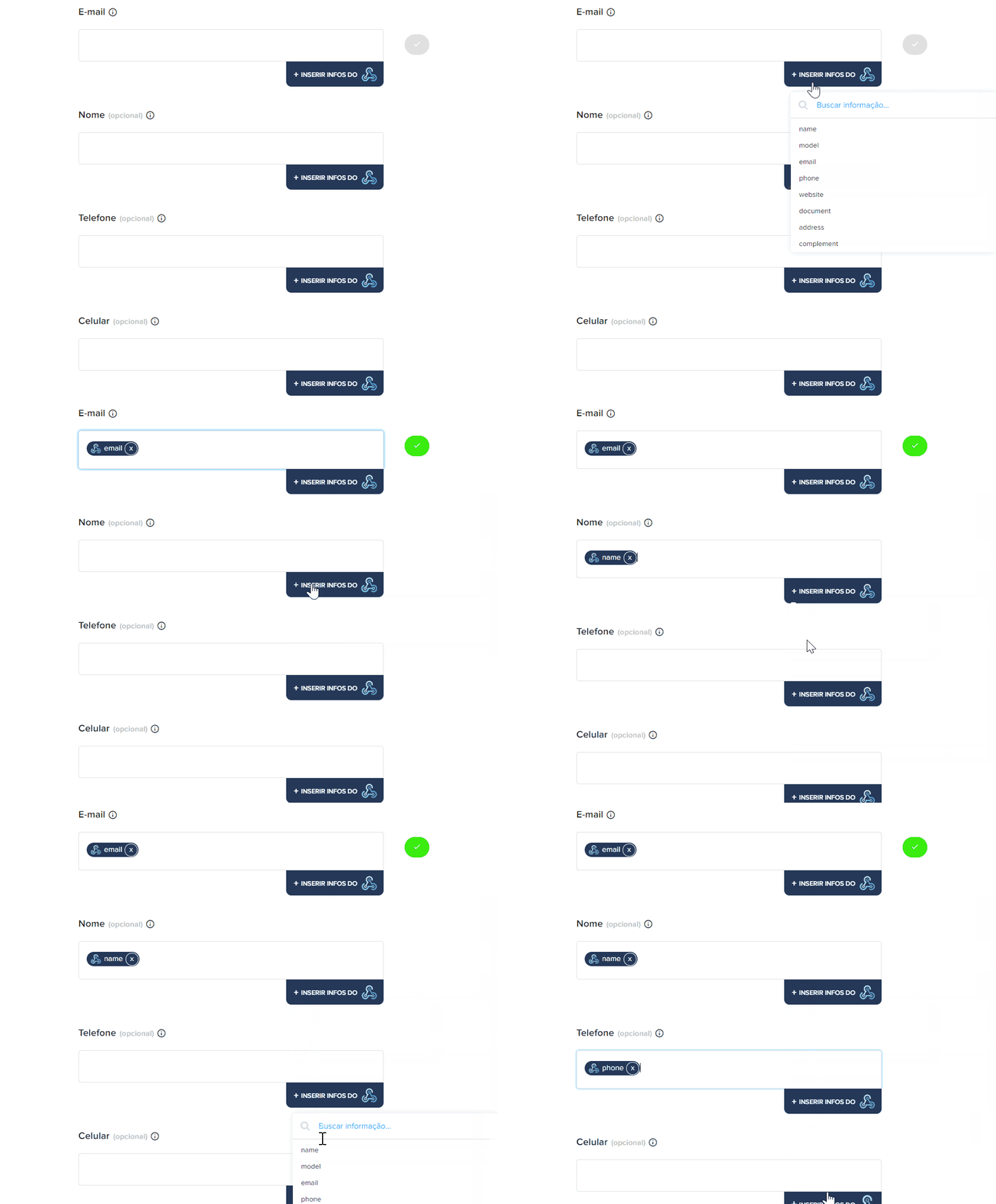
That's it! Now just click on "Finish automation" and let Pluga's robots work for you. 😎
Possible Automations via Pluga Webhooks
The integration between CodeQR and Pluga Webhooks opens up many possibilities, such as:
✅ Sending captured leads to CRMs like RD Station, Pipedrive, or HubSpot.
✅ Creating a task in Trello or Asana whenever a lead is captured.
✅ Logging clicks and scans into a Google Sheets spreadsheet for analysis.
✅ Sending a Slack notification when a QR Code is scanned.
✅ Creating an event in Google Calendar for follow-ups with captured leads.
Conclusion & Next Steps
Now you know how to integrate CodeQR with Pluga using Webhooks, creating powerful automations for your business. This allows you to optimize processes and integrate QR Code, link, and lead data directly into your favorite tools.
Take advantage of this integration and try it now! 🚀