
Make the form required or let visitors skip it
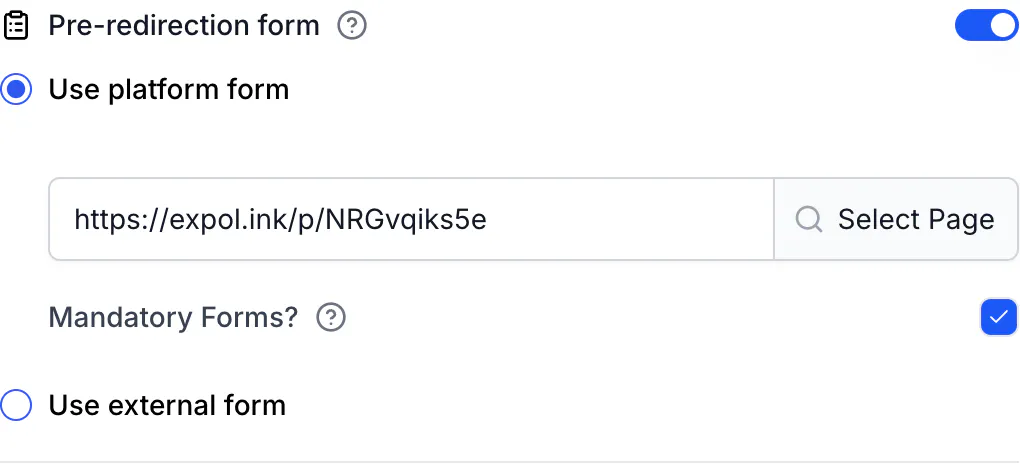
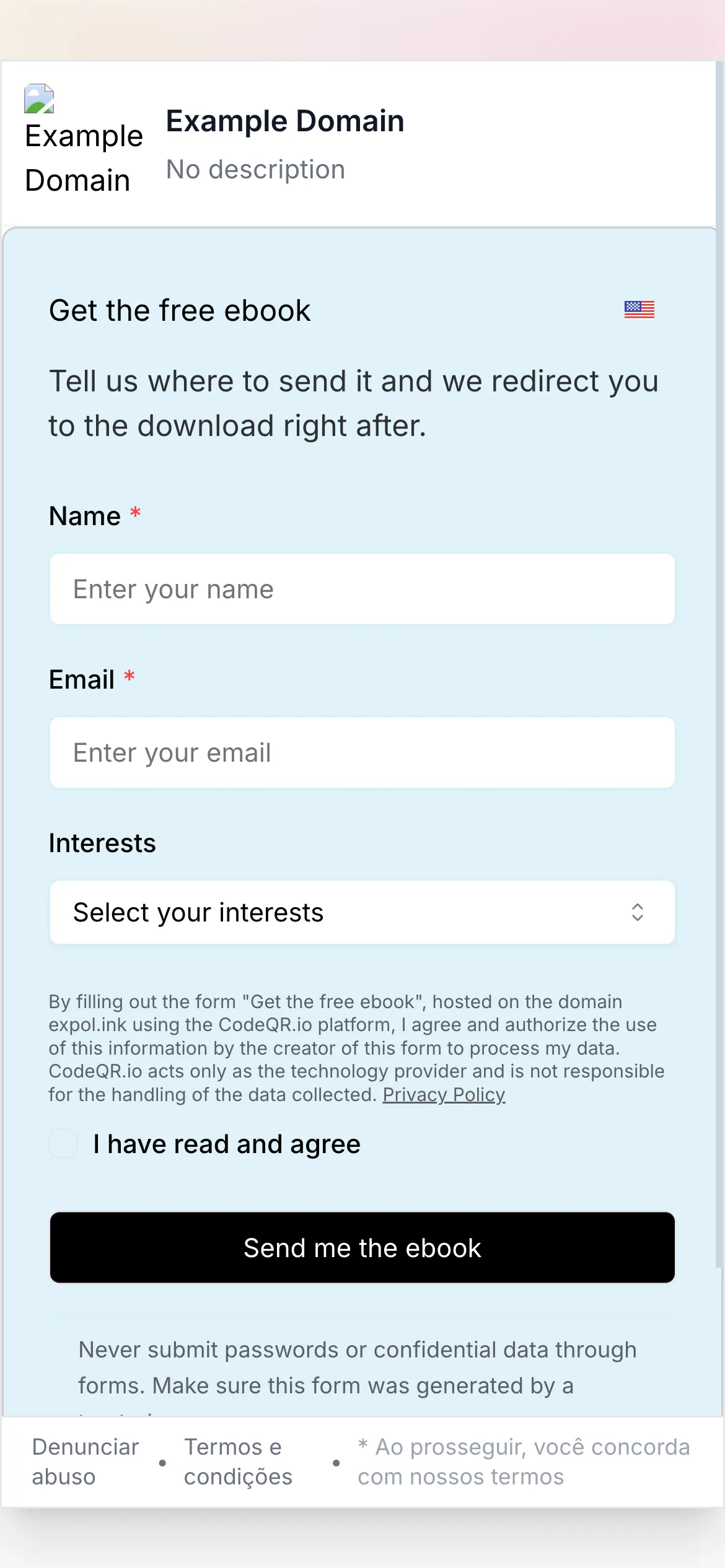
Mandatory Forms? removes the close button; otherwise visitors can skip. What happens after submit or skip: same short link, Smart Rules, WhatsApp, cookie.

After reading this page you can decide whether a visitor must fill in the form to reach the destination or may skip it, and you can predict exactly where they land afterwards — including a WhatsApp conversation, an app store, or a Smart Rules destination.
Availability
- Plan: Business and above (pricing).
- Where: link builder or QR code editor → Pre-redirection form → Mandatory Forms?. The checkbox is enabled only with Use platform form and a selected page. External forms can always be closed.
Required or skippable
- Close button in the modal — Skippable (default): yes · Required (Mandatory Forms? checked): no
- Visitor path — Skippable (default): fill in and submit, or close and continue · Required (Mandatory Forms? checked): fill in and submit
- Works with — Skippable (default): CodeQR Page form, external form · Required (Mandatory Forms? checked): CodeQR Page form only
- What CodeQR records — Skippable (default):
FORM_FILLEDorCONTINUED_WITHOUT_FORMin the visitor's cookie · Required (Mandatory Forms? checked):FORM_FILLED
Turning it on: open the link (⋮ → Edit) or the QR code, tick Mandatory Forms? under the selected page, and click Save link. Via the API, send "isFormMandatory": true together with pageId and pageUrl; without a pageId the API answers 400 CodeQR page required for form submission.
What happens after the form
- Submit — CodeQR saves the response and sends the visitor back through the same short link with a marker that says "form done". The link then behaves like any other CodeQR link: Smart Rules, iOS Targeting, Android Targeting, Geographic Targeting and Link Cloaking all apply. The visitor lands on the destination that those rules choose.
- Skip (skippable forms only) — same path, with a "continued without form" marker. No response is saved.
- Either way, CodeQR sets a
skipFormcookie for one hour, scoped to that link or QR code. During that hour the same browser goes straight to the destination; after that, the form shows again. Skipping is as sticky as submitting. - The click or scan was already counted when the visitor first opened the link, before the form. Submitting does not count a second click.
Where "the destination" is, per type:
- Short link, dynamic URL QR code — After the form the visitor gets: the Destination URL, or the URL chosen by Smart Rules and targeting
- WhatsApp QR code — After the form the visitor gets:
https://wa.me/<number>?text=<your message>— WhatsApp opens with the message pre-filled - Wi-Fi, vCard, text and other dynamic QR types — After the form the visitor gets: the QR code's own display page
Two things that do not happen in this flow:
- Query parameters on the short link are not forwarded. A visitor who opened
https://go.example.com/promo?utm_source=newsletterlands on the destination withoututm_source. The UTM values are stored with the response (they appear in the CSV export and incustomFieldsof the lead), but your destination's analytics will not see them. - The page's After Submission settings (thank-you message, redirect URL) belong to the standalone page and are not shown here — the redirect to the destination replaces them.
Choosing
- Required when the destination is the reward (an ebook, a coupon, a document) and you would rather have fewer, real leads than traffic. Expect a drop: a public contact form converts under 10% of the people who see it, and mobile forms convert several points below desktop; every extra field costs more.
- Skippable when the destination is your product, menu or listing and the form is a bonus. You keep the traffic; you count how many chose to leave their contact.
- Legal note. In the EU and UK, consent is not "freely given" when access to a service is tied to consenting to marketing; in Brazil the LGPD voids generic authorisations. A required form should collect what you need to deliver the promised thing, and the consent text should say what you will do with it. Keep the privacy policy link visible; CodeQR stores the consent text and time with each response.
Verify it works
# first visit: the form page (200), one-hour cq_id cookie
curl -sI -A "Mozilla/5.0 (iPhone; CPU iPhone OS 17_5 like Mac OS X)" https://go.example.com/promo | grep -iE "^HTTP|x-pathname"
# HTTP/2 200
# x-pathname: /go.example.com/pre-redirection/promo/link

# after submit or skip: the browser carries skipForm and gets the destination
curl -sI -b "skipForm=FORM_FILLED" https://go.example.com/promo | grep -iE "^HTTP|location"
# HTTP/2 302
# location: https://example.com/promo

# WhatsApp QR code after the form
curl -sI -b "skipForm=FORM_FILLED" https://go.example.com/wa-qr | grep -i location
# location: https://wa.me/5511999999999?text=Hi%2C%20I%20want%20the%20catalog
In a browser: open the link in a private window, submit, and watch the address bar go from the short link to the destination.
Troubleshooting
The visitor closed the modal and reached the page anyway
The form is skippable, or it is an external form (always skippable). Tick Mandatory Forms? on a platform page and save.
The form shows the first time and never again while I test
The one-hour skipForm cookie. Open a private window for each test, or clear cookies for the link's domain.
UTM parameters do not reach my landing page after the form
By design today: the redirect after the form is built from the short link itself. Put the UTM values on the destination URL in the link builder (UTM Builder) if your analytics needs them; the visitor's original parameters are kept with the response.
The visitor lands on the destination and not on the Smart Rules variant I expected
The rules ran after the form exactly as they run without it. Check the rule order and the visitor's device or country as usual: Send each visitor to the right destination with Smart Rules.