
Connect your own domain to CodeQR
Use your own domain for CodeQR short links and QR codes. What to prepare, how many domains each plan allows, and what changes once it is live.

A custom domain replaces the CodeQR domain in front of every link and QR code you create: go.acmestore.com/summer instead of a shared address. The link behaves exactly the same — the difference is that it carries your name, and that people who see it recognize where it leads.
Availability
- Plan: Starter and above. The Free plan is limited to 0 custom domains and uses a CodeQR shared domain instead.
- Where: Domains in the sidebar.
How many domains you can connect:
- Free — none.
- Starter — 1 domain.
- Pro — 5 domains.
- Business — 10 domains.
- Advanced — 50 domains.
- Enterprise — 1000 domains.
Before you start
- Have a domain you can change DNS for. Buying one is outside CodeQR; any registrar works.
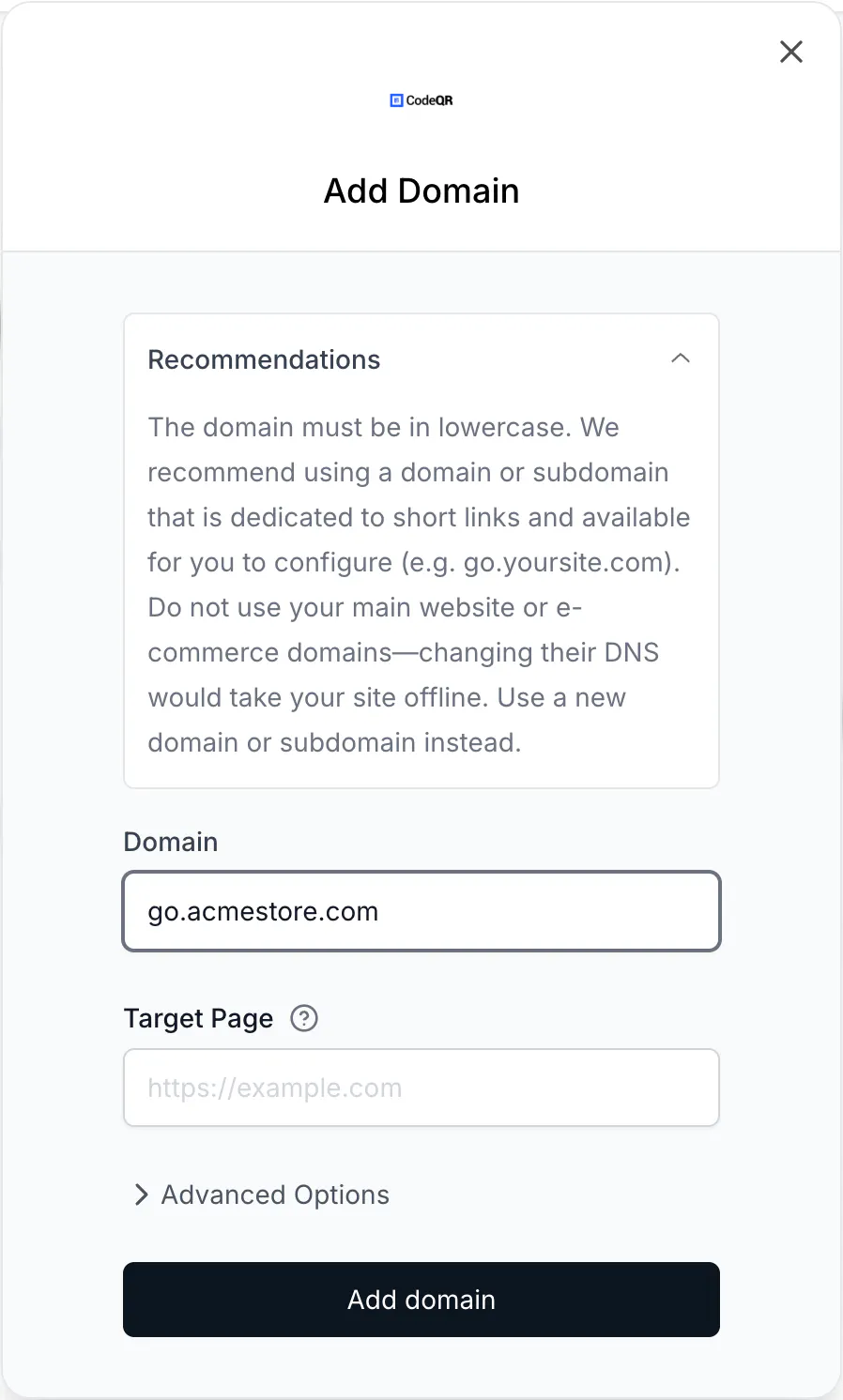
- Use a subdomain, not your website. The modal says it plainly: "Do not use your main website or e-commerce domains—changing their DNS would take your site offline." A subdomain such as
go.orqr.is free to create and carries no risk. Choose the right domain for your short links goes through the decision. - Know where your DNS lives. Often the registrar, sometimes Cloudflare, sometimes your hosting provider. You need to add a record there.
Steps
- Open Domains and select Add Domain.
- Type the domain in Domain. It is lowercased for you, so
GO.ACMESTORE.COMbecomesgo.acmestore.com. - Optional: fill Target Page with the address someone should land on if they open the domain by itself. See Redirect your domain root to your website.
- Select Add domain.
The domain now appears on the Domains page as Pending Verification, with the DNS record you have to add:

- Add the record at your DNS provider, as described in Point your domain with a CNAME or A record.
- Come back and select Refresh. Once DNS has propagated, the status changes and the domain starts serving links.
What changes once the domain is live
- New links and QR codes offer the domain in the Short Link field. If you mark it as Primary Domain, it is preselected.
- Existing links do not move. A link created on a CodeQR domain keeps that domain; the short URL you already shared never silently changes.
- Analytics stay in one place. Clicks and scans on the new domain land in the same Analytics as the rest of the workspace.
- The paid plan removes the CodeQR mark from what your visitors see, which is the other half of looking like your own brand — see Remove CodeQR branding from links and QR codes.
Managing domains outside the dashboard
Domains are managed in the dashboard only. The API reference lists domain endpoints, but they are not available: a request to https://api.codeqr.io/domains returns a 404 HTML page, while other endpoints on the same API key answer normally. The MCP tool list_domains calls that same endpoint, so it returns the 404 page rather than your domains.
Scripts and automations should not depend on domain endpoints today. Links and QR codes on a custom domain are created through the normal endpoints by passing the domain:
curl -X POST https://api.codeqr.io/links \
  -H "Authorization: Bearer codeqr_xxxxxxxxxxxxxxxxxxxxxxxx" \
  -H "Content-Type: application/json" \
  -d '{"url":"https://example.com/menu","domain":"go.example.com","key":"summer"}'
Verify it works
Once the domain is verified, create a link on it and request the headers:
curl -sSI https://go.example.com/summer
HTTP/2 302
location: https://example.com/menu
A 302 with your destination in location means the domain is serving your links. The click appears in Analytics within a few minutes.
Troubleshooting
Invalid domain
The address is not a valid hostname. Enter the domain alone, with no https://, no path and no port — go.acmestore.com, not https://go.acmestore.com/.
The domain stays on Pending Verification
The ownership record has not been seen yet. Check the record at your provider and read Fix a custom domain that is not working, which covers the Cloudflare proxy, CAA records and the cases where DNS looks right but is not.
Nothing happens when I select Add domain on a Free workspace
The Free plan cannot hold a custom domain, and the interface does not currently say so — the request is refused in the background. Upgrade to Starter or above, then add the domain.
I received an email saying my domain needs to be configured
A domain that stays invalid triggers a reminder after 14 days and another after 28. After 30 days the domain is suspended for manual review. Fixing the DNS record clears it.