
Measure views, leads and conversions
Read the numbers on a CodeQR page: what counts as a view, when a submission becomes a lead, and which figures on the screen you can trust.

A page counts what happens on it in three places, and they answer different questions. This is which to read for what.
Availability
- Plan: every plan. Conversion tracking is on Pro and above.
- Where: the card in Pages, the Analytics tab of the page, and Responses.
The three numbers on the card
Each card in the Pages list carries three figures in a row, marked by an icon rather than a word:
- the eye — how many times the page was fetched.
- the pencil — how many visits opened the form.
- the circled tick — how many people sent it.
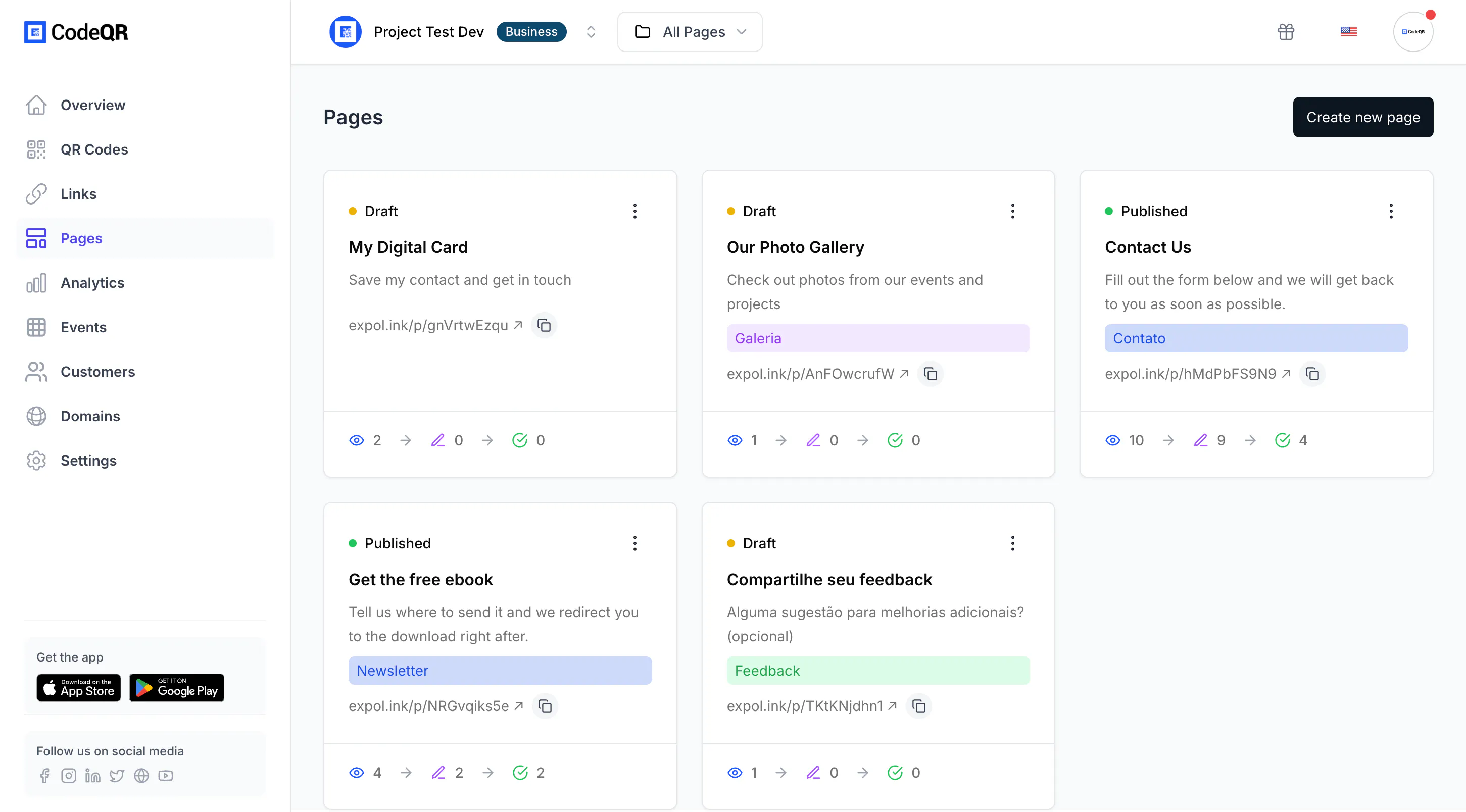
Views count every request, including the ones that never came from a person. A monitoring tool or a preview fetch adds to it, so treat views as traffic and completions as people.
The Analytics tab
Open the page and select Analytics for the full dashboard, already filtered to that page.
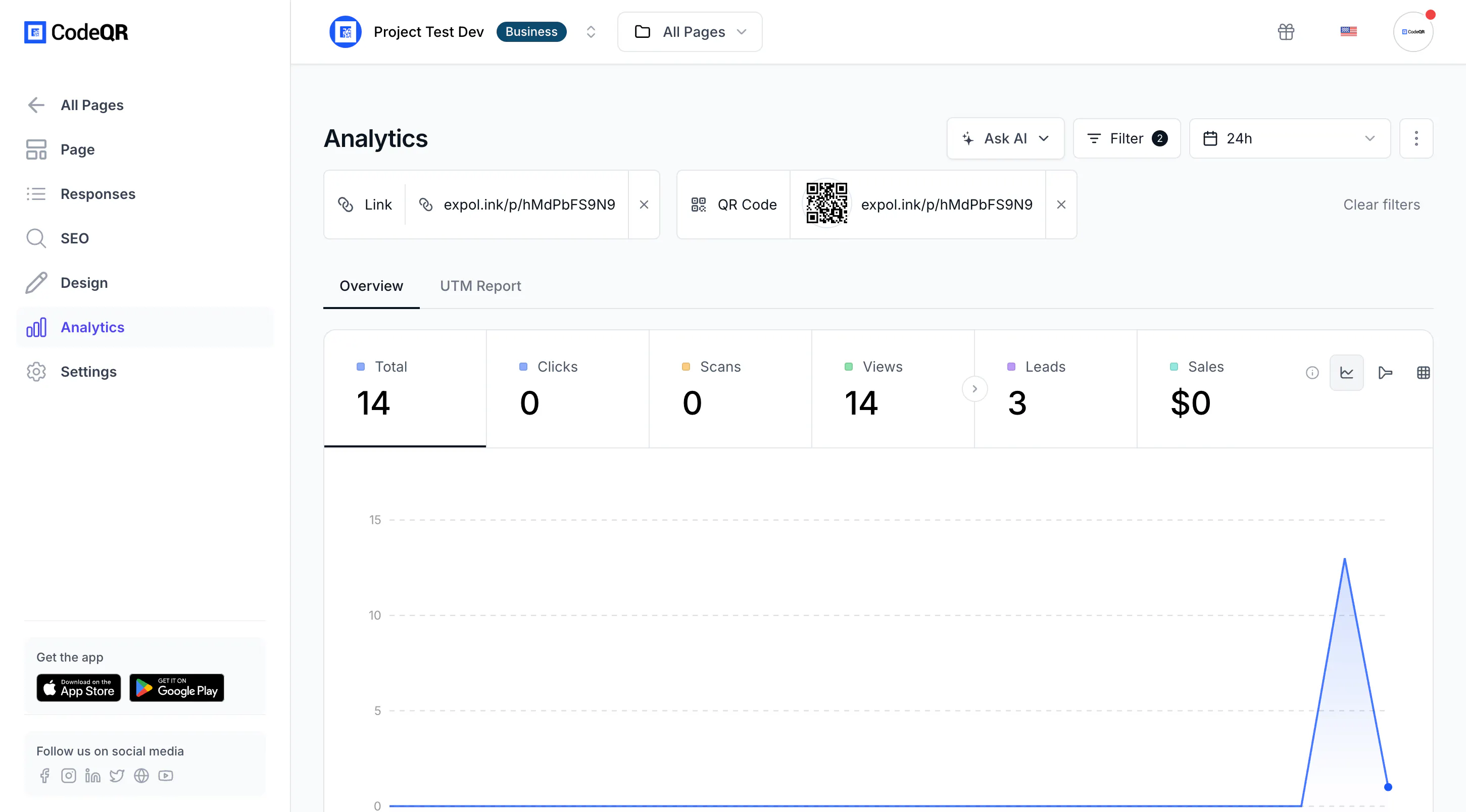
- Views is the page's own traffic. A page is neither a click nor a scan, so those two stay at zero unless a short link or QR code of yours points at it.
- Total adds clicks, scans and views together.
- Leads only moves when conversion tracking is on for the page.
- The breakdowns — countries, devices, browsers, referrers — work the same way as for links and QR codes: Track link clicks and QR code scans.
Turn a submission into a lead
Without conversion tracking, a submission is a row under Responses and nothing else. With it on, each completed submission is also recorded as a Lead, which is what makes a page comparable with the rest of your links and QR codes.
- Open the page and find Conversion tracking in Form Content.
- Turn it on and select Save.
- Send a test submission and reload Analytics: Leads goes up by one.
Turning it on also lengthens the visitor's cookie from one hour to thirty days, which is what allows a sale recorded later to be attributed back to the scan that started it. The rest of that chain is in Set up conversion tracking.
Which figure to trust for what
- How many people wrote to me — Where to look: Responses, counting the filled rows
- Whether the printed code is being scanned at all — Where to look: Views on the card or in Analytics
- Where my visitors are, and on what device — Where to look: Analytics, the breakdown cards
- How the page compares with my links and QR codes — Where to look: Leads in Analytics, with conversion tracking on
The strip at the top of the page editor reads Views, Starts, Completions, Drop-offs and Time. Each percentage is measured against the step before it, not against views: the one under Completions is the share of people who started and finished. That is the number to watch when you shorten a form.
Verify it works
Open the page from your phone, send a submission, then reload Analytics. Views and Leads both move within a minute or two. If Leads does not move, conversion tracking is off.
Troubleshooting
Views are much higher than responses
Normal. Most people who open a form do not send it, and views also count requests that were never a person. Compare completions with views over the same period rather than reading either alone.
Leads stays at zero although responses arrive
Conversion tracking is off for that page, or it was turned on after those submissions. It is not retroactive.
The numbers on the card and in Analytics disagree
They come from two different systems. The card reads the page's own counters and its stored responses, over the whole life of the page. Analytics reads the same event stream that serves links and QR codes, over the period selected at the top of the screen, and applies its own rules for repeated visits. Expect them to be close, not identical.
Starts is higher than views
One visitor can begin the form more than once in a single recorded view — going back to fix a field counts again. The rate under Starts is capped at 100% for that reason.