
Route campaign traffic by UTM or referrer
Send newsletter, ad or social traffic to its own landing page from one short link, using UTM parameters on the link or the referring site — steps, API, MCP and the cases where the referrer is empty.

At the end of this guide, one short link sends people who clicked it in your newsletter to a subscriber offer, people who came from Instagram to an Instagram offer, and everyone else to your default page — while the UTM parameters keep flowing to your analytics.
Availability
- Plan: Business and above (pricing).
- Where: link builder → Smart Rules. Same section in the QR code editor for dynamic QR codes of type URL.
Before you start
- Decide which signal you will route on:
- UTM Source / Medium / Campaign / Term / Content — CodeQR reads these from the query string of the short link as it was clicked, for example
https://go.example.com/promo?utm_source=newsletter. You control this signal completely: it is in the URL you distribute. - Referrer — the domain of the page the visitor came from, without
www.(instagram.com,news.ycombinator.com). You do not control this signal: apps, messengers and QR scans send no referrer at all (see Troubleshooting). Prefer UTMs whenever you can tag the link. - The destination for each audience and a default page for the link's Destination URL.
- Note: the UTM Builder in the link builder appends parameters to the destination; a rule reads parameters on the short link. Put the UTMs in the URL you share.
Steps
- Open Links and click Add Link, or open an existing link and choose Edit.
- Enter the default page in Destination URL, for example
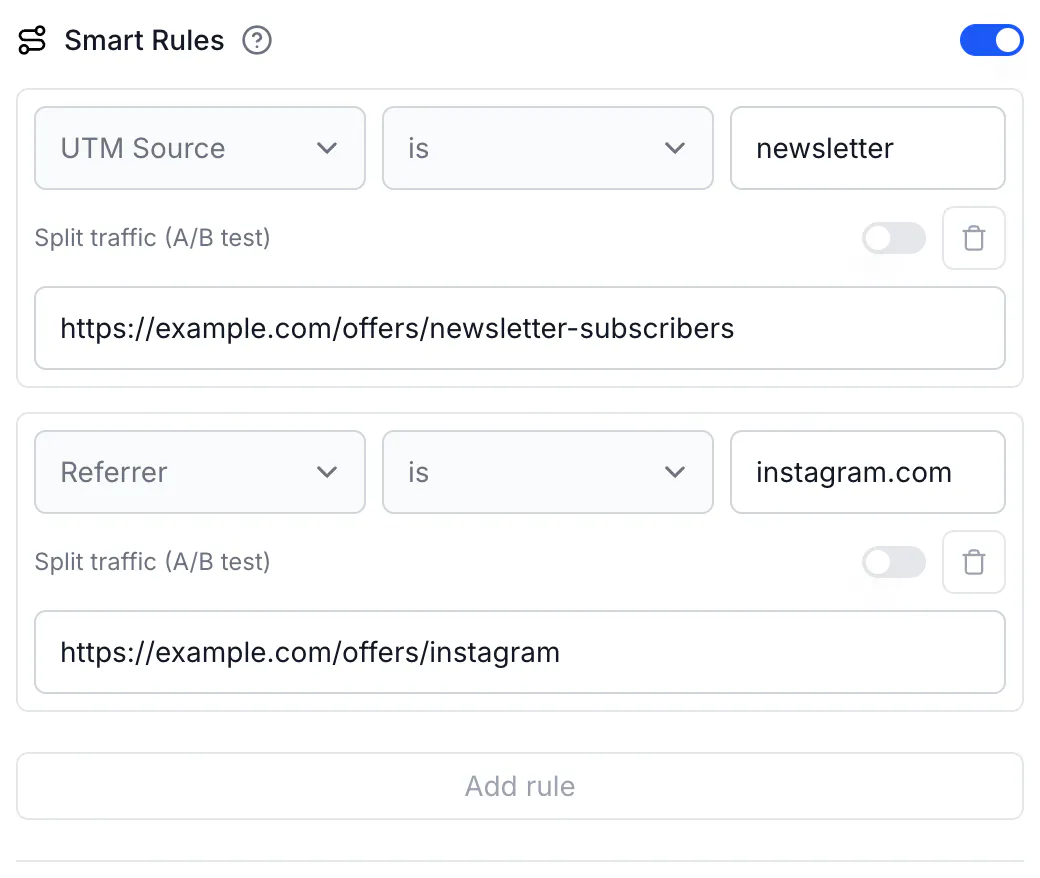
https://example.com/offers/. - Turn on Smart Rules.
- In the first rule, select UTM Source, keep is, and type
newsletter. - In that rule's Destination URL, enter
https://example.com/offers/newsletter-subscribers. - Click Add rule. Select Referrer, keep is, type
instagram.com, and enterhttps://example.com/offers/instagram. - Click Create link (or Save link).
- Distribute the tagged short link in the newsletter:
https://go.example.com/promo?utm_source=newsletter&utm_campaign=august. Put the plain short linkhttps://go.example.com/promoin your Instagram bio.
Everything on the short link's query string is passed on to the destination, so ?utm_source=newsletter&utm_campaign=august reaches https://example.com/offers/newsletter-subscribers?utm_source=newsletter&utm_campaign=august and your analytics attribute the visit as usual.
Do the same via API
Request:
curl -X PUT https://api.codeqr.io/links/cmswk759f0001j41i0vj1vmfq \
  -H "Authorization: Bearer codeqr_xxxxxxxxxxxxxxxxxxxxxxxx" \
  -H "Content-Type: application/json" \
  -d '{
    "rules": [
      { "attribute": "utm_source", "operator": "equals", "value": "newsletter",
        "url": "https://example.com/offers/newsletter-subscribers" },
      { "attribute": "referrer",   "operator": "equals", "value": "instagram.com",
        "url": "https://example.com/offers/instagram" }
    ]
  }'
Response (200 OK):
{
  "id": "cmswk759f0001j41i0vj1vmfq",
  "domain": "go.example.com",
  "key": "promo",
  "url": "https://example.com/offers/",
  "archived": false,
  "expiresAt": null,
  "expiredUrl": null,
  "password": null,
  "externalId": null,
  "trackConversion": false,
  "proxy": false,
  "title": null,
  "description": null,
  "image": null,
  "video": null,
  "utm_source": null,
  "utm_medium": null,
  "utm_campaign": null,
  "utm_term": null,
  "utm_content": null,
  "rewrite": false,
  "doIndex": false,
  "banned": false,
  "flexible": false,
  "filled": false,
  "ios": null,
  "android": null,
  "geo": null,
  "rules": [
    { "url": "https://example.com/offers/newsletter-subscribers", "value": "newsletter",    "operator": "equals", "attribute": "utm_source" },
    { "url": "https://example.com/offers/instagram",              "value": "instagram.com", "operator": "equals", "attribute": "referrer" }
  ],
  "userId": "cm73yc6m70002mtesulffnrgb",
  "folderId": null,
  "projectId": "cm73y7wm100008j24i1b137wr",
  "preRedirection": false,
  "pageId": null,
  "pageUrl": null,
  "isFormMandatory": false,
  "publicStats": false,
  "clicks": 0,
  "lastClicked": null,
  "leads": 0,
  "sales": 0,
  "saleAmount": 0,
  "createdAt": "2026-08-17T01:32:38.884Z",
  "updatedAt": "2026-08-17T02:14:10.212Z",
  "tagId": null,
  "comments": null,
  "notificationToken": null,
  "useAsTemplate": false,
  "tags": [],
  "shortLink": "https://go.example.com/promo",
  "webhookIds": [],
  "qrCode": "https://api.codeqr.io/qr?url=https://go.example.com/promo?qr=1"
}
The same rules array works on POST /links, POST /qrcodes (dynamic, type url) and PUT /qrcodes/{qrcodeId}. Note that the link's own utm_source … utm_content fields in the response describe the destination URL, not the incoming query; rules read the incoming query.
Do the same via MCP
Ask your agent, connected to https://mcp.codeqr.io/mcp:
On link cmswk759f0001j41i0vj1vmfq, send clicks with utm_source newsletter to https://example.com/offers/newsletter-subscribers and clicks referred by instagram.com to https://example.com/offers/instagram.
update_link is called with:
{
  "linkId": "cmswk759f0001j41i0vj1vmfq",
  "rules": [
    { "attribute": "utm_source", "operator": "equals", "value": "newsletter",
      "url": "https://example.com/offers/newsletter-subscribers" },
    { "attribute": "referrer", "operator": "equals", "value": "instagram.com",
      "url": "https://example.com/offers/instagram" }
  ]
}
Do the same via automations
No Make, Zapier or Pluga module has a rules field; use Make's Make an API Call module or an HTTP step with the request above. When an automation creates one link per campaign, put the UTM values in both the rule (value) and the URL you send out.
Verify it works
curl -sI "https://go.example.com/promo?utm_source=newsletter&utm_campaign=august" | grep -i location
# location: https://example.com/offers/newsletter-subscribers?utm_source=newsletter&utm_campaign=august

curl -sI -H "Referer: https://www.instagram.com/" https://go.example.com/promo | grep -i location
# location: https://example.com/offers/instagram

curl -sI https://go.example.com/promo | grep -i location
# location: https://example.com/offers/
In Analytics for the link, the URLs card shows clicks per destination, and the UTM Report breaks down clicks by source, medium and campaign.
Troubleshooting
The UTM rule never fires
The parameter is on the destination URL (added with the UTM Builder or typed into Destination URL), not on the short link that people click. Add it to the link you distribute: https://go.example.com/promo?utm_source=newsletter. Also check the parameter name — utm_source, utm_medium, utm_campaign, utm_term, utm_content — and that it has a value: ?utm_source= with nothing after it matches no rule.
Newsletter and newsletter — does capitalization matter?
Not for the rule: values are compared case-insensitively, so utm_source=Newsletter matches a rule with newsletter. It does matter for Google Analytics, which treats them as different sources, and the parameter is passed on exactly as it arrived. Lowercase your UTMs at the source.
The Referrer rule never fires for Instagram, TikTok, WhatsApp or a QR code
Mobile apps and messengers usually send no referrer, QR scans never do, and browsers send only the origin (or nothing) for links from HTTPS to HTTP pages or links marked noreferrer. When the referrer is missing, no Referrer rule matches, with is or is not. Route on UTMs instead: give each channel its own tagged short link.
The Referrer rule fires for www.instagram.com but not for l.instagram.com or l.facebook.com
The value is compared to the referring hostname with only a leading www. removed. Facebook and Instagram sometimes send visitors through l.facebook.com, lm.facebook.com or l.instagram.com. Add one rule per hostname you see in the Referrers card of the link's analytics.
I typed the full URL as the referrer value
Use the bare domain: instagram.com, not https://www.instagram.com/.
The API returns 400 "A rule condition needs attribute, operator and value together"
Every rule with an attribute needs operator and value too. Attribute names are lowercase with underscores: utm_source, referrer.