
How to receive payouts (PayPal)
Connect your PayPal account to receive affiliate payouts from CodeQR.

CodeQR pays affiliates via PayPal. To receive payouts, you must connect a valid PayPal account and ensure the email on that account is verified. Payouts are sent automatically according to the program’s payout schedule (e.g. monthly).
Connect your PayPal account
- Go to Account → Settings → Referrals in the CodeQR app.
- In the Payout method section, click Connect PayPal.
- Complete the PayPal sign-in or sign-up flow. Authorize CodeQR to send payouts to your PayPal account.
- Once connected, your PayPal email will be shown on the Referrals page. You can change or disconnect it from the same section if needed.
Your PayPal email must be verified in your PayPal account. If it is not verified, payouts may fail and you will be prompted to verify it.
Payout history
On the Referrals page, the Payout History section shows all your payouts. Each payout can have one of the following statuses:
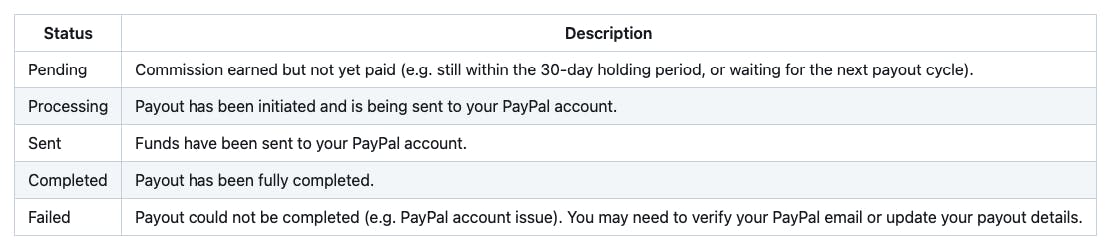
You can also see Upcoming (pending earnings) and Paid (total received) in the sidebar on the Referrals page.
Minimum payout and frequency
If the program has a minimum payout amount, your balance must reach that amount before a payout is triggered. Amounts below the minimum roll over to the next period. Payouts run on a monthly schedule; eligible commissions are included in the next cycle after the 30-day holding period.
Fees and currency
CodeQR does not charge you a fee for receiving payouts. PayPal may apply its own fees according to your account and region. Payouts are made in the currency configured for the program (e.g. USD). For tax and compliance, you are responsible for your own taxes; see the Affiliate Program Terms.
Troubleshooting
- PayPal email not verified: Verify the email in your PayPal account, then try connecting again from the Referrals page.
- Payout failed: Check that your PayPal account can receive payments and that the email is correct. Update your payout method if needed and contact support if the issue continues.
- Switch PayPal account: Use the option to change or disconnect your PayPal account on the Referrals page, then connect the new account.