
No responses are arriving from your page
Work through why a CodeQR page collects nothing: the wrong address, a form nobody can finish, notifications in spam, or an app browser blocking it.

Nothing has arrived. Before assuming the form is broken, separate the three places it can fail: people are not reaching the page, they are reaching it and not finishing, or they are finishing and you are not seeing it.
Availability
- Plan: every plan.
- Where: Pages → your page → Responses and Analytics.
Start here: are people reaching the page at all
Open the page and look at Views, on the card or in Analytics.
- Views is zero or nearly zero. The problem is upstream: the code, the poster, the link. Nobody is opening the page.
- Views is healthy, responses are not. People arrive and leave. Skip to the second half of this article.
Nobody is reaching the page
The page is not published
Check this one first. Only a published page is public: while the switch at the top of the editor is off, the address answers exactly like an address nobody created, and no visit is recorded. That is why Views stays at zero rather than showing people who bounced.
It is the likeliest cause when a page that used to collect responses went quiet: somebody turned the switch off, and every printed code for it stopped working the same minute.
The QR code points somewhere else
Scan the printed code with your own phone and read the address bar. It has to end in /p/ followed by the page's characters. A code made before you created the page, or made from a different page, still scans perfectly well and lands somewhere else.
The address changed
It does not. CodeQR assigns a page address once and there is no way to edit it, so a code that used to work still resolves. What can change is which page you are looking at: two pages in the same workspace can carry almost the same name and different addresses.
The code cannot be scanned
Poor contrast, a code printed too small, or a shiny surface. That is a QR code problem rather than a page problem — Create a dynamic QR code covers size and contrast.
They reach the page and do not finish
The form asks for too much
Every required field is a reason to give up, and someone scanning a code is usually standing up, in a queue, on data. Ask for the minimum you need and make the rest optional — Choose the fields your form asks for.
They did not tick the consent box
The form refuses to send without it, and on a phone the box sits below the last field, where somebody who scrolled fast can miss it. Open your page on a phone and go through it as a stranger would.
They opened it inside Instagram, TikTok or Facebook
A QR code scanned from a social app opens in that app's own browser, which is not a full browser. Saved passwords do not autofill, file pickers can fail silently, and some downloads never start. There is no setting that fixes this from your side. If you see many starts and few completions from mobile, this is a likely cause: keep the form to text fields that anyone can type.
The form asks in the wrong language
A page shows English field labels until you rename them, and it opens in English for every visitor regardless of their phone's language. Visitors can switch it with Idioma, but most will not look. Rename the fields and write your own consent text.
They finished and you cannot see it
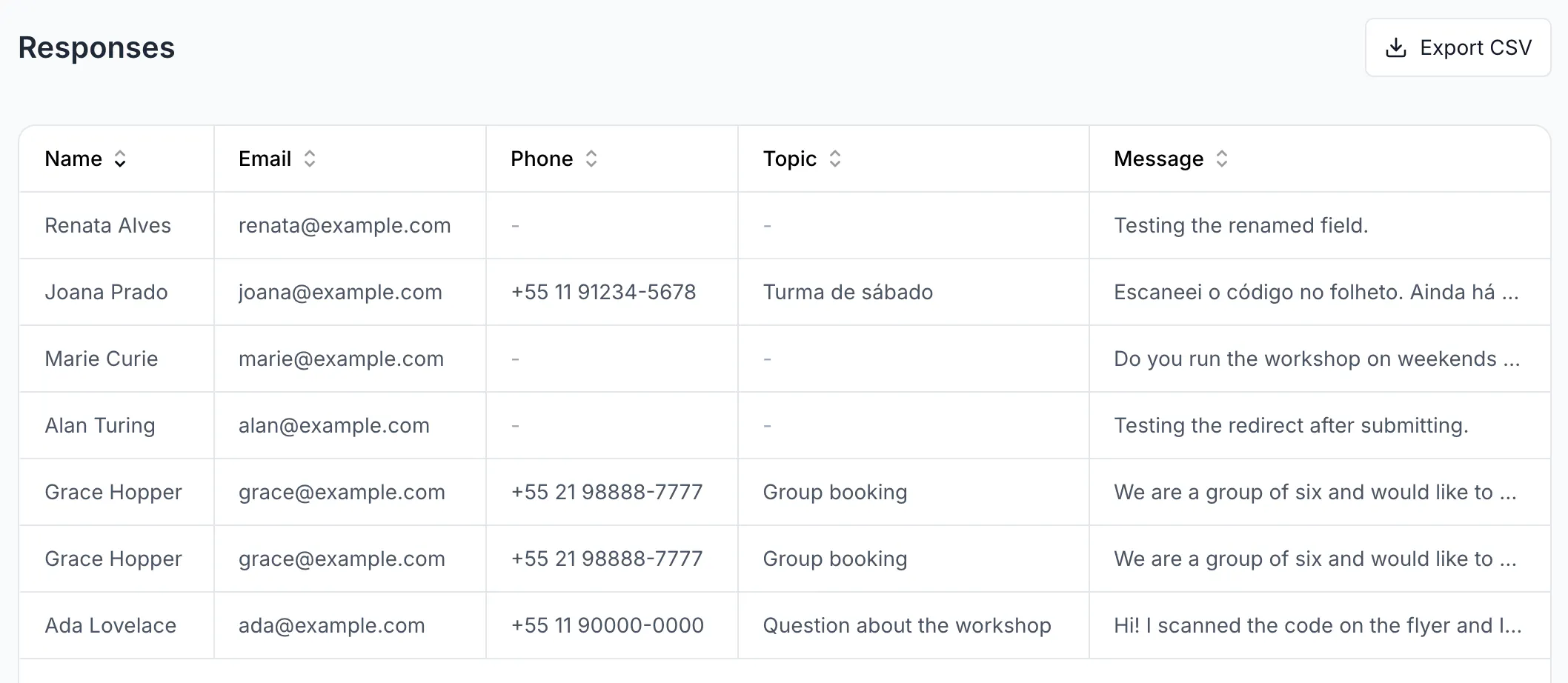
Look in Responses, not in your inbox
Responses is the record. The email is a convenience that can fail silently.
The email notification never arrived
Three things to check, in order: the switch Email me new leads is on for that page and was saved; the address you expect it at belongs to the workspace owner, which is the only role notified; the message is not in spam.
You are looking at a different page
Each page keeps its own responses. Match the address under the page name with the one your code opens.
A row is there but some cells show a dash
A dash is an optional field the person left blank. The row itself is a form that was sent — Responses does not list unfinished visits at all.
Someone sent the form twice in a row and only one arrived
A page limits how many submissions the same visitor can send in a minute. Genuine duplicates are rare; a person retrying after a slow connection is the usual case, and the first attempt is normally the one stored.
Verify it works
From a phone that has never opened the page, on mobile data rather than your office network, scan the printed code, fill the form and send it. You should see your thank-you message, and the entry should be in Responses immediately. If that works, the page is fine and the problem is reach.