
Choose a custom key for your short link
Pick the ending of your CodeQR short link — allowed characters, length rules, what changing a key breaks, and the errors you may see.

The key is everything after the domain — the summer-menu in go.example.com/summer-menu. A key people can read gets clicked and typed correctly; a random one is fine when nobody has to remember it. This page covers what you can type, what the limits are, and the one change that breaks links already in circulation.
Availability
- Plan: every plan. Keys of three characters or less, and a short list of premium keys, need Starter or above.
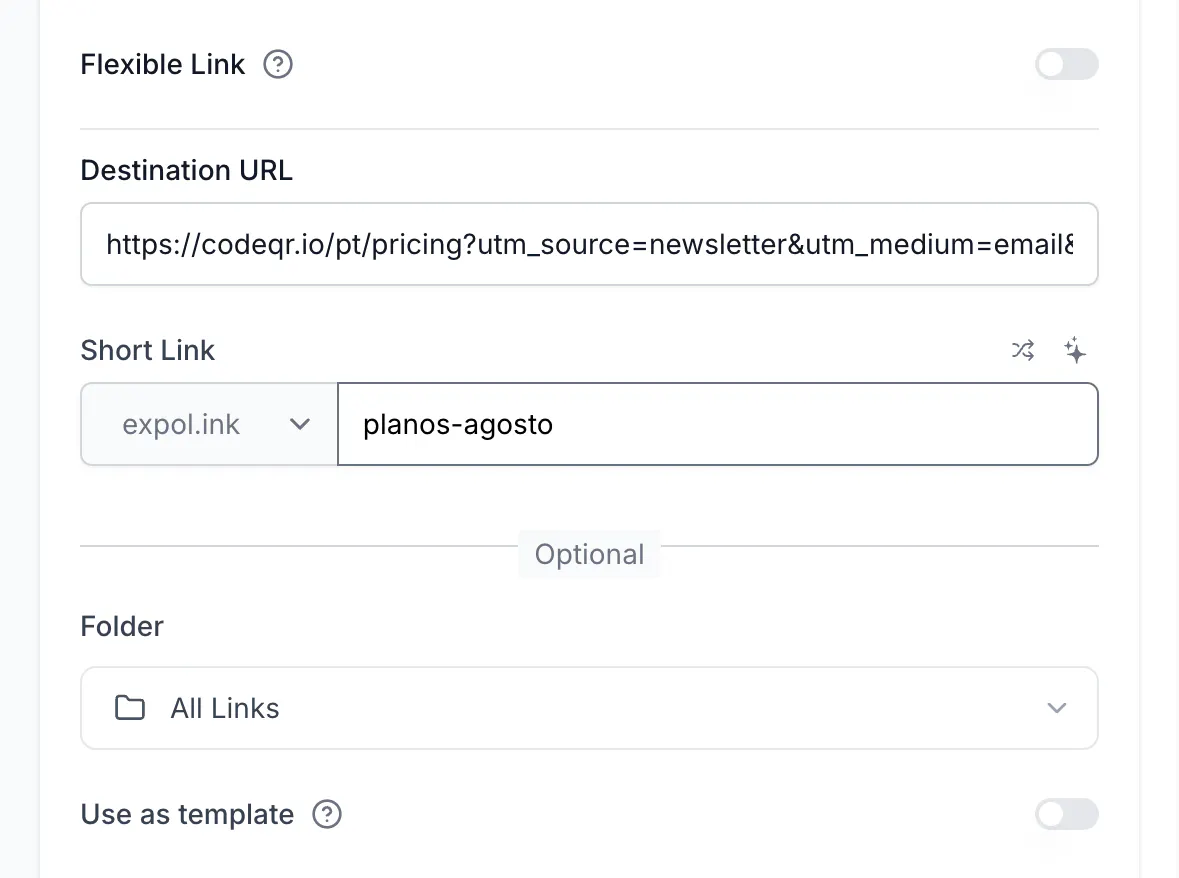
- Where: the Short Link field in the link builder, next to the domain selector.
Before you start
- Keys are unique per domain.
go.example.com/promoandlinks.example.com/promoare two different links. - If you leave the field on Optional, CodeQR assigns a random seven-character key.
Steps
- Open the link builder and fill in Destination URL first.
- Type your key in Short Link. Spaces become
-as you type. - Check the field once more before saving — see the first item under Troubleshooting.
- Select Create link.
What you can type
- Letters, numbers,
-and/. Accented and non-Latin letters are accepted and stored in a web-safe form. /creates a path.catalog/2026becomesgo.example.com/catalog/2026, which is useful for organizing printed material.- Case is preserved but ignored when resolving. A link saved as
Summer-Menualso opens fromsummer-menu, so nobody loses a visit to a capital letter. Reports show the key as you saved it. - Length: anything from four characters up on any plan; one, two or three characters need Starter or above, because short keys are scarce.
- Not allowed: spaces and punctuation other than
-and/, and endings with-qr, which CodeQR reserves for QR codes.
The two icons above the field build a key for you: one picks a random string, the other suggests one from your destination page with AI.
Changing a key later
You can rename a key at any time, and CodeQR asks you to confirm because the old address stops working immediately: Editing an existing short link may break existing links. Are you sure you want to proceed?
Everything already shared points at the old key — messages, printed material, other people's posts, and any QR code generated from the old address. If the link is already in the wild, change the Destination URL instead and leave the key alone. That is the whole point of a short link: the address stays, the destination moves.
Do the same with the API
Send key along with the destination:
curl -X POST https://api.codeqr.io/links \
  -H "Authorization: Bearer codeqr_xxxxxxxxxxxxxxxxxxxxxxxx" \
  -H "Content-Type: application/json" \
  -d '{"url":"https://example.com/menu","domain":"go.example.com","key":"summer-menu"}'
Omit key and the API returns a random one. To keep your own identifier alongside it — an order number, a row id — send externalId, then read the link back later with GET /links/info?externalId=ext_<your-id>.
Verify it works
curl -sSI https://go.example.com/summer-menu
HTTP/2 302
location: https://example.com/menu
A location line pointing at your destination means the key is live. Try it once in uppercase to see that it resolves the same way.
Troubleshooting
The key I typed changed to random characters
CodeQR asks the server for a random key as soon as you enter the destination. If you type your own key in the second or so before that answer arrives, it lands on top of yours. Retype the key and confirm the field before selecting Create link.
Duplicate key: this short link already exists.
That key is taken on that domain. Add a distinguishing word, use a path (summer/menu), or switch domains. Deleting the old link releases the key.
Invalid key.
There is a character CodeQR cannot store — most often a space pasted from a document, or punctuation such as ?, #, & or %. Keep to letters, numbers, - and /.
The key cannot end with '-qr'.
That suffix is reserved. Rename the key, or create a QR code from the link instead.
You can only use keys of 3 characters or less on a Starter plan.
Very short keys are a Starter feature. Use four characters or more, or upgrade.
This is a premium key.
A small set of high-demand words is reserved for paid workspaces. Pick another key or upgrade to Starter.