
QR Codes for Veterinarians: Booking, Directions and Pet Owner Info
Learn how veterinarians use QR codes for booking, clinic info and pet owner materials. Get ideas, metrics to track and how to create one free on CodeQR.


Pet owners find a vet clinic through a referral, a storefront sign, a business card, a pet store display, an adoption event, or the flyer handed out after a visit. In each of these moments, a QR code can make it faster to find directions, book an appointment, or reach general guidance without typing a long web address.
In veterinary care, the destination page has to keep a clear line between general information and clinical care. A code should never be used to diagnose, prescribe, or expose patient records. For emergencies, the page should point to the right contact channel and never suggest an automated response is coming.
With a link and QR code platform like CodeQR, you can bring together dynamic QR codes, short links, pages and visitor data in one organized flow. For a veterinarian, that turns cards, printed materials, events and messages into contact points you can update and track.
Why use a QR code in a veterinary practice
A dedicated page can show the species you treat, your services, location, hours and contact channels — helping pet owners confirm they found the right clinic before sending a message.
Separate codes for each pet store partner, campaign or event let you measure where contacts come from. For existing patients, general materials can stay behind a QR code, while records, test results and individual guidance stay on secure channels.

8 QR code ideas for veterinarians to capture contacts
These eight ideas support outreach, access and organization. None of them replace an exam, owner consent, patient records or individualized clinical guidance.
1. Introduction and directions page
A card or partner material can open a page with your address, map, hours, species you treat, general services and phone number. State clearly how to reach you outside business hours and which channels aren't monitored around the clock.
2. Booking requests
Use a calendar or a short form asking for the owner's name, the pet's species, a time preference and a contact method. Avoid asking for a detailed clinical history, test results or documents on a public page. Make clear that submitting the form doesn't confirm a time slot or count as an exam.
3. Partnerships with pet stores and groomers
Create a separate code for each partner. The page can introduce the clinic or a related service, and the data helps you evaluate the partnership without sharing client information between businesses without disclosure.
4. General pre- and post-visit guidance
Cards can open general care instructions, directions, paperwork to bring, or signs that mean it's time to call. Individual guidance still needs to be delivered through a secure channel — it shouldn't be replaced by generic text.
5. Vaccination and prevention campaigns
Educational materials can lead to a page with general information and booking. Avoid language that implies a guarantee or recommends a course of action without examining the animal. Review dates and requirements regularly.
6. Adoption events and community outreach
The QR code can open a schedule, a sign-up form, general guidance or the organization's contact info. Define responsibilities and consent for participants' data and images upfront.
7. Pet owner experience surveys
After a visit, ask about front-desk service, communication, wait times and the facility. Don't ask owners to share clinical details publicly, and never make support conditional on a positive review.
8. Educational materials and content
Flyers, talks and packaging can link to public videos and articles. Content should show authorship, a date, and when to seek care — without encouraging self-treatment or risky procedures.
What to link the QR code to
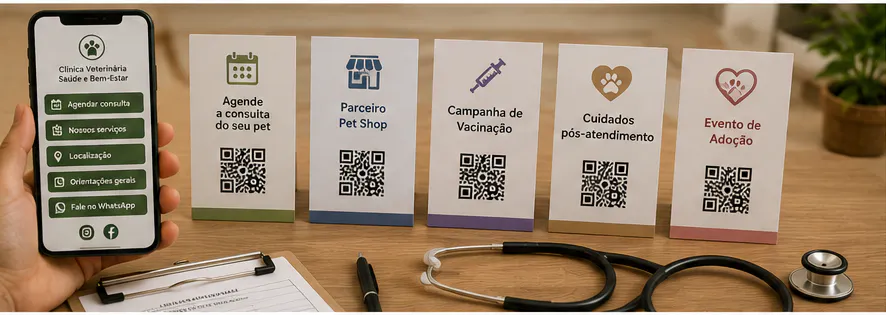
For new contacts, an introduction page with booking works well. For existing patients, the destination needs to protect clinical data and context.
Include the clinic or practitioner's name, license information where relevant, species and services, location, hours and contact channels. Make clear that messages and forms don't replace an exam.
Records, test results, prescriptions and other individual documents belong in a controlled environment. A public QR code should, at most, lead to a login screen or general guidance.
You can use CodeQR Pages to organize contact info, links, forms and one main call to action without building a page from scratch.
Where to place the QR code
Put the code somewhere clean and visible, with its purpose clearly labeled. In the clinic, it should never block signage or get in the way of patient flow.
- Business cards, flyers and the clinic's front desk.
- Materials at pet stores, groomers and authorized partners.
- Post-visit cards with general care instructions.
- Adoption events, fairs and educational outreach.
- Prevention campaigns and administrative reminders.
- Talks, flyers and public content for pet owners.
- PDFs and messages, with a short link as a backup.
Don't make the QR code your only channel for emergencies — keep a phone number and instructions visible. Test the scan at the counter, on a poster and on a card before the final print run.
How to create a professional QR code for a veterinary practice
Creation should prioritize clarity for pet owners and the security of clinical information.
- Decide whether the goal is directions, booking, a campaign, an event or general guidance.
- Build a page with your name, hours, services and one main call to action.
- Keep the form short and skip clinical data on the first contact.
- Choose a dynamic QR code so you can update the calendar, campaign or destination.
- Customize it with high contrast and enough clear space around it.
- Add a call to action like "See directions and hours" or "Request an appointment."
- Name it by partner, campaign and date.
- Test the page, phone number, form and emergency instructions.
Static or dynamic QR code: which one to choose
The choice between a static and a dynamic code depends on how stable the destination is, how long the material will be in circulation, and whether you need to track performance.
A static code stores the address permanently. It can work for something that truly never changes, but any update to hours, a campaign, your calendar, a partner's page or general guidance means printing a new code. That's worth thinking about for materials that stay in circulation for months.
With a dynamic QR code, the printed image stays the same while you can change the destination from your dashboard. You can also track scans and compare campaigns. Those numbers show interest, and should be combined with clicks, form submissions or contacts to judge business results.
Metrics that help you evaluate results
Metrics should measure outreach and lead capture, not infer anything about an animal's health. Work with aggregated data and restricted access.
- Scans by card, partner, event or campaign.
- Clicks on the map, phone number and calendar.
- Completed booking requests.
- Visits to educational materials.
- General source of new contacts.
- The gap between visits and completed actions.
A partner might generate few contacts that are exactly the right fit. An educational campaign might get a lot of visits and few bookings. Read the results against the goal, and never mix marketing data with patient records.
How to keep track of multiple QR codes
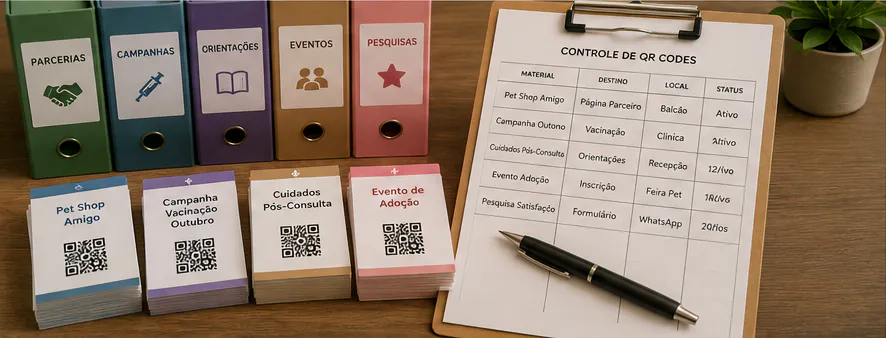
As a veterinary practice starts using codes across different materials, it matters to know where each one was published and what it's meant to do.
Use names with context, an action and a date, like "south-side pet store — counter display — booking — 2026-08." On Pro and above, group codes into folders for the clinic, partners, campaigns, events, post-visit follow-up and educational content; on any plan, tags and a consistent naming convention work just as well. This makes it easy to find campaigns, compare periods, and stop an old code from ending up on the wrong material.
Keep a record of printed materials in circulation and decide who can edit destinations. When a campaign ends, redirect the code to something that still makes sense, or pull the material. Never leave a visitor looking at an error, an expired form or information with no one responsible for it.
Advertising, data and the limits of veterinary care
Communication needs to respect professional rules, pet owner privacy and patient safety. Public content doesn't replace a visit or authorize the use of images and data.
- Don't offer a diagnosis, a prescription or a guaranteed outcome through the page.
- Avoid collecting records, test results or a detailed clinical history through a public form.
- Protect owner data, animal identification and individual documents.
- Confirm authorization before using images, testimonials or case details.
- State your channels and response times clearly, especially for emergencies.
- Keep your credentials and licensing information current.
Check your veterinary licensing board's current advertising and patient-consent rules. When in doubt, review a campaign, a form or the use of images with the people responsible before publishing it.
Mistakes that hurt QR code performance
Review these points before you publish or print. Small mistakes can hurt the scan, raise doubts, and undermine trust in the destination.
- Presenting the form as a diagnosis or immediate care.
- Putting test results, a prescription or records behind a public link.
- Using a call to action that guarantees a cure or an outcome.
- Not stating the limits of a channel for emergencies.
- Publishing a photo of a pet owner or animal without proper authorization.
- Leaving a campaign, hours or phone number out of date.
Frequently asked questions about QR codes for veterinarians
The answers below help you use a QR code to support communication without replacing a veterinary exam or exposing clinical information.
What's the best QR code destination for a veterinary practice?
A page with your name, general services, species you treat, location, hours and booking. For existing clients, use secure channels for documents.
Can I ask for symptoms in the form?
Keep the initial form short. Avoid collecting extensive details, and make clear that a message doesn't replace an exam. For emergencies, point to the right channel.
Can I use a QR code on a post-visit card?
Yes, for general guidance, contact info and secure access. Individual content should stay protected and consistent with what was discussed at the visit.
Can I change the campaign after printing?
With a dynamic code, yes. Check that the new destination still matches the call to action and your professional rules.
How do I measure which pet store partner generates contacts?
Use a separate code for each partner and compare scans with recorded requests, without sharing pet owner data inappropriately.
Make access easier without losing clinical responsibility
QR codes can help veterinarians introduce their services, guide people to the clinic, organize campaigns and simplify booking. The destination needs to communicate clearly and keep clinical data off public pages.
Start with a card or a partnership, test the flow, and review your professional rules. When communication and privacy are planned together, the code improves the pet owner's experience without crossing the line into clinical care.
Create a free CodeQR account and turn your veterinary materials into trackable contact points.