
QR Codes for Personal Trainers: 9 Ways to Fill Your Schedule
Learn how personal trainers can use QR codes for intake forms, bookings and gym partnerships. See practical ideas, metrics to track and how to create one free with CodeQR.


Personal trainers work in a range of settings: gyms, apartment buildings and residential communities, parks, studios, online sessions and sports events. In each one, a client may need to check your schedule, learn about your services, fill out an interest form or find extra resources, without typing a long web address into their phone.
A well-planned QR code bridges the gap between an in-person moment and the next step. Instead of cramming every detail onto a card or poster, you can send people straight to a focused page with your background, the services you offer, your location, hours and a contact button.
With a platform to create and track QR codes, you can bring together dynamic QR codes, short links, pages and access data in one organized flow. For a personal trainer, that means turning cards, printed materials, events and messages into contact points you can update and measure over time.
Why use a QR code in your personal training business
Hiring a personal trainer is a decision built on trust, schedule fit and a clear sense of how the service works. When your printed materials only point to a generic social profile, people still have to go looking for information, and some give up before they even reach out.
A QR code cuts that friction when it points to a destination built for the context where it appears. A code at a partner gym can open your intake form; one you hand out at a race can highlight training for runners; and your personal card can lead to a fuller professional page. Keeping the codes separate also lets you compare which locations and partnerships actually bring in leads.
9 practical uses of QR codes for personal trainers
The best uses don't try to replace your coaching. They make it easier to promote your business, stay organized and share information that matters before, during or after contact with a client.
1. Initial assessment form
Use the QR code on a card, banner or message to open a short form asking about general goals, availability, preferred location and contact channel. Avoid requesting detailed health history at this first stage; sensitive information should only be collected when necessary, with a clear purpose and proper safeguards.
2. Booking a call or trial session
Send interested people to a page with available times or to the channel you use for booking. The call to action should make clear what's being scheduled: an intro call, a trial session or an in-person assessment. That way no one expects a full consultation just for reserving a time slot.
3. Plans and service formats page
Build a page that distinguishes one-on-one coaching, partner sessions, small groups, online coaching and in-gym support. Explain what's included, how often sessions happen and how to get in touch, without promising specific physical results or using misleading comparisons.
4. Business card with a professional profile
Instead of pointing only to Instagram, your card can open a page with your background, professional certification when applicable, the services you offer, the areas you cover and buttons to get in touch or see your work. You can update the destination without reprinting the card whenever your hours or services change.
5. Training materials with demo videos
On printed handouts or gym boards, the code can open your own videos on exercise form, setting up a space or using equipment. Treat this material as support for guidance you've already given a client, not as a generic prescription for people you haven't assessed.
6. Partnerships with gyms, apartment buildings and companies
Create a dedicated QR code for each partner. That way, a flyer in an apartment building can lead to an offer aimed at residents, while a corporate outreach code shows activities designed for a team. Keeping each one separate helps you measure interest and report back to the partner.
7. Events, races and open classes
At a group class, a health fair or a race, use the code for sign-ups, a waitlist, event materials or follow-up contact. Keep the form short, and be clear about how the data will be used, especially if you plan to message people after the event.
8. Client experience survey
After a coaching cycle, a QR code can open a short survey about communication, punctuality, clarity of guidance and organization. Avoid open-ended questions about health conditions. The goal is to improve your service, not to collect personal health details.
9. Seasonal campaigns and educational content
Materials about getting back into a routine, preparing for a race or staying active on vacation can point to dedicated pages. With a dynamic QR code, the same printed piece can get a new destination once the campaign ends, as long as the printed call to action still matches the new content.
Where to point your QR code
The best destination depends on the moment someone encounters the code. A visitor who's still learning about your service needs context; an active client may just need quick access to their schedule or a support resource.
For general promotion, a professional page usually works better than a direct link to a chat with no explanation. Include who you work with, where you're based, the formats you offer, relevant credentials and one main action. If you have several options, prioritize them so the page doesn't turn into a confusing menu.
For internal materials, use specific destinations: a feedback form, a technique video, class rules or a calendar. Avoid using the same QR code across every touchpoint; it makes it hard to trace where a visit came from and increases the risk that an outdated destination stays in circulation.
CodeQR Pages can be used to organize contact details, links, forms and a main action without requiring you to build a page from scratch.
Where personal trainers can place a QR code
Code placement should balance visibility, context and enough time for someone to scan it. Before printing, watch how people actually interact with the material.
- Business cards and cards handed out after a trial session.
- Approved flyers in gyms, apartment buildings, clubs and partner businesses.
- Printed workout sheets, only when the destination fits the client who received it.
- A banner or screen at an open class, race, talk or wellness event.
- Business proposals and presentations sent to companies or residential communities.
- Welcome materials, studio reception areas and internal notices.
- Different links and QR codes across digital campaigns, print and partnerships, so you can compare where visits come from.
Don't place the code somewhere a phone stays in motion, too far away or under heavy glare. On a shirt worn during a workout, for example, scans can be unreliable; a nearby fixed panel usually works better.
How to create a professional QR code for your personal training business
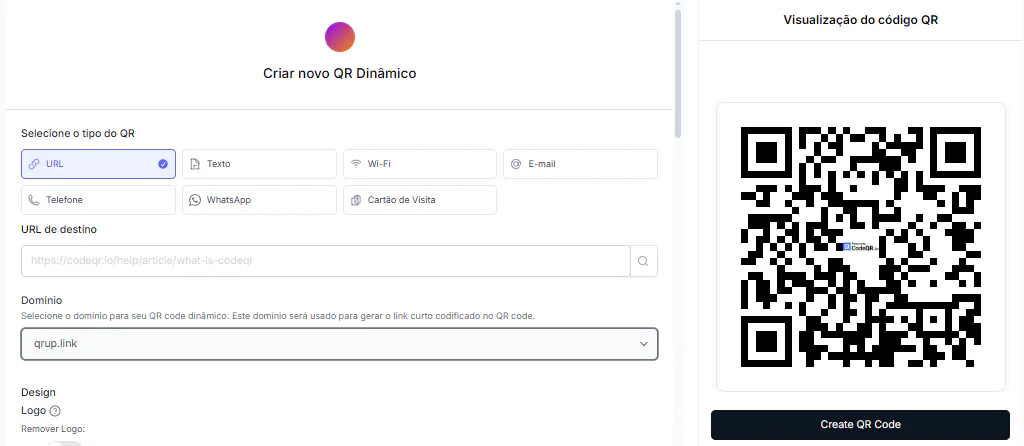
Start with the goal, not the code's design. The steps below help you keep it useful, measurable and secure.
- Define a single main action, like requesting an initial assessment, exploring your service formats or booking a call.
- Choose a destination that fits the context. For new contacts, a page with some explanation usually works better than a direct WhatsApp button.
- Create the QR code in CodeQR and use the dynamic format whenever hours, the page, a form or a campaign might change.
- Add your brand colors without reducing contrast; a custom logo in the center requires a paid plan (Free codes carry the CodeQR logo). Preserve the clear space around the code and don't cover the scannable modules.
- Write a clear call to action next to the image, like "See our coaching formats" or "Book your intro call."
- Name the code by location and purpose, for example: "jardins complex — initial assessment — Aug 2026."
- Test it at full size, on different devices and under the real lighting conditions where the material will be used.
- Review the destination, form fields and access permissions periodically before keeping the material in circulation.
Static or dynamic QR code: which one to choose
The choice between static and dynamic should factor in how long the material will stay in use and how likely the destination is to change.
A static QR code stores its destination permanently. It can work for something genuinely stable, but any change means generating and printing a new code. For schedules, campaigns, plan pages and partnerships, that limitation tends to create extra work.
With a dynamic QR code, the printed image stays the same while you update the destination from your dashboard. It also makes it easier to track scans and compare contexts. Read these numbers as signals of interest, not as proof that someone booked a session or achieved a result.
Metrics that help you evaluate results
Simple metrics help you figure out which materials are worth keeping around. Ideally, tie each scan to the next step, without collecting more data than you need.
- Scans by gym, apartment building, event or partner.
- Clicks on your booking button, plan overview or WhatsApp link.
- Interest forms completed.
- Times and days with the most activity.
- The gap between people who opened the page and those who took the main action.
- The source someone mentions during a conversation or on a form.
A poster with plenty of scans but few contacts might need a clearer offer. A material with few scans but well-qualified conversations might be well positioned for a smaller audience. Compare across periods and test one hypothesis at a time.
How to keep track of multiple QR codes
Once you're running codes across several locations and campaigns, generic names like "new QR" stop being useful. Your naming system should let you identify a piece of material even months later.
Use a pattern with location, purpose and date, like "downtown gym — trial session — 2026-08." On Pro and above, group related codes into folders for partnerships, active clients, events and your own promotions; on any plan, use tags and a consistent naming pattern to stay organized. Keep a spreadsheet or internal log noting where each code was printed.
When a partnership ends, don't leave the code pointing at a page that no longer exists. Redirect it to a neutral, relevant page, or retire the material in a planned way. Also decide who's allowed to edit destinations, to avoid accidental changes.
Privacy, ethics and content boundaries
Forms and pages tied to physical activity can involve personal data and, in some cases, health information. Beyond the privacy laws that apply to you, your communication should follow the professional rules for your field and avoid promises you can't back up.
- At first contact, only collect the data you need to respond and organize the engagement.
- Explain the purpose of the form and how you'll follow up.
- Don't publish client photos, testimonials, measurements or progress without proper consent.
- Avoid promising weight loss, muscle gain or performance results by a set deadline.
- Don't turn a public QR code into access for individual files, assessments or private documents.
- Keep your professional information, certifications and service formats up to date.
A QR code is a way to reach content, not automatic permission to process data or send messages. Review your forms carefully, and when you're unsure about professional communication or sensitive information, get specialized guidance.
Mistakes that hurt a QR code's effectiveness
Problems with the destination, printing or messaging can make solid material look unreliable. These are the most common mistakes to avoid:
- Sending everyone to a social profile without explaining your formats, location or next step.
- Reusing the same image across every partner and losing track of where visits come from.
- Asking for a full health history in an open lead-capture form.
- Printing too small, on low-contrast backgrounds or too close to a trim edge.
- Promising a physical result in the call to action next to the code.
- Leaving an old schedule, campaign or page live on permanent materials.
Frequently asked questions about QR codes for personal trainers
The questions below help you settle on a destination, format and way to measure results before you print cards, posters or client materials.
What's the best QR code destination for a personal trainer?
For general promotion, a page with your background, service formats, location, general hours and contact info tends to work better than a single isolated link. For internal materials, use a destination built for that specific client need.
Can I point the QR code straight to WhatsApp?
You can, but people arrive without context and may not know what to say. A short page before the chat can filter interest, explain your service and cut down on incomplete messages.
Where should personal trainers place a QR code?
Cards, proposals, studio reception areas, approved posters at partner locations and event materials are all good options. The code should stay still, stay visible and come with a clear call to action.
Can I change the link after printing?
Yes, with a dynamic code. That lets you swap the page, form or schedule without replacing the printed image. Check what your plan supports before printing in large quantities.
How do I track how many people scanned it?
Create separate codes by location or campaign and check the data in your dashboard. To gauge real interest, combine scans with clicks, submitted forms and the source people mention during your conversations.
Turn printed materials into clear next steps
For a personal trainer, a QR code's value comes from cutting friction: presenting the right service, making booking easier, organizing partnerships and delivering support material in the right context. It works best when every piece has a specific job and a call to action that explains what scanning gets you.
Start with one simple case, like your professional card or a partner poster. Measure how it's used, refine the page, and only then expand into events, forms and content. That way, the technology supports the client experience instead of replacing assessment, guidance and the professional relationship.
Create a free CodeQR account and turn your personal training materials into trackable contact points.