
Geo redirect by country, region, city, or language
Send visitors to a localized page by country, state, city, continent or browser language with one short link or QR code — steps, API and MCP examples, and what IP geolocation can and cannot do.

At the end of this guide, one short link or QR code works as a geo redirect: it sends visitors from Brazil to your Portuguese page, Spanish-speaking browsers to your Spanish page, and everyone else to your default page — with the same approach for states, cities and continents.
Availability
- Plan: Business and above (pricing).
- Where: link builder → Smart Rules. Same section in the QR code editor for dynamic QR codes of type URL.
Before you start
- The localized URLs, one per audience (for example
https://example.com/pt-br/,https://example.com/es/). - A default page for visitors who match no rule; it goes in the link's Destination URL.
- Decide what "audience" means for each rule:
- Country, Region (state), City, Continent come from the visitor's IP address. Country is reliable; region and city are approximate (see Troubleshooting).
- Language comes from the browser's preferred language, not from location. Ten languages are available: Português, English, Español, Français, Deutsch, 中文, Русский, Italiano, 日本語, 한국어.
- For Region (state), have the ISO 3166-2 code ready (
SPfor São Paulo,CAfor California) — the code, not the name.
Steps
- Open Links and click Add Link, or open an existing link and choose Edit.
- Enter the default page in Destination URL, for example
https://example.com/. - Turn on Smart Rules.
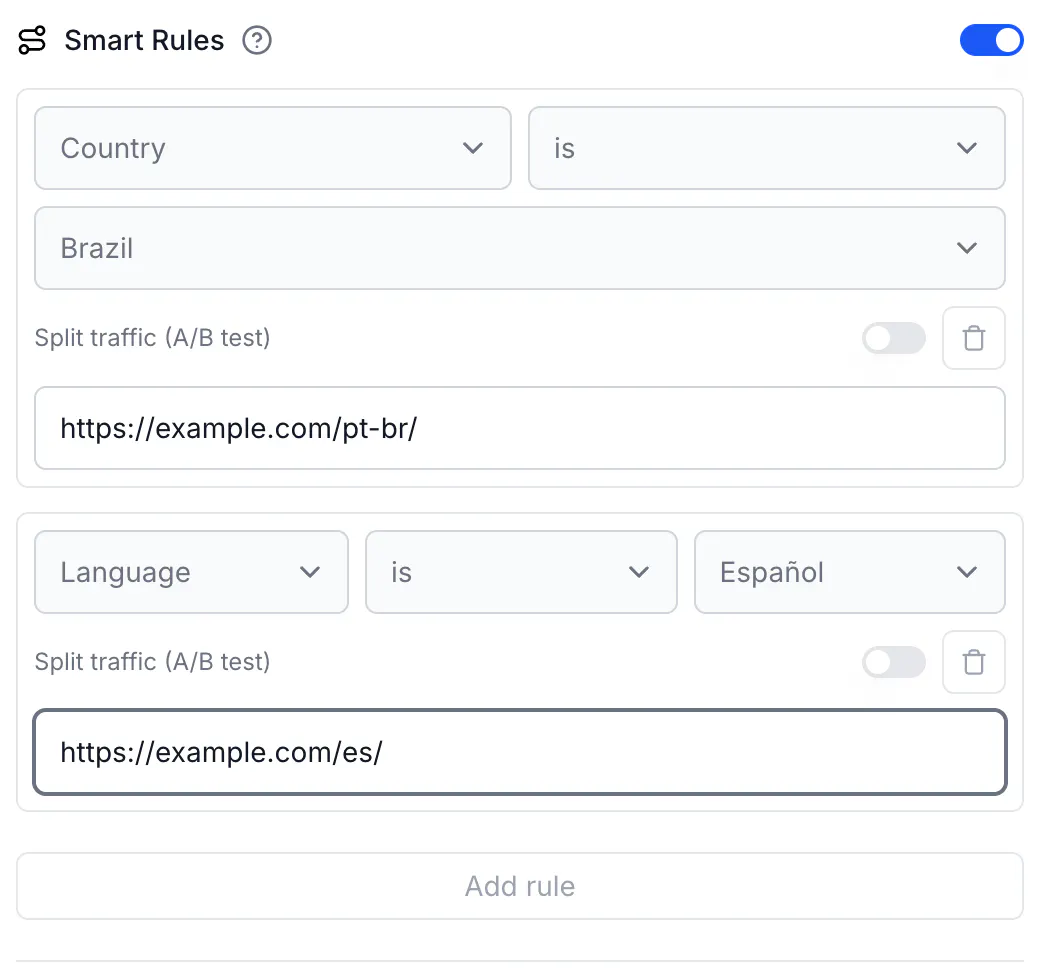
- In the first rule, select Country, keep is, and pick Brazil from the list.
- In that rule's Destination URL, enter
https://example.com/pt-br/. - Click Add rule. Select Language, keep is, pick Español, and enter
https://example.com/es/. - Add more rules the same way — for a state choose Region (state) and type the code (
SP); for a city choose City and type the name (São Paulo); for a continent choose Continent and pick it from the list. - Order the rules from most specific to least specific. Rules run top to bottom and the first match wins, so put City is São Paulo above Country is Brazil, and decide whether a country rule or a language rule should win when both could match.
- Click Create link (or Save link).
To send everyone except one audience elsewhere, use is not: Country is not United States → https://example.com/international/.
For a QR code, do the same in the Smart Rules section of the editor for a dynamic QR code of type URL.
Do the same via API
Add or replace rules on an existing link with PUT https://api.codeqr.io/links/{linkId} (the same rules array works on POST /links, POST /qrcodes and PUT /qrcodes/{qrcodeId}). Country codes are two-letter ISO 3166-1 alpha-2, region codes bare ISO 3166-2, continent codes AF AN AS EU NA OC SA, languages two-letter (pt, es, …).
Request:
curl -X PUT https://api.codeqr.io/links/cmswk759f0001j41i0vj1vmfq \
  -H "Authorization: Bearer codeqr_xxxxxxxxxxxxxxxxxxxxxxxx" \
  -H "Content-Type: application/json" \
  -d '{
    "rules": [
      { "attribute": "city",     "operator": "equals", "value": "São Paulo", "url": "https://example.com/pt-br/sao-paulo/" },
      { "attribute": "country",  "operator": "equals", "value": "BR",        "url": "https://example.com/pt-br/" },
      { "attribute": "language", "operator": "equals", "value": "es",        "url": "https://example.com/es/" }
    ]
  }'
Response (200 OK):
{
  "id": "cmswk759f0001j41i0vj1vmfq",
  "domain": "go.example.com",
  "key": "summer-menu",
  "url": "https://example.com/",
  "archived": false,
  "expiresAt": null,
  "expiredUrl": null,
  "password": null,
  "externalId": null,
  "trackConversion": false,
  "proxy": false,
  "title": null,
  "description": null,
  "image": null,
  "video": null,
  "utm_source": null,
  "utm_medium": null,
  "utm_campaign": null,
  "utm_term": null,
  "utm_content": null,
  "rewrite": false,
  "doIndex": false,
  "banned": false,
  "flexible": false,
  "filled": false,
  "ios": null,
  "android": null,
  "geo": null,
  "rules": [
    { "url": "https://example.com/pt-br/sao-paulo/", "value": "São Paulo", "operator": "equals", "attribute": "city" },
    { "url": "https://example.com/pt-br/",           "value": "BR",        "operator": "equals", "attribute": "country" },
    { "url": "https://example.com/es/",              "value": "es",        "operator": "equals", "attribute": "language" }
  ],
  "userId": "cm73yc6m70002mtesulffnrgb",
  "folderId": null,
  "projectId": "cm73y7wm100008j24i1b137wr",
  "preRedirection": false,
  "pageId": null,
  "pageUrl": null,
  "isFormMandatory": false,
  "publicStats": false,
  "clicks": 0,
  "lastClicked": null,
  "leads": 0,
  "sales": 0,
  "saleAmount": 0,
  "createdAt": "2026-08-17T01:32:38.884Z",
  "updatedAt": "2026-08-17T01:32:59.384Z",
  "tagId": null,
  "comments": null,
  "notificationToken": null,
  "useAsTemplate": false,
  "tags": [],
  "shortLink": "https://go.example.com/summer-menu",
  "webhookIds": [],
  "qrCode": "https://api.codeqr.io/qr?url=https://go.example.com/summer-menu?qr=1"
}
Sending rules replaces the whole list; send every rule you want to keep. To remove all rules, send "rules": null.
Do the same via MCP
With your AI client connected to https://mcp.codeqr.io/mcp, ask:
Update link cmswk759f0001j41i0vj1vmfq: visitors from Brazil (country BR) go to https://example.com/pt-br/, browsers in Spanish (language es) go to https://example.com/es/, everyone else keeps the default.
The agent calls update_link:
{
  "linkId": "cmswk759f0001j41i0vj1vmfq",
  "rules": [
    { "attribute": "country",  "operator": "equals", "value": "BR", "url": "https://example.com/pt-br/" },
    { "attribute": "language", "operator": "equals", "value": "es", "url": "https://example.com/es/" }
  ]
}
The tool description carries the accepted formats (two-letter country, bare region code, city name, two-letter continent and language), so a well-behaved agent will not send Brazil or BR-SP. create_qrcode and update_qrcode do not accept rules over MCP.
Do the same via automations
Make, Zapier and Pluga modules have no rules field. Use Make's CodeQR Make an API Call module (PUT, /links/{linkId}, body as above) or an HTTP step in Zapier or Pluga. link.created and link.updated webhooks include rules.
Verify it works
- Language is the easiest to test from anywhere. Change your browser's preferred language and open the link, or from a terminal:
` curl -sI -H "Accept-Language: es-ES,es;q=0.9,en;q=0.8" https://go.example.com/summer-menu | grep -i location # location: https://example.com/es/
curl -sI -H "Accept-Language: en-US,en;q=0.9" https://go.example.com/summer-menu | grep -i location # location: https://example.com/ `
- Country, region, city, continent come from the IP address, so test from a device in that place — a colleague, a customer, a phone on a local mobile network. A VPN exit in the target country usually triggers the rule, but VPN and data-center IP ranges are sometimes registered elsewhere; a failed VPN test does not prove the rule is wrong.
- After some clicks, open Analytics for the link: the URLs card shows clicks per destination, and the Countries, Cities and Continents cards show where CodeQR placed the visitors.
Troubleshooting
A visitor in Brazil got the default page
CodeQR reads the country from the visitor's IP address. Corporate proxies, VPNs, mobile carriers and privacy relays route traffic through addresses registered in another country or region, so that visitor looked like they were somewhere else. Country detection is right for the vast majority of visitors; when it is wrong, the visitor gets the Destination URL or another rule's page, never an error. Keep the default page usable for everyone.
The City rule rarely fires
City-level IP geolocation is approximate: IP databases publish accuracy well below country level, and mobile carriers assign one address to phones across a large area. Prefer Country or Region (state) for anything that matters; use City only where an occasional miss is fine.
The Region rule never fires
The value must be the ISO 3166-2 code without the country prefix: SP, CA, NY. São Paulo, BR-SP and US-CA never match. If the visitor's region is unknown, no region rule matches and the visitor falls through to the next rule.
A visitor in Brazil with the browser in English got the English page
Language reads the browser's preferred language, not the location. A visitor in Brazil whose browser prefers English matches Language is English. If location matters more than language, put the Country rule above the Language rule.
The visitor's language is not in the list
Ten languages are supported. A browser that prefers any other language matches no Language rule — with is or is not — and continues down the list to the Destination URL. Regional variants map to their base language: pt-BR matches Português, es-MX matches Español.
Search engines index the wrong language
Crawlers usually arrive from US addresses without a language preference and are routed like any visitor. Smart Rules are for short links and QR codes; for indexable pages on your own site, keep separate URLs per language with hreflang and let visitors choose.
The API returns 400 "invalid_enum_value" for the attribute or "A rule condition needs attribute, operator and value together"
Attribute names are lowercase (country, region, city, continent, language), operators are equals or not_equals, and every rule with a condition needs all three fields. Full list: Smart Rules reference.