
Ask for consent before you collect data
Every CodeQR page asks the visitor to agree before it accepts a submission. Write your own notice, link your privacy policy and keep the proof.

A form that collects a name, an email or a phone number is collecting personal data, and the person handing it over has to be told what they are agreeing to. CodeQR does this on every page by default, and refuses submissions that arrive without it.
Availability
- Plan: every plan. The consent block is part of every page and cannot be switched off.
- Where: Pages → your page → Form Content → Consent.
What your visitor already sees
Under the fields, above the button, every page shows a paragraph and a checkbox labelled I have read and agree. The default paragraph names your form and the domain it is hosted on, and states that you — not CodeQR — are responsible for the data:
By filling out the form "Get in Touch", hosted on the domain expol.ink using the CodeQR.io platform, I agree and authorize the use of this information by the creator of this form to process my data. CodeQR.io acts only as the technology provider and is not responsible for the handling of the data collected.
The name it quotes is the page Name from Settings, not the Title the visitor is reading above the fields. If they differ, the sentence will name a form your visitor has never heard of.
That same Name is what the SEO tab calls Title, and it is the headline shown when your address is shared — one field, three places. Pick a name a stranger would recognise and it works in all of them.
The checkbox is not decoration. The form will not send without it, and the server refuses the submission a second time even if the box is bypassed in the browser.
Write your own notice
The default is generic on purpose. Replace it whenever you can say something more specific — who you are, what you will do with the data, and how long you keep it.
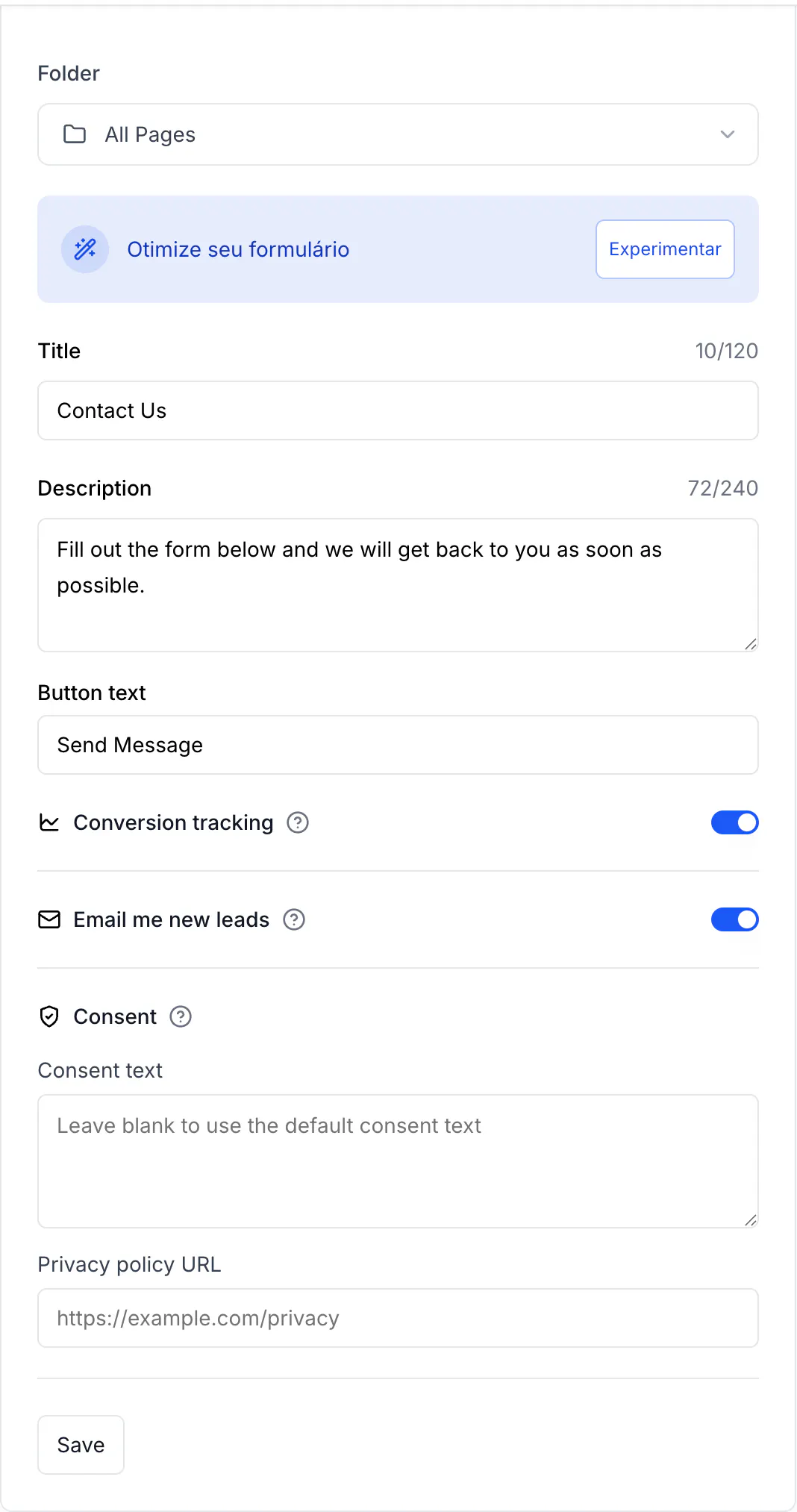
- Open your page and find Consent in Form Content.
- Fill in Consent text. Leaving it blank keeps the default.
- Fill in Privacy policy URL with the address of your own policy.
- Select Save.
Write it in your visitor's language
The page opens in English for everyone. A visitor can switch it with the Idioma control at the top — the default notice is translated and becomes "Ao preencher o formulário … Li e concordo" in Portuguese — but nobody should have to look for a control to understand what they are agreeing to.
If your visitors are Brazilian, write Consent text in Portuguese. What you type is shown exactly as you typed it, in every language, so it is the one way to be sure the notice reads in the language of the person standing in front of your QR code.
What is stored as proof
Each submission records the moment the box was ticked, and stores a copy of the notice that was on screen at that moment — so changing your text later does not rewrite what earlier visitors agreed to.
The timestamp comes out with the answers as the consentAt column of Responses → Export CSV. The stored copy of the text is not in that file; ask support if you ever need it produced. See Read and export your form responses.
What the notice does not do for you
Consent is one requirement, not the whole of it. Under the LGPD and the GDPR you are the controller of what your form collects, which also means:
- Ask only for what you will use. Every extra field is data you have to justify, protect and eventually delete — see Choose the fields your form asks for.
- Say what you will do with it, in the notice or in the policy you link to. "I agree" with nothing to read is not informed consent.
- Answer the person who asks. If a visitor asks for a copy of their data or asks you to delete it, that request is yours to answer, not CodeQR's.
- Never collect passwords, card numbers or documents you do not need. The page already warns visitors not to send confidential data through a form.
Verify it works
Open the page in a private window and try to send the form without ticking the box: the submission is refused. Tick it, send, then export the responses — your row carries a consentAt timestamp.
Troubleshooting
The notice names the wrong form
It quotes the page Name from Settings. Rename the page there and the sentence follows.
You cannot find a way to remove the checkbox
There is none, by design. A page that collects personal data asks for consent.
Your visitors read the notice in English
Write your own Consent text in their language. The default follows the page's language control, and the page opens in English until someone changes it.
You need the consent record for a specific person
Export the responses and look for their row: consentAt is the timestamp, and the row holds what they sent alongside it.