
Try CodeQR free for 7 days
Start a 7-day CodeQR trial without a credit card, see which features it unlocks and which it does not, and know what happens the day it ends.

The trial gives a free workspace the limits and features of a paid plan for 7 days, with no credit card and no charge at the end. When it ends the workspace returns to Free on its own.
Availability
- Plan: a workspace on the Free plan that has not used a trial before.
- Where: the plan selector in Settings → Billing, or the offer that appears in the workspace.
- Length: 7 days.
- Card: not required.
Before you start
Create your first link or QR code first. The trial only starts on a workspace that already has something in it — an empty workspace is refused with Create your first QR code or link to start the trial.
That order is worth respecting for another reason: a trial spent deciding what to build is a trial spent, and the clock does not pause.
Steps
- Create a link or a QR code, if the workspace has none — Create a dynamic QR code.
- Open Settings → Billing.
- Choose the plan you want to try.
- Start the trial.
The workspace immediately carries that plan's limits and features, and the plan badge shows the trial with the days remaining.
What the trial includes, and the one thing it does not
For 7 days the workspace behaves as the plan you chose: its link and QR code allowances, its click and scan counting, its analytics retention, and its paid features.
Custom domains are the exception. They stay unavailable during a trial and open once you complete checkout. The message on screen says so: Custom domains are available once you complete checkout. Everything else in your trial is unaffected.
Everything you create during the trial is yours and stays after it ends, whichever plan you land on.
What happens on the last day
Two reminders arrive by e-mail, three days before the end and one day before. On the final day the workspace returns to the Free plan on its own — there is no card on file, so nothing is charged and nothing needs cancelling.
Your links and QR codes keep redirecting. The Free plan's limits apply from that moment, and What happens to your QR codes if you stop paying lists exactly what changes.
You are then asked whether you want to choose a plan or continue on Free. Continuing on Free costs nothing and keeps everything you built.
Verify it works
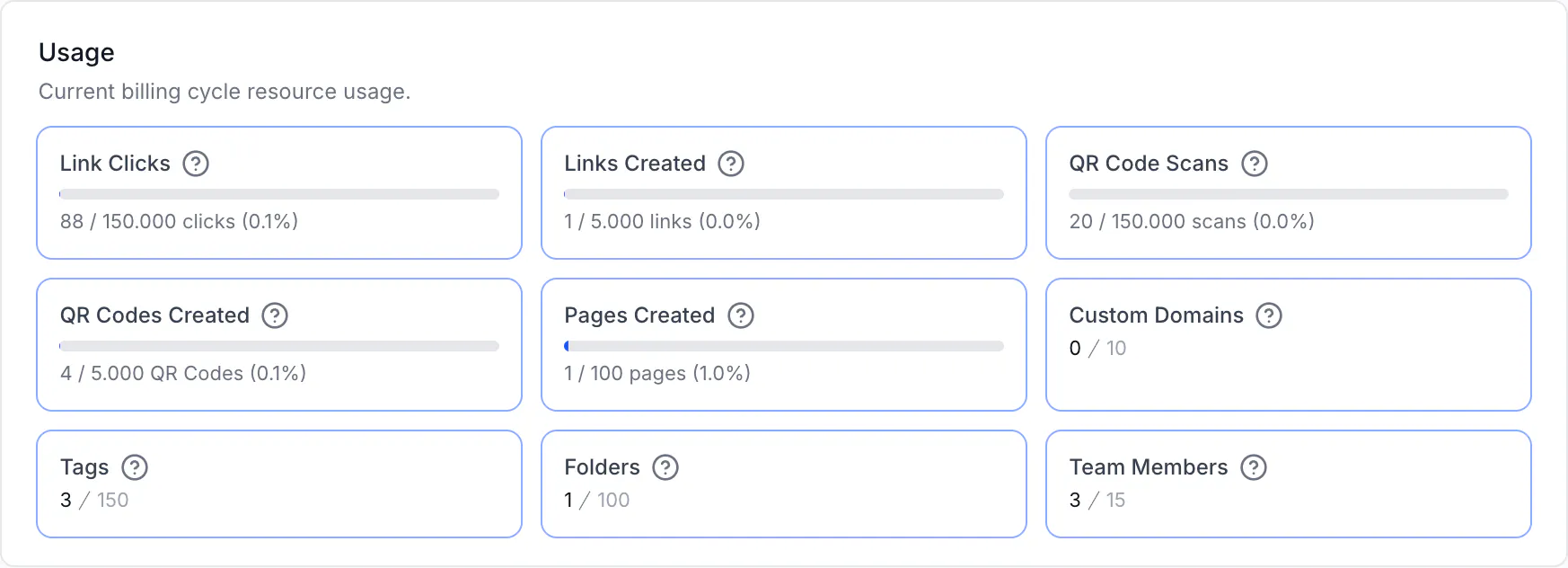
Open Settings → Billing. During a trial the plan card shows the plan you picked and how many days remain. The usage section shows that plan's limits rather than the Free ones.
Troubleshooting
The trial button is refused
Three reasons, each with its own message. The workspace is not on the Free plan (You can only create projects on the free plan.), it has used a trial before (This workspace has already used its trial. Choose a plan to continue.), or it is empty (Create your first QR code or link to start the trial.).
I cannot add a custom domain during the trial
That is deliberate. Custom domains open when you complete checkout; the rest of the trial is unaffected.
Will I be charged when it ends
Not on this trial — it takes no card. A trial started from checkout with a card is a different flow, and that one renews into a paid plan unless you cancel before it ends. The e-mail you received at checkout states the renewal date and price.
Can I try a second time
A workspace gets one trial. A different workspace can have its own.
My trial ended and I lost access to a feature
The features tied to the plan you were trying stop applying when the trial ends. Everything you created with them stays, and choosing a plan brings them back.