
Cancel your CodeQR subscription
Cancel a CodeQR plan from Settings, choose whether it ends now or on your renewal date, and undo the cancellation while the plan is still running.

Cancelling moves the workspace to the Free plan. Your links and QR codes keep redirecting — What happens to your QR codes if you stop paying covers exactly what changes and what does not.
Availability
- Plan: any paid plan.
- Where: Settings → Billing → Cancel Subscription.
- Who: the workspace owner.
Before you start
Decide when you want it to end. The two options are not equivalent, and one of them costs you the rest of a period you already paid for.
If your goal is a smaller plan rather than no plan, cancel is the wrong door — change the plan instead, and keep the paid features you still use.
Steps
- Open Settings → Billing.
- Select Cancel Subscription.
- Choose a reason. The screen asks before it lets you continue.
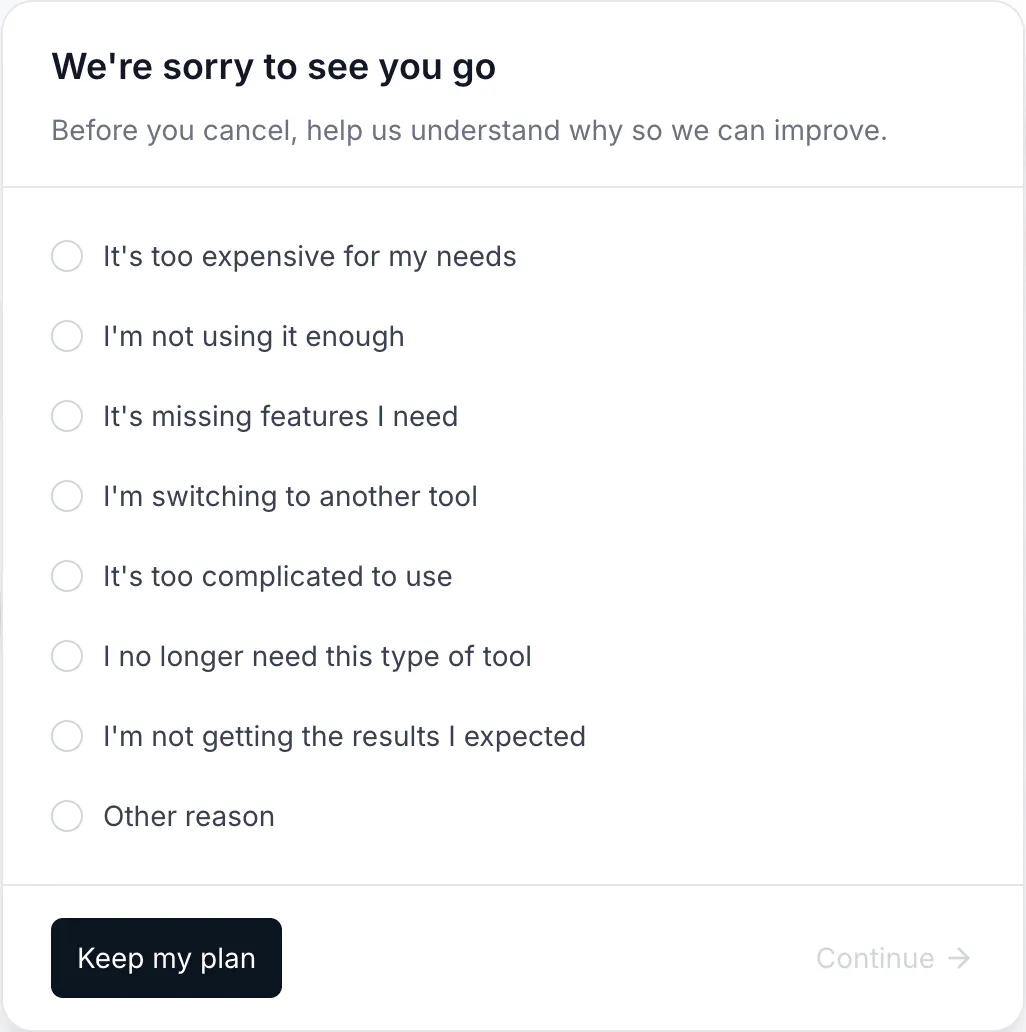
- Read the offer, if one appears. Depending on the reason, CodeQR may offer a discount for the next few months. Taking it keeps the plan and closes the flow.
- Read what changes on the Free plan.
- Choose At the end of my current billing period or Cancel immediately.
- Select Confirm cancellation.
Choosing when it ends
- At the end of my current billing period keeps every paid feature until your renewal date, and no further charge is made. This is the option to pick in almost every case, because you already paid for those days.
- Cancel immediately switches the workspace to Free right away. There is no refund for the remaining days of the period.
Undo it
While a cancellation is scheduled, the plan is still running and a banner offers Undo Cancellation. Undoing restores the subscription with the same plan and the same renewal date, and nothing was lost in between.
Once the period has ended and the workspace is on Free, undo is no longer available — the way back is a new subscription, which restores your limits, retention window and paid features.
What the screen does not tell you
One thing changes that the cancellation screens do not list: if a custom domain of yours redirected its root to your website, that redirect is cleared. The links and QR codes on the domain are unaffected. Set it up again after you subscribe.
Refunds
Cancelling does not issue a refund, and choosing to cancel immediately gives up the days you already paid for. If you believe a charge should be refunded, reply to your invoice e-mail or write to support with the invoice number.
Verify it works
Return to Settings → Billing. A scheduled cancellation shows the plan with a Canceling status and the date it ends. An immediate cancellation shows the Free plan straight away.
Then open one of your links or scan one of your QR codes. It redirects exactly as before — that is the expected result, not a sign that the cancellation failed.
Troubleshooting
I do not see the Cancel Subscription button
Only the workspace owner can cancel. If you are a member, ask an owner.
I want to keep the account but stop paying
Cancelling does that. The workspace, its links, its QR codes and its history stay; the plan becomes Free. Deleting the workspace is a different action and it removes the content — see Rename, transfer or delete a workspace.
I cancelled and I was charged anyway
Check the charge date against your renewal date. A charge issued before the cancellation belongs to a period that had already started. If the charge is dated after the cancellation took effect, send the invoice number to support.
I was offered a discount and it did not apply
A retention discount cannot be applied twice in a short period, and it cannot stack with a discount already on the subscription. The screen says so when that is the case.
Can I cancel one workspace and keep another
Yes. A subscription belongs to a single workspace, and cancelling one leaves the others untouched.