
Link Cloaking in CodeQR: How to Mask URLs
Learn how to use link cloaking in CodeQR to mask destination URLs with short links.

This feature is available only for Pro plans and above.
With CodeQR, you can mask your destination URL using your short link.
To enable link cloaking, click to activate Add Link Cloaking in the link builder.
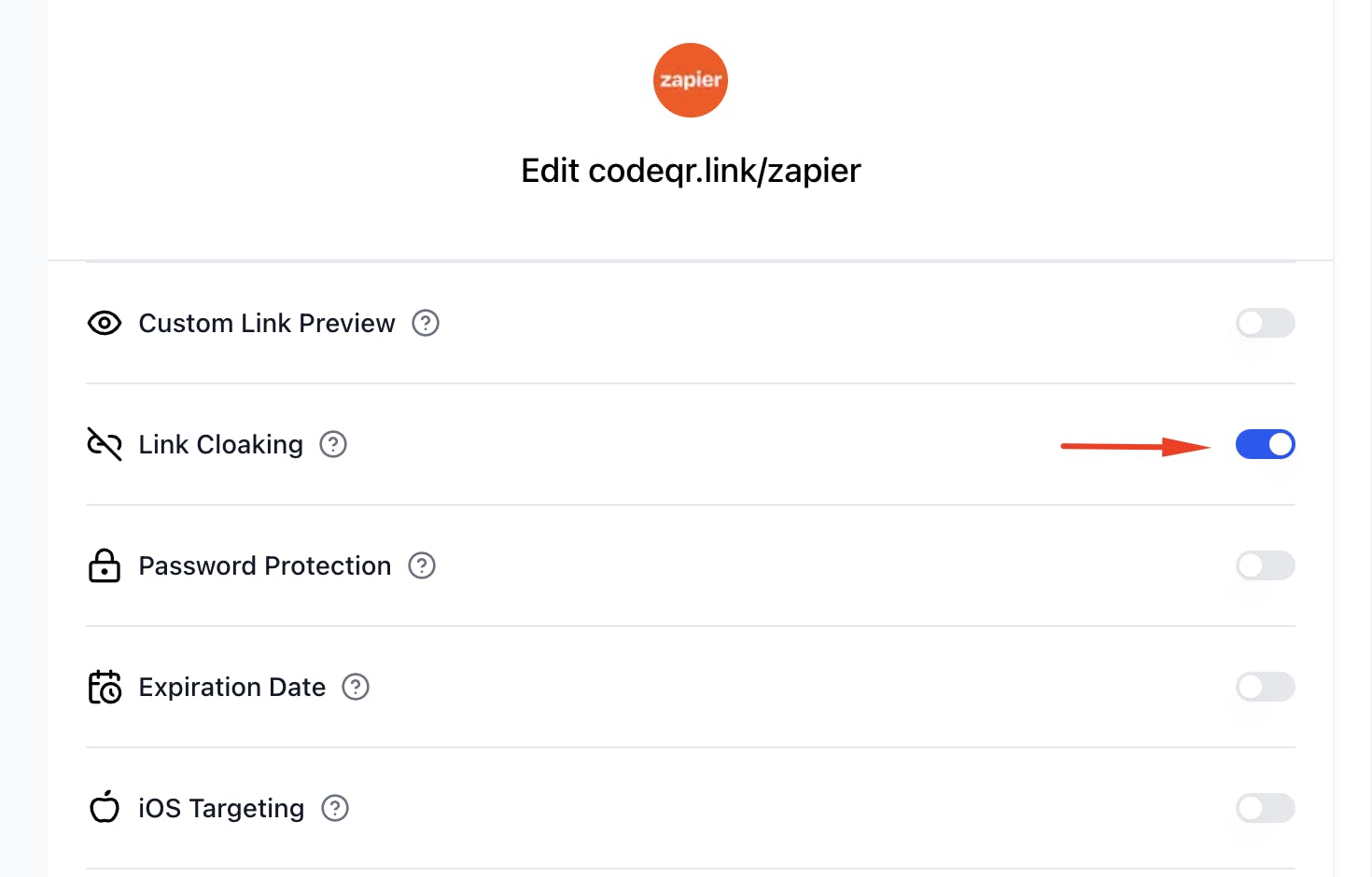
This is useful when you want to display your brand or custom domain instead of the actual destination URL.
When enabled, your short link will be shown in your users’ browser address bar when they visit your link, instead of the destination URL.
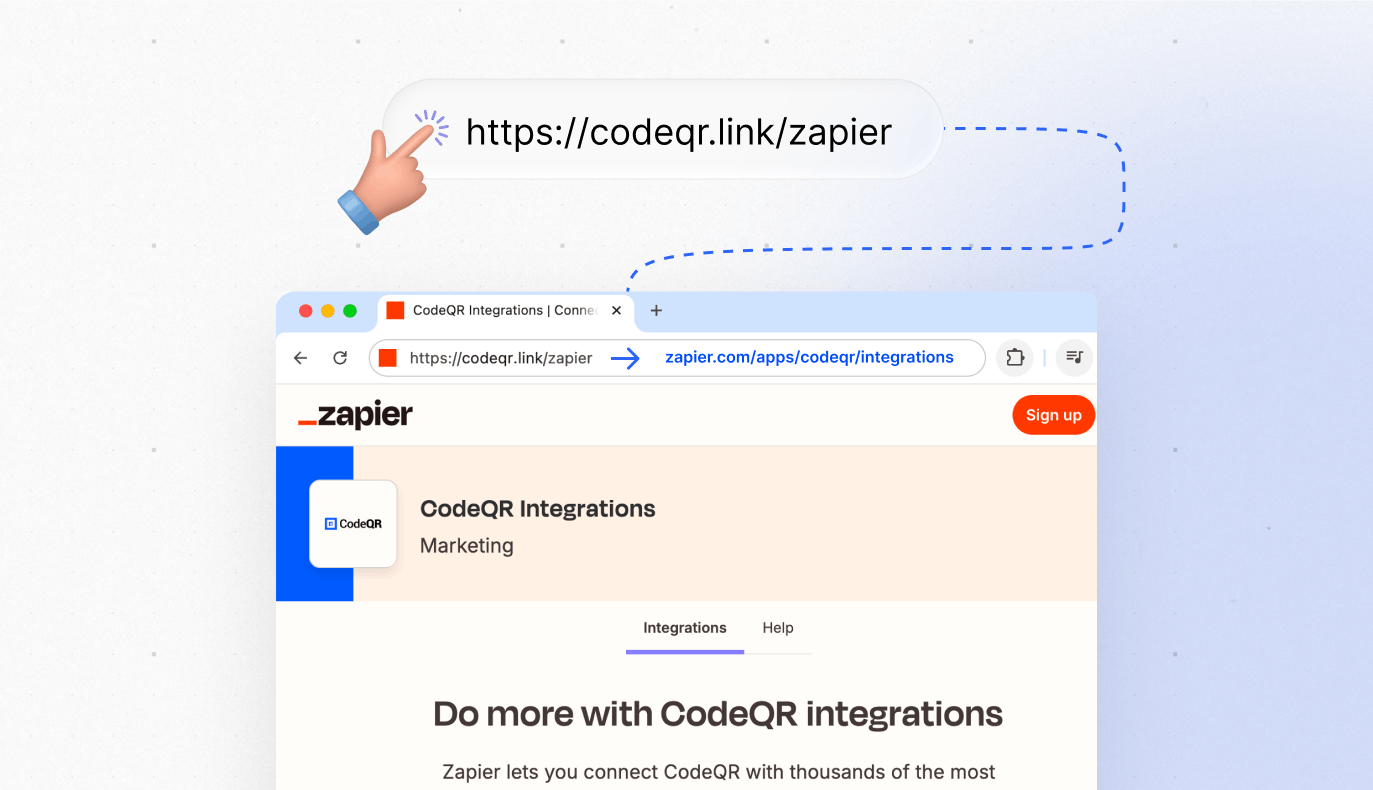
How Link Cloaking Works
Link cloaking works by embedding the destination page in an iframe inside a page hosted on your short domain. This means:
Advantages of Link Cloaking
- Consistent branding: Users always see your domain in the address bar
- Protection of the real URL: The destination URL is hidden from users
- Unified experience: Maintains your brand’s visual identity
- Enhanced analytics: Improved tracking of user behavior
When to Use Link Cloaking
- Marketing campaigns: To keep brand consistency
- Affiliate links: To hide long affiliate URLs
- URL protection: To prevent direct access to resources
- Professional branding: To present a more professional image
Limitations of Link Cloaking
Some important limitations of the link cloaking feature:
1. HTTPS Requirement
For link cloaking to work, make sure to use https for your destination URL. If your destination URL is http, the browser will display a “Not Secure” warning, and link cloaking will not work.
2. Security Restrictions
Link cloaking may not work with certain sites that have security measures in place to prevent this:
- X-Frame-Options header set to DENY
- content-security-policy header set to frame-ancestors 'none'
- Restrictive referrer policies
- JavaScript detecting iframes and redirecting
3. Functionality Limitations
- Popups: May not work properly
- Downloads: Some downloads may be blocked
- Authentication: Logins might experience issues
- Third-party cookies: May be blocked by the browser
Link Cloaking with Security Headers
If you control the destination URL you are masking, you can use security headers to enable link cloaking in CodeQR while also disabling iframe embedding elsewhere.
Adding security headers to your destination URL
To do this, you need to include your CodeQR short domain as an allowed source on your site by adding the following response headers to your website:
Content-Security-Policy: frame-ancestors 'self' [seudominio.com]
For example, if your CodeQR short domain is meulink.com, you would need to add the following headers to your destination URL:
Content-Security-Policy: frame-ancestors 'self' meulink.com
Including multiple domains in the whitelist
You can also include multiple domains by separating them with a space:
Content-Security-Policy: frame-ancestors 'self' meulink.com outrodominio.com
This will ensure your site cannot be embedded on third-party sites, but can still be masked by your CodeQR short domain.
Practical implementation example
For WordPress sites
Add to your .htaccess file:
<IfModule mod_headers.c>
    Header always set Content-Security-Policy "frame-ancestors 'self' seudominio.com"
</IfModule>
For Node.js/Express apps
app.use((req, res, next) => {
  res.setHeader('Content-Security-Policy', "frame-ancestors 'self' seudominio.com")
  next()
})
For Nginx sites
add_header Content-Security-Policy "frame-ancestors 'self' seudominio.com" always;
Advanced Settings
Conditional configuration
You can set up link cloaking to work only under certain conditions:
// Exemplo para habilitar cloaking apenas para referrers específicos
if (document.referrer.includes('seudominio.com')) {
  // Permitir iframe
  res.setHeader('X-Frame-Options', 'SAMEORIGIN')
} else {
  // Bloquear iframe
  res.setHeader('X-Frame-Options', 'DENY')
}
Iframe detection
For sites that need to detect when they are displayed in an iframe:
// Verificar se a página está em um iframe
if (window !== window.top) {
  // Página está em iframe (provavelmente via link cloaking)
  console.log('Página exibida via link cloaking')
} else {
  // Página acessada diretamente
  console.log('Acesso direto à página')
}
Best Practices
1. Always test
- Different browsers: Chrome, Firefox, Safari, Edge
- Mobile devices: iOS and Android
- Specific functionalities: Forms, downloads, authentication
2. Monitor performance
- Load times: Iframes can be slower
- Bounce rate: Monitor for any negative impact
- Conversions: Check if cloaking affects conversions
3. Communicate to users
- Transparency: Inform users about redirection when appropriate
- Support: Provide direct links as alternatives
- Documentation: Keep clear instructions for your team
4. Security
- HTTPS required: Always use secure connections
- Domain validation: Keep the allowed domains list updated
- Monitoring: Track unauthorized access attempts
Common Use Cases
Marketing and Campaigns
- Email marketing: Maintain visual consistency
- Social networks: Present a professional brand
- PPC ads: Hide tracking parameters
E-commerce
- Product links: Keep users on the brand domain
- Promotional campaigns: Hide complex URL structures
- Affiliate programs: Mask partner links
Educational Content
- Online courses: Maintain a unified experience
- External resources: Integrate third-party content
- Digital libraries: Present a consistent interface
Troubleshooting
Common Problems and Solutions
1. Page does not load in iframe
Issue: The destination page does not appear Solutions:
- Check if the URL uses HTTPS
- Check X-Frame-Options headers
- Test the URL directly in the browser
2. Features do not work
Issue: Forms or JavaScript do not respond Solutions:
- Check cookie policies
- Test without link cloaking
- Contact the destination site owner
3. Security warnings
Issue: Browser displays warnings Solutions:
- Ensure HTTPS on both domains
- Check SSL certificates
- Update security headers
SEO Impact
Important Considerations
- Indexing: Links with cloaking may affect indexing
- Link juice: May not pass domain authority
- Crawling: Crawlers may have difficulty
Recommendations
- Use noindex when appropriate
- Monitor impact on rankings
- Consider canonical URLs
- Keep your sitemap updated
Related Articles
- How to create a short link in CodeQR
- How to set up custom views for your links
- How to create password-protected links in CodeQR
- How to set expiration dates for your links
- How to use device targeting in CodeQR
- How to use geographic targeting in CodeQR
- How search engine indexing works in CodeQR